JustDial for Manufacturing
Capture JustDial leads into the RFQ pipeline with the call recording reference, so a phone enquiry becomes a tracked lead.
In short
KanchanFlow, the RFQ-to-Order CRM, receives JustDial leads over their webhook so a phone or app enquiry lands in the pipeline within seconds, with the caller's number, the searched category and the JustDial lead reference. Leads deduplicate against existing accounts by mobile number before anyone is assigned.
Who this is for. This connector is for USA manufacturers with India operations, India-based contract customers, or manufacturers exporting to India. JustDial is an Indian local-search channel and is of no use outside that market.
JustDial is a phone-first channel. A buyer searches a category, JustDial connects the call, and a lead reference is generated whether or not anybody in your shop picked up. That last part matters: the missed calls are as informative as the answered ones and they usually go unrecorded.
The connector takes the webhook JustDial sends and turns it into a lead with the category searched, the caller's number and the reference, deduplicated against your existing accounts. Missed enquiries are visible as leads with no first response, which is generally the first uncomfortable report a shop runs after switching this on.
- Status
- Live in production
- Category
- Lead source
- Plan availability
- All tiers — Starter includes one selectable lead source; Professional and Enterprise include unlimited
- Sync cadence
- Real time by webhook; a 15-minute reconciliation poll catches anything the webhook missed
Field by field
What syncs, in both directions
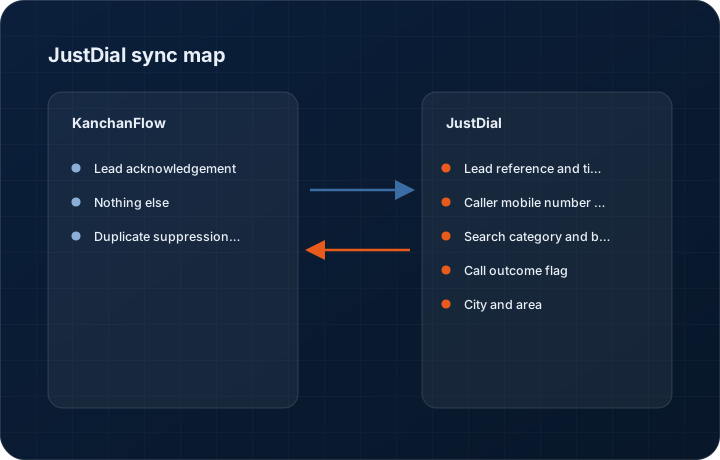
These are the actual fields that move. Anything not on these two tables does not sync, and we would rather write that down than let you assume it does.
KanchanFlow → JustDial
What we write out when a record moves forward.
| Field | What we send |
|---|---|
| Lead acknowledgement | Where the JustDial account supports acknowledgement, we confirm receipt so the lead is not re-sent repeatedly to the same webhook. |
| Nothing else | We do not manage your JustDial listing, catalogue, photos or paid campaign settings, and we do not write anything back into the JustDial panel. |
| Duplicate suppression key | The JustDial lead reference is stored on our lead so a redelivered webhook updates the existing record rather than creating a second one. |
JustDial → KanchanFlow
What comes back onto the customer, quote or order record.
| Field | What we read |
|---|---|
| Lead reference and timestamp | The JustDial lead ID and the moment the enquiry was generated, which is the clock the response target runs against. |
| Caller mobile number and name | The buyer's mobile and the name JustDial holds, which is the primary dedupe key against existing accounts. |
| Search category and branch | What the buyer searched for and which of your JustDial listings they reached, used for product-line routing. |
| Call outcome flag | Whether the connected call was answered or missed, which is what makes the missed-enquiry report possible. |
| City and area | Used for territory routing and for judging whether the enquiry is inside your delivery radius. |
Sync cadence. Real time by webhook; a 15-minute reconciliation poll catches anything the webhook missed. Every record also carries a Sync now control, and the last successful sync time is shown on the record so nobody works from a number of unknown age.
Figures
What this looks like in the product
We do not ship stock imagery or mocked-up screens. These three figures describe the exact shots a designer must capture from a live workspace, each carrying a visible date stamp and recaptured at every quarterly re-test.
Capture date required. Capture with genuine missed enquiries present. Date stamp required; mask caller numbers in the product.
Capture date required. Capture from a live workspace. Date stamp required.
Capture date required. Capture real data. If the workspace has none, do not stage the shot. Date stamp required.
11 steps
Setting it up
Written for the person who will actually do it, in the order they will do it. Nothing here assumes you have done this before.
- 1Log in to the JustDial seller dashboard with an account that administers the listing.
- 2Open the lead settings and locate the API or webhook integration section. On some account types this must be enabled by JustDial support first.
- 3In KanchanFlow, open Settings, Integrations, JustDial and copy the webhook URL and secret shown there.
- 4Paste both into the JustDial dashboard as the lead delivery destination.
- 5Ask JustDial support to send a test lead, or generate one by calling your listed number from a phone that is not already in your CRM.
- 6Confirm the test lead appears in the CRM lead inbox with the correct category and number.
- 7Set the dedupe rule to mobile number. JustDial provides no email, so mobile is the only reliable key.
- 8Configure routing by search category so a sheet-metal enquiry does not land with the machining estimator.
- 9Set the response target. JustDial callers are usually still comparing suppliers within the hour, so fifteen to thirty minutes is the realistic window.
- 10Turn on the missed-enquiry alert so an unanswered connected call raises a task rather than disappearing.
- 11Watch a full day of live leads before relying on the routing rules.
Honest ceilings
What this integration cannot do
Every connector has limits. You will find these in week three whether or not we write them down, so we write them down.
- JustDial supplies a mobile number, a name and a category. There is no enquiry text, no quantity, no drawing and no email, so every lead needs a human call to qualify it.
- Webhook delivery is not guaranteed and JustDial does not offer a replay facility. Our reconciliation poll narrows the gap but cannot fully close it.
- Lead quality is the weakest of any channel we integrate. A large share of JustDial enquiries for industrial categories are individuals, brokers or wrong-category clicks, and the connector cannot filter them for you.
- No historical backfill exists. From the day you connect it forward, and nothing before.
- Some JustDial account tiers do not expose webhook delivery at all, and whether yours does is a commercial matter between you and JustDial.
- We cannot attribute a lead to a specific paid campaign, so return on JustDial spend cannot be measured inside the CRM beyond raw lead counts and conversion.
From the quarterly re-test
Errors you will actually hit
Each of these was reproduced deliberately during testing. The wording is the error as the system reports it, not a paraphrase.
| Error | Likely cause | Fix |
|---|---|---|
| No leads arrive after setup | Webhook delivery is not enabled on that JustDial account tier, or the URL was saved without the secret. | Confirm with JustDial support that lead API delivery is active for your listing, then re-copy both the URL and the secret from the connector page. |
| Leads arrive with a blank category | The enquiry came through a JustDial channel that does not carry category data, such as some app-based callbacks. | Set a default routing rule for uncategorised leads so they land with a named person rather than sitting unassigned. |
| The same caller creates a new lead every time they ring | Dedupe is off or the number arrives in different formats, sometimes with the country code and sometimes without. | Enable mobile dedupe with number normalisation in connector settings, which strips the country code before matching. |
| Webhook signature verification failures in the log | The secret in JustDial's dashboard does not match the connector, usually after the secret was rotated on one side. | Rotate the secret from the connector page and paste the new value into JustDial. Rotating in JustDial alone will not work. |
| Response clock shows leads as breached immediately | The timestamp JustDial sends is in Indian Standard Time and the workspace timezone is set to US Eastern. | Set the workspace timezone correctly in Settings, General. The connector converts, but only once it knows the target timezone. |
Questions people ask about the JustDial integration
Yes, where JustDial flags the call outcome. Missed enquiries create leads with no first response, which is usually the most useful report a shop gets from this connector in its first week.
Related integrations
IndiaMART Insta & Enquiries
Pull IndiaMART enquiries into the CRM within minutes, deduplicate them against existing accounts, and route them to an estimator.
Read moreTradeIndia
Import TradeIndia buy leads and enquiries into the RFQ pipeline, including the export enquiries that matter to overseas suppliers.
Read moreSulekha
Capture Sulekha service and supplier enquiries into the pipeline so a local enquiry is not lost between an app notification and a callback.
Read moreKeeping this page true
This connector was last tested end to end on 2026-08-27 against a live sandbox: fresh authorisation, an outbound write, an inbound read checked field by field, and the failure paths above triggered deliberately. It is re-tested every quarter and the date on this page changes when it is. Read how we test integrations, or see what is shipping today.
See a live quote draft built from a real RFQ
Fourteen days, no credit card, sample data pre-loaded. If it does not fit your shop, we will tell you in the first call.
- Delaware LLC
- SOC 2 Type II
- USA Data Centers (AWS)