Manufacturing quoting software that shows its work
A four-column cost buildup per line, quantity breaks side by side, margin guardrails before send, and a revision diff you can put in front of a buyer.
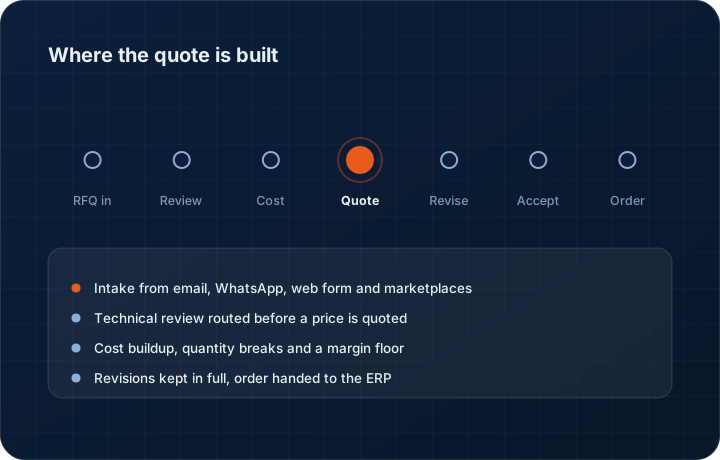
In short
KanchanFlow is an RFQ-to-Order CRM whose quoting module prices manufacturing work in a four-column buildup — material, process, outside services, overhead and margin — with quantity breaks and a margin floor per part family. Quote revision history is unlimited on every tier, including Starter.
Most shop quotes are built in a spreadsheet that one estimator wrote and everyone else is afraid of. It works until that estimator is on vacation, until a cell reference breaks, or until a buyer asks why the price moved between two quotes and the answer lives in a file that was saved over.
The quoting module here is not smarter than your estimator. It is more consistent than a spreadsheet. Every line carries the same four cost columns, every quantity break uses the same amortisation, every margin exception is recorded with a name against it, and every revision is kept.
Cost buildup
Four columns per line
Not a price field. A buildup you can defend line by line eighteen months later when the same part comes back.
- Material
- Spec, weight, yield
- Grade, form, buy weight against finished weight, drop and scrap allowance, and the price you are actually paying this month rather than the one in last year's sheet.
- Process
- Setup + run by operation
- Setup minutes and run minutes per operation at your posted rate per machine group. A 5-axis hour and a manual mill hour are not the same number and should never share a rate.
- Outside services
- Vendor quotes
- Heat treat, plating, anodize, NDT, powder coat, freight in and out. Held as a line with the vendor and the quoted price, so a $6 per part plating cost is never absorbed silently.
- Overhead + margin
- Applied, with a floor
- Burden applied by your own rule, then margin with a floor the owner sets. The estimator sees the floor before the line goes out, not after the job ships.
The columns are the same on a two-line prototype quote and a 400-line production quote. That consistency is what makes historical cost useful — when the part returns, you can see what the material actually cost, what the setup actually took, and where the margin went.
The buildup is the fallback, not the first answer. Pricing walks a hierarchy — contract price, then customer price, then the quantity break, then the buildup — so a part covered by a negotiated contract or customer price list prices from the agreement you signed rather than from what it would cost today. That is how a shop stops quoting a standard price to an account that negotiated ten percent off eighteen months ago. Both that work and the four-column buildup are in development against Wave 1 Milestone 4.
Quantity breaks
Price 10, 50, 250 and 1,000 in one pass
Buyers ask for price breaks because their own planner has not decided the order size yet. Quoting them separately wastes a day and invites an inconsistency.
| Quantity | Setup treatment | What changes in the buy | Typical use |
|---|---|---|---|
| 10 pieces | Setup amortised over 10 | Highest per-piece price | Prototype or first article |
| 50 pieces | Setup amortised over 50 | Material moves to a cut-length buy | Typical bridge quantity |
| 250 pieces | Setup amortised over 250 | Bar stock or coil pricing applies | Where a repeat rhythm starts |
| 1,000 pieces | Second setup considered | Tooling amortisation line appears | Where a fixture pays for itself |
Quantity breaks are a Professional and Enterprise feature. The break table goes onto the quote document as one table, so the buyer compares four numbers instead of four PDFs.
Margin guardrails
Six checks that run before the quote leaves
The Quote Risk agent scans the assembled quote and raises what a busy estimator misses at 5:40pm on a Friday.
- Margin floor by part family — Turned parts and weldments do not carry the same floor. Set the floor where it belongs and the estimator is warned per line, not per quote.
- Missing outside service — A line with a plating callout on the print and no outside-service cost is flagged before send. This single check pays for the software in most fab shops.
- Unpriced tooling — A fixture or a soft jaw set that appears in the process plan but has no line on the quote gets raised.
- Lead time you cannot hold — A promised date inside your current backlog for that machine group is flagged. Winning a job you ship late costs more than losing it.
- Stale material price — Where a material cost has not been touched since a price move, the line is marked. Steel and aluminium do not sit still and neither should the buildup.
- Below last accepted price — Where the same part was accepted at a higher price six months ago, the estimator sees that before quoting down without meaning to.
None of these block the send. An estimator can quote below the floor with a reason recorded, and the owner sees it on the margin exception list rather than finding out at the end of the quarter. The point is that the decision is visible, not that the software gets a veto.
Revisions
Rev 0 through Rev 4, and the diff between any two
A worked example of one quote for a machined housing across five revisions in eleven days.
| Revision | What the buyer asked for | What moved |
|---|---|---|
| Rev 0 | Original quote as sent | Baseline |
| Rev 1 | Quantity changed 50 to 250 | Per-piece price down, total up, lead time out two weeks |
| Rev 2 | Material substitution to 4140 pre-hard | Material line up, heat treat line removed |
| Rev 3 | Buyer added two lines | Two new lines, existing lines unchanged |
| Rev 4 | Lead time pulled in at buyer request | Expedite line added, margin unchanged |
The diff view is the feature shops use in a price argument. When a purchasing agent says the price went up without explanation, the diff shows that the quantity dropped from 250 to 50 at their request, and that the per-piece price moved for exactly that reason.
We never cap revision history, on any tier. Rev 0 through Rev 7 is the record of what you agreed to. Charging for it, or ageing it out after ninety days, would be the wrong kind of gate.
Boundaries
What this quoting module is not
What this is not
This is not an ERP, MRP, CAD, BOM, or advanced CPQ system — it manages customer RFQs, quotes, follow-ups, and order handoff.
It is not a configurator, not a geometry-based instant-pricing engine, not a CAD tool, and not a shop-floor scheduler. It does not know your machine backlog unless your ERP tells it. It does not read a tolerance stack off a print and decide whether you can hold it. Those are estimator judgements, and pretending otherwise is how shops end up with confidently wrong prices.
Questions about quoting software
No, and we are deliberate about that. Configure-price-quote systems are built around a product configurator with rules and options — you pick a model, then valid choices cascade. A job shop does not have a catalogue; it has a print that arrived this morning for a part nobody has ever made. What we ship is a cost buildup and a quote document, not a configurator. There are five validation rules on a quote — option compatibility, dependency, exclusion, visibility and mandatory fields — but they exist to stop an unmakeable or incomplete quote leaving the building, not to generate a configuration from a catalogue. Call it CPQ Lite. If you sell configurable standard products with hundreds of valid permutations, a real CPQ system will serve you better than we will.
Related reading
RFQ management software
What happens before the buildup: intake from four channels, routing and qualification.
Read moreQuote management software
Managing the open quote book: ageing, follow-up cadence, expiry and win/loss.
Read moreManufacturing CPQ feature detail
The cost buildup screen with current shipping status.
Read moreContract and customer price lists
The negotiated price that gets read before the cost buildup does, with its effective dates.
Read moreMargin guardrails
How floors are set per part family and how exceptions are recorded.
Read moreQuote revision diff
The side-by-side revision comparison, unlimited on every tier.
Read moreCPQ vs CRM: what is the difference?
Why a job shop usually needs the second one, and when it genuinely needs the first.
Read moreSee a live quote draft built from a real RFQ
Fourteen days, no credit card, sample data pre-loaded. If it does not fit your shop, we will tell you in the first call.
- Delaware LLC
- SOC 2 Type II
- USA Data Centers (AWS)