Manufacturing CPQ Lite — cost buildup, quantity breaks and margin floors
Where the price comes from, written down. Material, labour, outside process and overhead in four columns, quantity breaks off the same structure, and a floor that stops the Friday-afternoon line going out at four points of margin.
Development progress
30%
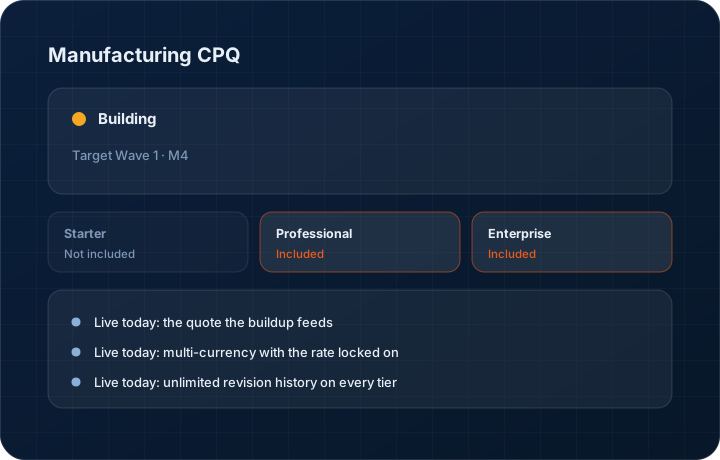
Target Wave 1 · M4. Progress figures move when the work does, and the changelog records the release.
In short
Manufacturing CPQ is the estimating layer of the KanchanFlow RFQ-to-Order CRM: a four-column cost buildup — material, labour, outside process, overhead — with quantity breaks, alternates and a margin floor. It is CPQ Lite for job shops, not an enterprise configure-price-quote suite. Roughly 30 percent built, targeted at Wave 1 Milestone 4.
What it is
Two things are true about quoting in KanchanFlow today, and it matters which is which. The quote itself is live and in production: line items, drawings and material certificates attached to the record, a share link the buyer opens without a login, multi-currency with the FX rate locked onto the quote at the moment you price it, US sales tax and India GST rates, e-signed acceptance, and unlimited revision history on every tier including Starter. What is still in development is the estimating engine underneath it — the four-column cost buildup, quantity-break tiers, alternate variants, structured BOM roll-up, the margin floor and the rules-based approval engine. That work is roughly 30 percent complete and targeted at Wave 1 Milestone 4.
We call it CPQ Lite deliberately, and the distinction is not marketing. KanchanFlow is not an ERP, MRP, CAD, BOM or advanced CPQ system. We are not building a rival to Salesforce CPQ, PROS or Conga, and we will not pretend otherwise on a feature page. Those suites exist to configure a catalogue product across thousands of valid option permutations and to price a licence or a subscription against a rate card. A job shop has a different problem: one print, one material, six operations, an outside plater, and a number that has to hold for sixty days while steel moves. CPQ Lite is the five things an estimator pricing a machined part actually needs — cost buildup, quantity breaks, alternates, margin guardrails and revisions — and deliberately nothing beyond them.
The buildup has four columns because a shop carries four kinds of cost. Material is weight times rate plus scrap allowance, taken from the stock form you are actually buying rather than the finished part weight. Labour is setup plus cycle time per operation at your own machine and labour rates, with setup amortised across the quantity — which is exactly why the 500-piece unit price is lower than the 100-piece one, and why a quantity break is a calculation rather than a concession. Outside process is the plating, heat treat, anodise, passivation or NDT you buy in, held as its own column so a vendor increase is visible instead of being smeared into overhead. Overhead applies on the basis you choose. Margin sits on top of the four, against a floor.
Pricing is a hierarchy, not a single lookup, and the order is fixed: contract price first, then customer price, then the quantity break, then the standard cost buildup. If the part sits on a negotiated contract price list that is in effect on the quote date, that price wins and the buildup does not get a vote. If there is no contract but the customer carries their own agreed price for the part, that comes next. If neither exists, the quantity-break ladder for the part applies at the quantity being quoted. The cost buildup is the fallback — the answer when nothing has been agreed yet — not the first answer. Estimators get this wrong in spreadsheets constantly, quoting a standard price to an account that negotiated a lower one eighteen months ago and then honouring the mistake.
Discount authority is a threshold by role rather than a habit. A salesperson can discount to a set percentage; an inside sales manager further; a sales director further again; below the margin floor is the owner or the general manager and nobody else. A quote that goes past the holder's threshold cannot be finalised or sent until the named approver has approved it, and the approval is recorded on the quote with the approver, the timestamp, the depth of the discount and the reason given. There is no silent override. Where an emergency override exists it is available to authorised users and it is logged as an override, because an undocumented back door defeats the point of having thresholds at all.
Every quote carries a revision number, Rev 0 through Rev n, and historical pricing is never overwritten. When you re-quote at a new material rate, the old revision keeps the rate, the buildup, the margin, the approvals and the exact document that was sent. This is not a storage nicety. Eighteen months after a job, when a buyer holds a purchase order against Rev 3 and your material has moved twenty percent, you have to be able to answer one question without argument: why did this quote carry this price on the day it was sent. Revision history is what answers it, which is why we never cap it or expire it on any tier — Starter, Professional and Enterprise all keep the full chain, and the pricing page carries that as a guarantee rather than an upgrade lever.
Capabilities
What it does
Live today: the quote the buildup feeds
Line items with part number, quantity, unit price and lead time, drawings and certificates attached to the record, a browser share link the buyer opens without a login, open timestamps, and a validity window that expires the quote rather than letting somebody book an order against March material pricing.
Live today: multi-currency with the rate locked on
Quote a Canadian or Mexican customer in their currency and the FX rate is captured on the quote when you price it. It does not drift between quote and order. Re-rating is an explicit act on a new revision, so the customer sees what changed and why.
Live today: unlimited revision history on every tier
Rev 0 through Rev n, never trimmed, never expired, on Starter as well as Enterprise. Each revision keeps its own pricing, its own approvals and the exact document that went out. This is the mechanism behind the historical-pricing guarantee on the pricing page.
Live today: tax rates and e-signed acceptance
US sales tax rates and the full India GST, HSN and e-Invoice suite apply on the quote and the invoice that follows it. Acceptance through the share link records the accepting contact, timestamp and IP, and where a legally valid signature is required the quote routes through Aadhaar eSign and the signed revision locks.
Building: the four-column cost buildup
Material, labour, outside process and overhead as four separate visible columns, with margin on top. When a buyer pushes back on price you can see which column has room in it, and when a vendor raises plating you can see which quotes it touches.
Building: quantity-break pricing tiers
Quote 100, 500 and 1,000 from one buildup. Setup amortises across each break, so the ladder falls for a reason you can show the buyer rather than because somebody rounded down. The customer sees three prices; you maintain one calculation.
Building: alternate variants on the same enquiry
Price the 6061-T6 version and the 304 stainless version, or the machined-from-bar and the near-net-casting route, as alternates on the same quote. The buyer picks; you do not maintain three quote documents that drift apart by Wednesday.
Building: structured BOM with parent-child roll-up
A weldment made of six machined details and two purchased parts prices as a parent with children. Each child carries its own buildup and the parent rolls up, so an assembly price is traceable to the details rather than being one typed number.
Building: margin guardrails with a floor
A minimum margin per product family, per customer or globally. A line that prices below the floor flags in the editor while the estimator can still act on it, and either warns or blocks depending on the rule. Every below-floor line that went out is reportable, with who approved it.
Building: the rules an estimator actually needs
Option compatibility, dependency, exclusion, visibility and mandatory-field validation — five rule types, not a constraint solver. They exist to stop an unmakeable or incomplete quote leaving the building, not to generate configurations.
Building: the pricing hierarchy, applied in order
Contract price, then customer price, then quantity break, then the standard cost buildup. The line shows which level it priced from, so an estimator can see at a glance that this part came off a contract list expiring in March rather than off the buildup.
Building: discount approval thresholds by role
Each role carries a discount ceiling. Past it, the quote cannot be finalised until the named approver approves, and the decision is written onto the quote with the approver, timestamp, discount depth and reason. Approvals are actionable from the mobile app so a job does not wait for someone to reach a laptop.
Step by step
How it works
The order these steps happen in matters more than the feature list above it.
- 1
Configure
The estimator opens the RFQ line and configures the part as it was actually asked for: material and temper, stock form, the operation list, finish, tolerance class, heat treat, marking, packaging, and the quantity or quantities the buyer wants priced. A repeat part starts from the last accepted revision rather than a blank line, so a reorder is a check rather than a re-estimate.
- 2
Validate
The rules run before anything is priced. Compatibility blocks a combination that cannot be made — black anodise is not available on 304 stainless, so it is not offered on a 304 part. Dependency pulls in what a choice requires: a bore held to ±0.0005 in adds a CMM inspection operation to the buildup instead of being remembered on the shop floor three weeks later. Exclusion removes what a choice rules out. Visibility hides options that do not apply to the material selected. Mandatory-field validation holds the quote until the drawing revision, quantity and required date are present, so an incomplete quote cannot be sent.
- 3
Price
Pricing walks the hierarchy in order. Contract price first: if this customer has a negotiated price list in effect on the quote date, that is the price. Then customer price, then the quantity-break ladder at the quantity being quoted. Only if none of those apply does the four-column buildup run — material from weight and rate plus scrap, labour from setup and cycle at your machine rates with setup amortised over the quantity, outside process from your vendor cost, overhead on your chosen basis, margin on top. The buildup is the fallback, not the first answer.
- 4
Review
The margin floor is checked line by line. A line below the floor flags before the quote can be sent, and a discount past the estimator's role threshold routes to the named approver with the buildup, the floor and the shortfall visible. Until that approval lands the quote cannot be finalised. The decision — approver, timestamp, depth, reason — is written onto the quote and, on Enterprise, into the immutable audit log.
- 5
Quote
The approved buildup becomes a quote document the buyer recognises: line items, quantity breaks side by side, alternates where you offered them, lead times, tooling, validity window, tax and terms. Your team sees the cost structure; the customer copy shows the price. One record, two views — the buildup never appears on the document that leaves the building.
- 6
Send
Send it as a share link by email or WhatsApp rather than a 6 MB attachment that a mail filter eats. The buyer opens it in a browser, you get the open timestamp and view count, and the follow-up cadence starts the moment it leaves. Acceptance happens on the link, and the accepted revision locks.
- 7
Track
The open quote book ages, follow-ups run on the cadence you set, and every change makes a new revision with the previous one preserved intact. Win or lose, the quote keeps the price, the buildup, the rate, the approvals and the document as they were on the day it was sent. That is what lets you answer the buyer eighteen months later without opening a mail archive.
What this is not
This is not an enterprise configure-price-quote suite and it does not try to be one. There is no catalogue configurator generating thousands of valid permutations, no constraint solver, no subscription or licence rate cards, and no intention of competing with Salesforce CPQ, PROS or Conga. It is manufacturing cost estimating expressed as a quote line, with the five rule types an estimator actually uses.
This is not an ERP, MRP, CAD, BOM, or advanced CPQ system — it manages customer RFQs, quotes, follow-ups, and order handoff.
Tier availability
What you get on each plan
These rows come from the same feature matrix the pricing page publishes. If the two ever disagree, the matrix is wrong and we fix it.
| Plan | Availability |
|---|---|
| Starter | 2-column basic cost buildup. No quantity breaks, no structured BOM, no alternate variants and no approval engine. Unlimited revision history and unlimited RFQ line items are included, as on every tier. |
| Professional | 4-column cost buildup with margin guardrails, plus quantity breaks, structured BOM, alternate variants and the full-rules approval engine. |
| Enterprise | 4-column cost buildup with custom columns and custom cost bases, plus quantity breaks, structured BOM, alternate variants, and the approval engine with custom workflows. |
Starter is $39 per user per month, Professional $49, Enterprise $99 plus a $2,000 monthly platform fee. Annual billing is 17% lower. See the full matrix.
Interface
What it looks like
Development build of the four-column cost buildup on a quote line, showing material, labour, outside process and overhead with margin against the floor.
Development build capture at approximately 30 percent complete. Rates and part numbers are sample data.
Development build of a quantity break ladder at 100, 500 and 1,000 pieces generated from one buildup, with setup amortisation shown per break.
Development build capture. The calculation basis is not final.
Live quote editor with six line items, a drawing attached to line 3 and the revision selector open on Rev 2 — the surface the buildup feeds into.
Interface capture from the production quote editor, which is live today on every tier.
Screenshots are described rather than mocked up. Captures are taken from the build current at the date shown in the changelog, on a sample workspace.
Questions about manufacturing cpq
Live today: the quote editor, line items, attachments, share links, multi-currency with a locked FX rate, unlimited revision history, US sales tax and India GST rates, and e-signed acceptance. In development: the four-column cost buildup, quantity breaks, alternate variants, structured BOM roll-up, margin guardrails and the approval engine. That second list is about 30 percent complete against Wave 1 Milestone 4.
Related features
Contract and customer price lists
Contract and customer price lists with effective dates
Read moreMargin guardrails
Margin guardrails on line items
Read moreApproval engine
Rules-based approval engine
Read moreQuote editor
Quote editor with attachments, share links, FX and revisions
Read moreQuote revision diff
Quote revision side-by-side diff
Read moreMulti-item RFQ header
Multi-item RFQ header
Read moreWhat's shipping today
All 47 features grouped by status on one page, with the newest releases alongside.
Read moreSee a live quote draft built from a real RFQ
Fourteen days, no credit card, sample data pre-loaded. If it does not fit your shop, we will tell you in the first call.
- Delaware LLC
- SOC 2 Type II
- USA Data Centers (AWS)