Rules-based approval engine
Who has to say yes, when, and on what basis — written as rules rather than as a habit that breaks the week the owner is travelling.
Development progress
40%
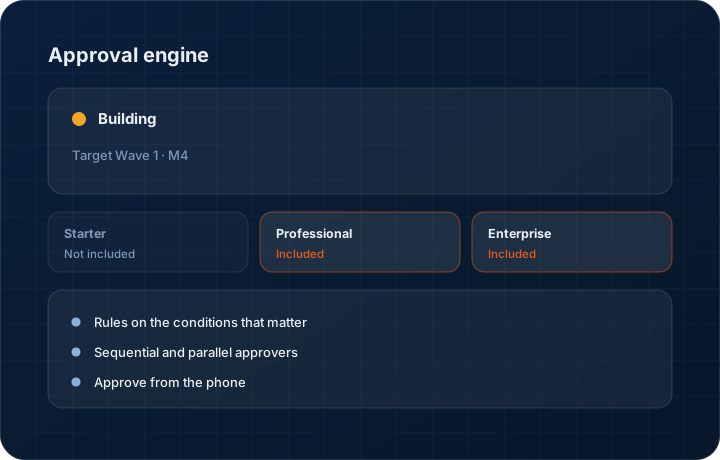
Target Wave 1 · M4. Progress figures move when the work does, and the changelog records the release.
In short
The approval engine routes KanchanFlow quotes, orders and exceptions to named approvers based on rules you define — discount depth, margin floor, order value, payment terms. It is roughly 40 percent complete, targeted at Wave 1 Milestone 4, and it is the mechanism the margin guardrails and technical pre-sales routing both depend on.
What it is
In most shops approval is a person. The owner sees the big quotes, usually, when they are not travelling, and everything else goes out on judgement. That works at fifteen quotes a week and fails at eighty, and the failure is invisible until you look at what actually shipped. By that point the discount has been given and the order is on the floor.
Rules make the same judgement repeatable. Discount above a percentage goes to the sales manager. Margin below the floor goes to the owner. Payment terms beyond thirty days go to finance. Order value above a threshold goes to two people in sequence. Each decision is recorded with who made it and when, on the record itself.
Capabilities
What it does
Rules on the conditions that matter
Discount percentage, margin against floor, order value, payment terms, lead-time commitment and customer credit status can each trigger a rule, alone or in combination.
Sequential and parallel approvers
Some approvals need two people in order; others need any one of a group. Both patterns are supported rather than forcing every rule into a single chain.
Approve from the phone
Pending approvals appear in the mobile app with the numbers that matter — price, cost, margin, customer history — so a decision does not wait for someone to reach a laptop.
Decisions recorded on the record
Approver, timestamp, decision and any comment are stored against the quote or order permanently, and on Enterprise into the immutable audit log.
Escalation on delay
An approval sitting untouched past its threshold escalates rather than quietly holding up a quote. The default failure mode of an approval workflow is silence, and escalation is what answers it.
Override with a record, not a back door
Where a genuine emergency needs an override, it is available to authorised users and it is recorded as an override. Undocumented back doors defeat the point of having rules.
Step by step
How it works
The order these steps happen in matters more than the feature list above it.
- 1
Write the rules
Define conditions and the approver for each. Start with the two or three that matter — discount depth and margin floor are usually enough to begin with.
- 2
A quote hits a condition
As the estimator prices, the engine evaluates the rules. A quote that needs approval is marked before it can be sent, not after.
- 3
The approver is notified
The approval appears on the approver's home screen and in the mobile app with the full context — cost buildup, customer history, what is being asked.
- 4
The decision is recorded
Approve, reject or approve with a comment. The decision, the approver and the timestamp attach to the quote permanently.
- 5
The quote proceeds or returns
Approved quotes can send. Rejected ones return to the estimator with the reason attached rather than disappearing into a conversation.
What this is not
This is not a general business process management platform — it approves commercial exceptions on quotes and orders, it does not model arbitrary company-wide workflows.
This is not an ERP, MRP, CAD, BOM, or advanced CPQ system — it manages customer RFQs, quotes, follow-ups, and order handoff.
Tier availability
What you get on each plan
These rows come from the same feature matrix the pricing page publishes. If the two ever disagree, the matrix is wrong and we fix it.
| Plan | Availability |
|---|---|
| Starter | Not included. |
| Professional | Full rules-based approval engine. |
| Enterprise | Full rules plus custom workflows, with decisions written to the immutable audit log. |
Starter is $39 per user per month, Professional $49, Enterprise $99 plus a $2,000 monthly platform fee. Annual billing is 17% lower. See the full matrix.
Interface
What it looks like
Development build of the rule editor with three rules: discount over 12 percent, margin below floor, and order value over $50,000.
Development build capture at approximately 40 percent complete. Rule syntax may change before release.
Development build of a pending approval showing quoted price, cost buildup, resulting margin and customer order history.
Development build capture, sample data.
Screenshots are described rather than mocked up. Captures are taken from the build current at the date shown in the changelog, on a sample workspace.
Questions about approval engine
About 40 percent, targeted at Wave 1 Milestone 4. Rule evaluation is built; the approver experience, escalation and mobile approvals are still in progress.
Related features
Margin guardrails
Margin guardrails on line items
Read moreTechnical pre-sales routing
Technical pre-sales routing to engineering, costing and production
Read moreImmutable audit log
Immutable audit log for compliance-driven manufacturers
Read moreWhat's shipping today
All 47 features grouped by status on one page, with the newest releases alongside.
Read moreSee a live quote draft built from a real RFQ
Fourteen days, no credit card, sample data pre-loaded. If it does not fit your shop, we will tell you in the first call.
- Delaware LLC
- SOC 2 Type II
- USA Data Centers (AWS)