The RFQ-to-Order workflow, end to end
From the email that lands in your estimating inbox to the reorder eighteen months later. Nine stages, one record, no re-keying between them.
In short
KanchanFlow is an RFQ-to-Order CRM for job shops and contract manufacturers. It captures RFQs from email, WhatsApp, your web form and marketplaces, prices them in a four-column cost buildup, tracks every quote revision without a retention limit, and hands the signed order to your ERP.
Most shops do not lose work because they quote badly. They lose it because the RFQ sat in someone's inbox for three days, because the follow-up never happened, or because nobody could prove what Rev 2 said. The software below is built around that specific failure, stage by stage.
Each stage names what the software does, what data it holds, and where to read the detail. The badge on each stage is read straight from the feature catalogue, so it says live, building or planned exactly as that feature page does.
The journey
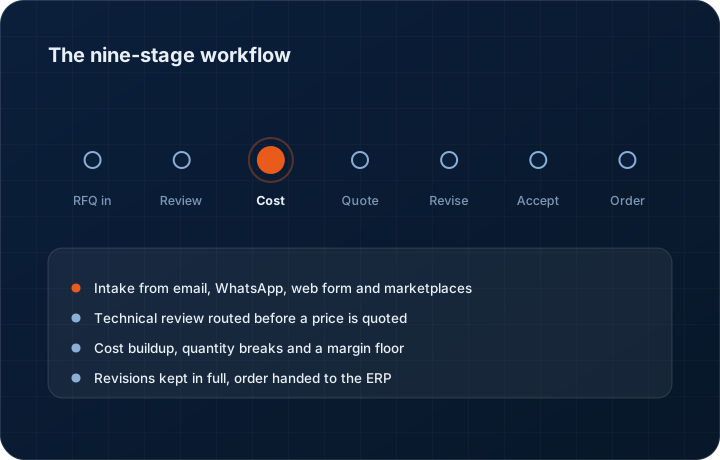
Nine stages from RFQ to reorder
One record carries through all nine. The quote knows which RFQ it came from, the order knows which revision was signed, and the reorder knows what the part last cost.
- STAGE 01Building· Wave 1 · M2
RFQ intake
Pulls RFQs out of the four places they actually arrive — a shared estimating inbox, a WhatsApp thread, your website form, and marketplace enquiries — and turns each one into a structured RFQ record with a number, a customer, a due date and a line-item table. Attachments are kept with the RFQ, not buried in a mail client.
Data it holds — Source channel, received timestamp, requester and their plant, raw email body, every attachment, extracted part numbers, quantities, materials, target date and target price.
- STAGE 02Building· Wave 1 · M3
Technical review routing
Routes the RFQ to the person who can actually price it. Rules run on material, process, part size and customer, so a stainless weldment goes to your fabrication estimator and a 5-axis job goes to the machinist who quotes 5-axis. Anything missing a drawing, a tolerance or a quantity gets flagged before it eats an estimator's afternoon.
Data it holds — Assigned estimator, review checklist state, open technical questions back to the customer, drawing revision referenced, and the clock since receipt.
- STAGE 03Building· Wave 1 · M4
Cost buildup
A 4-column cost buildup per line: material, process, outside services, and overhead plus margin. Quantity breaks sit side by side so you can price 10, 50 and 250 pieces in one pass. Margin guardrails warn the estimator before a line goes out below the floor the owner set. Pricing walks a hierarchy before it reaches the buildup at all — contract price, then customer price, then the quantity break — so an account with a negotiated price list gets the price you agreed rather than today's cost.
Data it holds — Per-line material spec and weight, setup and run minutes by operation, outside-service quotes, scrap allowance, freight, the applied margin, the price list a line came from and who approved an exception.
- STAGE 04Live
Quote assembly and send
Turns the buildup into a quote document your customer recognises — line items, lead times, tooling, validity window, terms — and sends it by email or WhatsApp with a read receipt. The follow-up cadence starts the moment it leaves.
Data it holds — Quote number, revision, validity date, per-line price and lead time, terms, the exact PDF that was sent, and the delivery and open events after it.
- STAGE 05Building· Wave 1 · M3
Revision control
Every change makes a new revision — Rev 0, Rev 1, Rev 2 — and a diff view shows exactly what moved between them: price, quantity, lead time, material, line added, line removed. When a buyer says 'you quoted us less last time', you open the diff instead of digging through sent mail.
Data it holds — Full revision chain with no retention limit on any tier, the diff between any two revisions, the reason for the change and the person who made it.
- STAGE 06Live
Acceptance and e-signature
The customer accepts the quote in a browser and signs it. The signed revision is locked, so the accepted price and lead time are a fixed record rather than a version of a file somebody re-saved.
Data it holds — Signed revision, signer name and email, IP and timestamp, accepted line items, and the countersigned PDF.
- STAGE 07Building· Wave 1 · M4
Purchase order capture
Reads the customer PO — usually a PDF attached to an email — and lines it up against the accepted quote. Price, quantity, part number, revision and delivery date are compared line for line, and mismatches are raised before the job hits the floor.
Data it holds — PO number and date, OCR'd line items, the quote line each PO line maps to, every mismatch and how it was resolved, and the buyer's terms.
- STAGE 08Live
Order handoff and dispatch
Hands the confirmed order to whoever runs your floor — your ERP or job-tracking system by connector or webhook, or a work order pack if you run on paper. Production milestones come back in, so inside sales can answer 'where is my order' without walking to the shop.
Data it holds — Order record linked to quote and PO, milestone events from the ERP, promised versus current ship date, delivery risk flags, freight details and the packing and dispatch record.
- STAGE 09Building· Wave 1 · M5
Reorder
Watches the parts a customer buys on a rhythm and tells you when the next order is due before the buyer calls. Repeat work is quoted from the last accepted revision instead of being priced from scratch, which is where most shops quietly lose margin.
Data it holds — Order history per part and per customer, inferred reorder interval, last accepted price, current cost delta, and the suggested requote date.
AI agents
Thirteen agents, one credit pool
Every agent draws from the same workspace credit balance. There is no per-agent licence, no per-seat AI upgrade, and no agent that acts without a person reviewing what it produced.
| Agent | What it does |
|---|---|
| RFQ Agent | Reads an inbound RFQ email or attachment and produces a structured RFQ with parts, quantities, materials and dates. |
| RFQ Qualification | Scores an incoming RFQ against the work you actually win, so a no-bid gets called early rather than after two days of estimating. |
| Quote Follow-Up | Drafts the next follow-up on an open quote, on the cadence you set, in email or WhatsApp. A person still presses send. |
| Quote Risk | Scans a quote before it goes out for thin margin, missing outside-service cost, an unpriced tooling line or a lead time you cannot hold. |
| Reorder | Predicts the next order date on repeat parts from the customer's own order rhythm. |
| Dealer Health | Scores each dealer or rep on order frequency, quote conversion and response time, and flags the ones going quiet. |
| Sales Forecast | Builds a forecast from open quotes weighted by stage, age and historical win rate for that customer and part family. |
| Meeting Summarization | Turns a customer call recording into a summary, the commitments made and the follow-up tasks. |
| Cross-Sell | Looks at what an account buys against what similar accounts buy and names the gap. |
| Deal Risk | Flags an opportunity that has gone cold, lost its champion or slipped its decision date. |
| Quote Probability | Estimates the chance a specific open quote converts, so the follow-up effort goes where it pays. |
| Churn Detection | Watches order frequency per account and raises an account whose pattern has broken. |
| Voice Agent | Runs an outbound qualification call on Enterprise, and writes what it learned back onto the record. |
Starter includes the RFQ Agent and Quote Follow-Up. Professional opens nine agents. Enterprise adds the Voice Agent and custom prompts. Consumption is metered in credits and pooled across the workspace, not locked to a seat — the full credit table is on /ai-credits.
Revenue Leakage Dashboard
Six numbers that tell you where the money went
Not a vanity dashboard. Each metric points at a specific recoverable loss and links to the list of records causing it.
- Quotes never followed up
- Count + value
- Open quotes past their follow-up date with no contact logged.
- Quotes expired unconverted
- Count + value
- Validity window closed while the quote was still open.
- Margin given away
- Quoted vs floor
- Lines shipped below the margin floor, by estimator and by customer.
- Repeat parts not requoted
- Parts + last price
- Repeat work still priced off a costing older than your material moves.
- Dormant accounts
- Accounts + last order
- Customers whose order rhythm has broken.
- RFQ response lag
- Median hours
- Time from RFQ received to quote sent, by estimator and channel.
Starter shows three of the six. Professional shows all six. Enterprise adds custom metrics on top.
Owner Command Centre
Six panels for the person who signs the cheques
Built for a 20-minute Monday review, not for a monthly board pack.
- Today's RFQs
- Intake queue
- What came in, from where, and who owns it.
- Quotes at risk
- Risk list
- Ageing, expiring or unfollowed quotes ranked by value.
- Pipeline by stage
- Value + count
- Open quote value across the RFQ-to-Order stages.
- Win / loss
- Rate + reasons
- Conversion by customer, part family and estimator with logged loss reasons.
- Order book
- Confirmed value
- Confirmed orders, promised dates and delivery risk flags.
- Team load
- Per estimator
- Open RFQs and quotes per person, and the response clock on each.
Role home screens
Eight roles, eight different first screens
- Owner — revenue leakage, order book, margin exceptions and the week's win rate
- Sales manager — team load, quote ageing, forecast and loss reasons
- Salesperson — my open quotes, today's follow-ups, my accounts
- Estimator — RFQ queue, technical questions outstanding, cost buildups in progress
- Inside sales / CSR — order status enquiries, delivery dates, reorder prompts
- Production coordinator — confirmed orders handed off, milestones, at-risk ship dates
- Dealer / channel manager — dealer health, territory coverage, dealer-submitted RFQs
- Finance — accepted orders, invoicing handoff, payment status and compliance flags
Starter ships the Owner and Salesperson screens. Professional ships all eight. Enterprise adds custom role-based access control on top of them.
Templates
Twelve manufacturing templates
A template sets the cost buildup columns, the quote document layout, the RFQ intake checklist and the default lead-time fields for a process. You can edit any of them; you should not have to build one from an empty grid.
Starter includes five of the twelve. Professional includes all twelve. Enterprise adds custom templates built with your CSM.
Boundaries
What we do not do
Not in scope
- Production scheduling, routings and capacity planning
- Inventory, MRP runs and purchasing
- CAD, GD&T interpretation or drawing markup
- Multi-level BOM engineering and revision control of the design itself
- Shop-floor data collection and machine monitoring
In scope
- Customer RFQs from every channel they arrive on
- Estimating, cost buildup and quote documents
- Revisions, diffs, approvals and e-signed acceptance
- Follow-up cadence, forecast and win/loss
- PO capture, order handoff and reorder
This is not an ERP, MRP, CAD, BOM, or advanced CPQ system — it manages customer RFQs, quotes, follow-ups, and order handoff.
One line in that sentence is worth being precise about. We do ship a manufacturing CPQ Lite — a cost buildup with quantity breaks, alternates, margin guardrails and revisions, priced from contract and customer price lists before it ever falls back to that buildup. What we are not is an enterprise configure-price-quote suite with a catalogue configurator and a constraint solver. Both things are true at the same time, and the CPQ work is in development against Wave 1 Milestone 4.
Questions shop owners ask about the product
No. KanchanFlow stops where production starts. We own the customer-facing half — the RFQ, the estimate, the quote, the revisions, the acceptance and the PO — and then hand the confirmed order to your ERP or job-tracking system by connector or webhook. Scheduling, routings, work-in-process, inventory and shop-floor data collection stay where they are.
Go deeper
Pricing
Three tiers, per user, 3-user minimum, 14-day trial without a card.
Read moreAI credits explained
The credit weight of every agent operation and two worked examples.
Read moreAll features
The full feature list with a live status badge on each one.
Read moreAll integrations
Accounting, WhatsApp, marketplaces and ERP connectors with last-tested dates.
Read moreWhat's shipping
Feature truth audit — what is live, beta, building and merely planned.
Read moreDealer and territory exclusivity
Which partner holds which SKUs and territories, and what happens when two register the same customer.
Read moreSee a live quote draft
Bring one real RFQ; we build the quote on the call.
Read moreSee a live quote draft built from a real RFQ
Fourteen days, no credit card, sample data pre-loaded. If it does not fit your shop, we will tell you in the first call.
- Delaware LLC
- SOC 2 Type II
- USA Data Centers (AWS)