Quote-as-Order with staged billing and partial dispatch
The handoff that usually happens in email. An accepted quote becomes an order with its lines intact, and stays open until every line has shipped and been billed.
In short
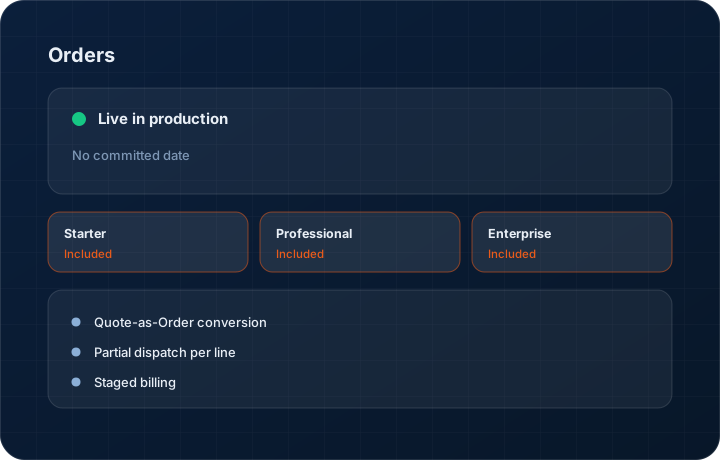
Orders is the handoff layer of the KanchanFlow RFQ-to-Order CRM. An accepted quote becomes an order carrying its own line structure, so staged billing and partial dispatch run against the quantities the customer actually agreed to. The module shipped to production on 25 August 2026 and is included on every tier.
What it is
In most shops the order does not exist as a record. There is an accepted quote, a customer PO in a mailbox, and a job traveller on the floor — and reconciling them is somebody's Friday afternoon. Orders makes the agreement itself a record: what was ordered, what has shipped, what has been billed, what is still open.
Because job shop work rarely ships in one go, the order is built around partial fulfilment from the start. Each line holds an ordered quantity, a dispatched quantity and an invoiced quantity, and those three numbers are allowed to differ. The order closes when they agree, not when someone remembers to close it.
Capabilities
What it does
Quote-as-Order conversion
The accepted quote revision becomes the order. Lines, prices, lead times, delivery address and attachments carry across, and the order keeps a permanent link back to the exact revision the customer accepted.
Partial dispatch per line
Ship 40 of 100 today and 60 in three weeks. Each dispatch records quantity, date and reference against the line, and the remaining quantity stays visible on the order.
Staged billing
Bill on advance, on dispatch, or on milestone. The order tracks invoiced value against ordered value so you can see, per line, what is still to be billed.
Customer PO capture
Attach the customer's purchase order to the order record and store their PO number against it, so your invoice quotes the reference their accounts payable system is looking for.
Production milestone visibility
Mark milestone progress manually on Starter, or take milestone updates from an ERP webhook on Professional. Enterprise rolls milestones up across plants.
Open-order view for the whole team
One list of every open order with dispatched, invoiced and outstanding value. It is the list you would otherwise rebuild in a spreadsheet every Monday morning.
Step by step
How it works
The order these steps happen in matters more than the feature list above it.
- 1
Customer accepts a quote revision
Acceptance comes through the share link, an eSign flow, or is recorded manually when a PO lands by email. The accepted revision is stamped on the record.
- 2
Convert to an order
Press convert. The order opens with the same lines and prices. Add the customer PO number and attach their purchase order document.
- 3
Set the billing stages
Choose whether this order bills on advance, on dispatch or against milestones, and set the split. The order shows what is billable now and what is not yet.
- 4
Dispatch against lines
As parts ship, record the quantity dispatched per line with a date and a reference. The remaining quantity updates on the line and on the order header.
- 5
Invoice what shipped
Raise an invoice for the dispatched quantity. The invoiced quantity on the line moves, and the order shows the outstanding balance.
- 6
Close when the three numbers agree
When ordered, dispatched and invoiced match on every line, the order closes. Anything unmatched stays visible, which is the point.
What this is not
This is not production scheduling — we track what was ordered, shipped and billed, not machine loading, routings or shop-floor capacity.
This is not an ERP, MRP, CAD, BOM, or advanced CPQ system — it manages customer RFQs, quotes, follow-ups, and order handoff.
Tier availability
What you get on each plan
These rows come from the same feature matrix the pricing page publishes. If the two ever disagree, the matrix is wrong and we fix it.
| Plan | Availability |
|---|---|
| Starter | Included. Manual production milestone updates. |
| Professional | Included. Milestone updates via ERP webhook, plus delivery risk alerts and freight helpers. |
| Enterprise | Included. Multi-plant milestone roll-up across entities. |
Starter is $39 per user per month, Professional $49, Enterprise $99 plus a $2,000 monthly platform fee. Annual billing is 17% lower. See the full matrix.
Interface
What it looks like
Open order with four lines, two partially dispatched, showing ordered, dispatched, invoiced and outstanding quantities side by side.
Interface capture of the order detail view, sample data.
Staged billing panel with a 30 percent advance and 70 percent on dispatch split across the order value.
Interface capture of the billing stage configuration.
Screenshots are described rather than mocked up. Captures are taken from the build current at the date shown in the changelog, on a sample workspace.
Connectors
Integrations this feature uses
Starter includes one accounting connector and one lead source; Professional and Enterprise include all of them. Browse every integration.
Questions about orders
25 August 2026. It is listed in the changelog as a new feature release, and it is live for every tier today.
Related features
Quote editor
Quote editor with attachments, share links, FX and revisions
Read moreInvoice editor
Invoice editor with credit and debit notes, aging and credit management
Read morePurchase order OCR
Purchase order OCR
Read moreWhat's shipping today
All 47 features grouped by status on one page, with the newest releases alongside.
Read moreSee a live quote draft built from a real RFQ
Fourteen days, no credit card, sample data pre-loaded. If it does not fit your shop, we will tell you in the first call.
- Delaware LLC
- SOC 2 Type II
- USA Data Centers (AWS)