QuickBooks Online & Enterprise for Manufacturing
Post accepted quotes to QuickBooks as estimates, sales orders or invoices, and bring A/R ageing back to the estimator's screen.
In short
KanchanFlow, the RFQ-to-Order CRM, posts an accepted quote into QuickBooks Online or QuickBooks Desktop Enterprise as an estimate, sales order or invoice, with customer, item, class and sales-tax fields mapped. A/R ageing returns to the customer record, so an estimator sees a 90-day balance before quoting the next job.
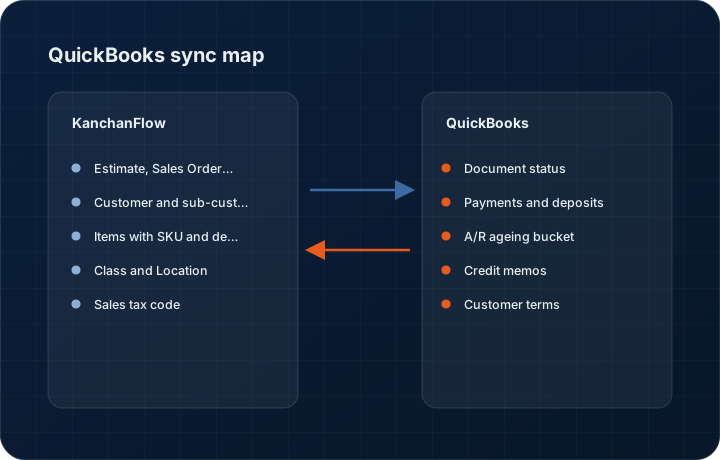
For most USA job shops QuickBooks is the system the accountant will not give up, and there is no reason they should. The problem is that quoting in QuickBooks is miserable: no revision history, no cost buildup, no way to hold six variants of the same part. So shops quote in a spreadsheet and re-key the winner.
This connector lets the two systems each do what they are good at. KanchanFlow holds the RFQ, the four-column cost buildup and every revision. When the customer accepts, the finished numbers land in QuickBooks in whichever document type your bookkeeper actually works from, and the A/R position comes back so sales is not the last to know a customer stopped paying.
- Status
- Live in production
- Category
- Accounting
- Plan availability
- All tiers — Starter selects one accounting connector; Professional and Enterprise include all three
- Sync cadence
- Every 15 minutes for QuickBooks Online; every 30 minutes for Desktop Enterprise via the Web Connector, or on demand
Field by field
What syncs, in both directions
These are the actual fields that move. Anything not on these two tables does not sync, and we would rather write that down than let you assume it does.
KanchanFlow → QuickBooks Online & Enterprise
What we write out when a record moves forward.
| Field | What we send |
|---|---|
| Estimate, Sales Order or Invoice | Selectable per workspace. QuickBooks Online supports Estimate and Invoice; Sales Order exists only in Desktop Enterprise and the connector hides it when you are on Online. |
| Customer and sub-customer | Matched on the QuickBooks customer ID we stored on first link, then on exact display name. Ship-to plants can post as sub-customers so a multi-plant account rolls up correctly in QuickBooks reports. |
| Items with SKU and description | Quote lines post as Non-inventory or Service items by default, keyed on part number. Inventory items are matched but never created, because creating one wrong affects your inventory valuation. |
| Class and Location | Territory maps to Class and the producing plant maps to Location, if class and location tracking are switched on in QuickBooks. |
| Sales tax code | The customer's tax code and the automated sales tax setting in QuickBooks Online decide the tax. We pass the taxable flag and the ship-to address and let QuickBooks compute the rate, rather than computing it ourselves. |
| Customer memo and document number | The quote number and revision go into the document number field where your numbering scheme allows it, and always into the customer memo. |
QuickBooks Online & Enterprise → KanchanFlow
What comes back onto the customer, quote or order record.
| Field | What we read |
|---|---|
| Document status | Pending, accepted, closed, paid or voided, refreshed each cycle onto the order timeline. |
| Payments and deposits | Payments applied to a synced invoice, including deposits taken against an estimate, appear on the customer 360. |
| A/R ageing bucket | Current, 1-30, 31-60, 61-90 and 90+ balances per customer, shown as a band on new quotes for that account. |
| Credit memos | Credit memos applied to a synced invoice, so sales does not chase a balance that has been credited. |
| Customer terms | Net 30, Net 45 and similar terms are read back and shown on the quote header so estimators quote against the terms accounting actually granted. |
Sync cadence. Every 15 minutes for QuickBooks Online; every 30 minutes for Desktop Enterprise via the Web Connector, or on demand. Every record also carries a Sync now control, and the last successful sync time is shown on the record so nobody works from a number of unknown age.
Figures
What this looks like in the product
We do not ship stock imagery or mocked-up screens. These three figures describe the exact shots a designer must capture from a live workspace, each carrying a visible date stamp and recaptured at every quarterly re-test.
Capture date required. Capture the genuine Intuit screen. Date stamp required; company name may be blurred.
Capture date required. Capture against a customer with automated sales tax enabled. Date stamp required.
Capture date required. Do not stage a zero-balance account for this shot. Date stamp required; recapture each quarter.
12 steps
Setting it up
Written for the person who will actually do it, in the order they will do it. Nothing here assumes you have done this before.
- 1Decide first whether you are connecting QuickBooks Online or QuickBooks Desktop Enterprise. The two use completely different plumbing and the setup diverges from step three.
- 2In KanchanFlow open Settings, Integrations, QuickBooks and choose your edition.
- 3For QuickBooks Online, click Connect to QuickBooks and sign in with an Intuit account that has Company Administrator rights on the company file you want to bind.
- 4For Desktop Enterprise, download the KanchanFlow QuickBooks Web Connector package, then in QuickBooks go to File, App Management, Update Web Services and add the supplied .qwc file.
- 5In Desktop Enterprise, set the Web Connector to Auto-Run at 30-minute intervals and allow access even when QuickBooks is not running. Without that second setting the sync stops every time someone closes QuickBooks.
- 6Choose the document type an accepted quote should create: Estimate, Sales Order in Desktop, or Invoice.
- 7Confirm the item type used for newly posted lines. Non-inventory Part is the default. Ask your bookkeeper before changing it, because item type drives which account the revenue posts to.
- 8Map income accounts. Every posted line must resolve to an income account; the connector will not guess and will hold the push if a mapping is missing.
- 9Turn on Class and Location mapping only if you already use class tracking. Half-populated classes make QuickBooks reports worse, not better.
- 10Confirm sales tax handling. On QuickBooks Online we recommend leaving automated sales tax in control and passing only the taxable flag.
- 11Run the pre-flight check, which posts a one-line document, reads it back and voids it.
- 12Post one real accepted quote and have your bookkeeper open it in QuickBooks and confirm the account coding before you enable the connector for everyone.
Honest ceilings
What this integration cannot do
Every connector has limits. You will find these in week three whether or not we write them down, so we write them down.
- QuickBooks Desktop Enterprise syncs through the Web Connector, which means the sync is only as reliable as the Windows machine it runs on. Thirty minutes is the realistic floor, and a machine that sleeps stops the sync entirely.
- We never create Inventory items and we never adjust quantity on hand. If your quote line is an inventory part that does not exist in QuickBooks, the push holds and asks a human to create it.
- QuickBooks Online enforces a limit on how many custom fields a document can carry, and older company files may already be at it. Where we cannot write the quote number to a custom field, it goes to the memo instead.
- Progress invoicing, job costing detail, time tracking, purchase orders, bills and payroll are all out of scope.
- Multi-currency posts at the QuickBooks rate on the day, and we do not revalue afterwards.
- There is no field-level conflict resolution. If a bookkeeper edits a synced document in QuickBooks and an estimator revises the quote in KanchanFlow, we do not merge the two. The CRM record is flagged Diverged and someone must choose.
From the quarterly re-test
Errors you will actually hit
Each of these was reproduced deliberately during testing. The wording is the error as the system reports it, not a paraphrase.
| Error | Likely cause | Fix |
|---|---|---|
| Post fails with An income account is required for this item | A quote line resolved to an item with no income account mapping, commonly a newly added service line. | Open the connector's account mapping table, assign an income account for that item type, and re-push. The queued document is not lost. |
| Web Connector reports QuickBooks is not running or company file is not open | Desktop Enterprise was closed and the company file was not configured for background access. | In QuickBooks, open Edit, Preferences, Integrated Applications, select KanchanFlow and tick Allow this application to log in automatically. Restart the Web Connector. |
| Sales tax on the posted invoice differs from the quote | The quote computed tax from a stored rate while QuickBooks Online recalculated using automated sales tax and the ship-to address. | Treat QuickBooks as authoritative for tax and switch the connector to Pass taxable flag only. Then correct the quote template so estimators are not quoting a rate the invoice will not match. |
| Customer matched to the wrong QuickBooks record | Two customers share a display name, or a name was matched before the QuickBooks customer ID was stored. | Open the CRM customer, click Unlink, then Link existing and pick the correct QuickBooks customer by ID. The link is stored by ID from then on and will not re-match by name. |
| Connection needs re-authorising roughly every 100 days | Intuit refresh tokens expire, and the expiry clock resets only when the token is used. | Reconnect when prompted. A workspace that has been idle for months will always need this, so reconnect before a busy quoting week rather than during one. |
Questions people ask about the QuickBooks Online & Enterprise integration
Starter includes one accounting connector of your choice. Professional and Enterprise include all three of Tally, Zoho Books and QuickBooks. Adding a second connector on Starter costs $15 per month.
Related integrations
Zoho Books
Turn an accepted quote into a Zoho Books sales order or invoice, and read payment status back onto the customer record.
Read moreStripe
Send a hosted payment link with a quote, take a deposit by card or ACH, and reconcile the payout back onto the order.
Read moreShopify
Pull direct and B2B Shopify orders into the same pipeline as your RFQs, so catalogue sales and custom work share one customer record.
Read moreKeeping this page true
This connector was last tested end to end on 2026-08-27 against a live sandbox: fresh authorisation, an outbound write, an inbound read checked field by field, and the failure paths above triggered deliberately. It is re-tested every quarter and the date on this page changes when it is. Read how we test integrations, or see what is shipping today.
See a live quote draft built from a real RFQ
Fourteen days, no credit card, sample data pre-loaded. If it does not fit your shop, we will tell you in the first call.
- Delaware LLC
- SOC 2 Type II
- USA Data Centers (AWS)