Stripe for Manufacturing
Send a hosted payment link with a quote, take a deposit by card or ACH, and reconcile the payout back onto the order.
In short
KanchanFlow, the RFQ-to-Order CRM, creates Stripe payment links against a quote or a production milestone so a buyer can pay a deposit by card or ACH debit. Captures, refunds, disputes and payouts return by webhook, so the estimator sees the deposit land without asking accounting whether the money arrived.
A USA job shop that takes a fifty per cent deposit on tooling has a cash-flow reason to make paying easy. Most of the friction is procedural: a PDF with wire instructions, a purchasing department that needs a W-9, and a week of nobody being sure whether the money is coming.
This connector puts a hosted Stripe link on the quote and reports back the moment it is paid. ACH debit is supported for the buyers who will not put a machine order on a card, and the payout reference comes through so the deposit can be matched in QuickBooks against the actual bank deposit rather than guessed at.
- Status
- Live in production
- Category
- Payments
- Plan availability
- All tiers
- Sync cadence
- Real time by webhook; a 15-minute reconciliation sweep backfills any missed event
Field by field
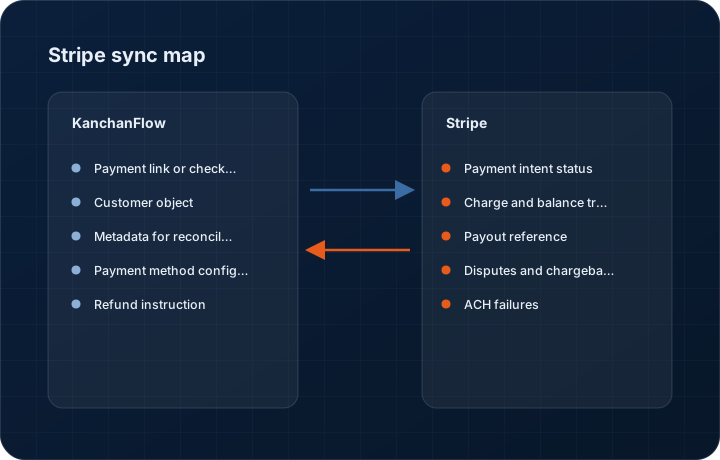
What syncs, in both directions
These are the actual fields that move. Anything not on these two tables does not sync, and we would rather write that down than let you assume it does.
KanchanFlow → Stripe
What we write out when a record moves forward.
| Field | What we send |
|---|---|
| Payment link or checkout session | Created against a quote or milestone with amount, currency, description, the CRM reference and an expiry. Hosted by Stripe so no card data ever reaches our systems or yours. |
| Customer object | Created or matched on email, carrying company name, billing address and the CRM customer ID in metadata, so Stripe's dashboard shows who paid without a lookup. |
| Metadata for reconciliation | Quote number, revision, order number and territory are written to payment intent metadata, which is what makes reconciliation in the Stripe dashboard possible. |
| Payment method configuration | Card, ACH debit and, where you enable it, Link. ACH is the one that matters for deposits above a few thousand dollars. |
| Refund instruction | Full or partial refunds initiated from the order record, with reason, and only by users holding the refund permission. |
Stripe → KanchanFlow
What comes back onto the customer, quote or order record.
| Field | What we read |
|---|---|
| Payment intent status | Requires payment, processing, succeeded or canceled, on the order timeline in near real time. |
| Charge and balance transaction | The charge ID, the Stripe fee and the net amount, so the order shows what you actually received rather than what was quoted. |
| Payout reference | The Stripe payout ID and expected arrival date, which is the link between a charge and a line on your bank statement. |
| Disputes and chargebacks | Dispute reason, evidence deadline and outcome, surfaced on the order because a chargeback on a shipped job is a commercial emergency. |
| ACH failures | ACH debits can fail days after they appear to succeed. Failure codes come back onto the order so nobody treats a reversed payment as received. |
Sync cadence. Real time by webhook; a 15-minute reconciliation sweep backfills any missed event. Every record also carries a Sync now control, and the last successful sync time is shown on the record so nobody works from a number of unknown age.
Figures
What this looks like in the product
We do not ship stock imagery or mocked-up screens. These three figures describe the exact shots a designer must capture from a live workspace, each carrying a visible date stamp and recaptured at every quarterly re-test.
Capture date required. Capture in Stripe test mode from a live workspace. Date stamp required.
Capture date required. Capture the genuine hosted page in test mode. Date stamp required; do not mock this screen.
Capture date required. Capture a test charge that has an associated payout so the reconciliation chain is visible end to end. Date stamp required.
11 steps
Setting it up
Written for the person who will actually do it, in the order they will do it. Nothing here assumes you have done this before.
- 1Confirm your Stripe account is activated for live payments with a bank account attached and business verification complete.
- 2Decide whether you need ACH debit. If you do, enable it in the Stripe dashboard under Payment methods before connecting, because it needs Stripe's approval on some accounts.
- 3In KanchanFlow, open Settings, Integrations, Stripe and click Connect. We use Stripe Connect OAuth, so you authorise on Stripe's own screen rather than pasting a secret key.
- 4Confirm the account being connected is the correct one if you hold several Stripe accounts. The account name is shown on the consent screen; read it.
- 5Copy the webhook endpoint from the connector into Stripe under Developers, Webhooks, subscribing to payment_intent, charge, refund, payout and dispute events.
- 6Set the deposit percentage default. Fifty per cent on tooling and thirty on repeat production is a common starting point, and it can be overridden per quote.
- 7Set the link expiry. Fourteen days suits USA purchasing cycles better than seven, because a PO often has to pass through a controller.
- 8Place the payment block on the quote PDF template so the link prints on the document the buyer forwards internally.
- 9Assign the refund permission deliberately. By default no role holds it, and that is correct.
- 10Run a test payment in test mode, then a one dollar live charge, and confirm both appear on the order timeline with the fee and net amounts.
- 11Refund the live one dollar charge from the order record to confirm the refund path works before you need it under pressure.
Honest ceilings
What this integration cannot do
Every connector has limits. You will find these in week three whether or not we write them down, so we write them down.
- ACH debit settles slowly and can fail up to several business days after it appears to have succeeded. Do not release a shipment on an ACH payment that has not settled, and the order badge will tell you which state it is in.
- Stripe fees are deducted before payout, so the net you receive is less than the deposit you quoted. We report the fee, we do not add it to the buyer's total for you.
- We do not support Stripe Billing subscriptions, invoicing through Stripe Invoices, or Stripe Tax. Deposits and one-off milestone payments only.
- Disputes must be defended in the Stripe dashboard. We surface the deadline and the reason code but we cannot upload evidence on your behalf.
- One Stripe account per workspace. A group with several legal entities and separate Stripe accounts needs a workspace per entity.
- Payment links do not carry sales tax logic. The amount on the link is the amount on the quote; if tax handling is wrong on the quote, it is wrong on the link.
From the quarterly re-test
Errors you will actually hit
Each of these was reproduced deliberately during testing. The wording is the error as the system reports it, not a paraphrase.
| Error | Likely cause | Fix |
|---|---|---|
| Payment succeeded in Stripe but the order shows nothing | The webhook endpoint is missing an event type, most often payment_intent.succeeded, or the endpoint was added to the wrong Stripe mode. | Check the endpoint's subscribed events and mode in the Stripe dashboard. The reconciliation sweep will catch it within fifteen minutes regardless. |
| ACH payment marked Reversed several days after it succeeded | The buyer's bank returned the debit, commonly for insufficient funds or a closed account. | The order reverts to unpaid with the return code shown. Contact the buyer before shipping. This is a property of ACH, not a bug in the connector. |
| Connect flow authorises the wrong Stripe account | The user was signed into a different Stripe account in the same browser. | Disconnect in the connector, sign out of Stripe, and reconnect while signed in to the intended account. Verify the account name on the consent screen. |
| Refund fails with Charge has already been refunded | Someone refunded in the Stripe dashboard and then again from the CRM. | Refresh the order; the reconciliation sweep imports dashboard-issued refunds. Agree with your team which system issues refunds and stick to it. |
| Buyer reports the link is expired | The link passed its expiry while sitting in a purchasing inbox. | Regenerate from the quote, which issues a fresh link bound to the current revision. If this happens often, lengthen the default expiry rather than reissuing manually each time. |
Questions people ask about the Stripe integration
No. Payment pages are hosted by Stripe. We hold payment intent IDs, statuses and amounts. We never see a card number and we are not in your PCI scope for this flow.
Related integrations
Razorpay & RazorpayX
Attach a payment link to a quote, take an advance before the job is scheduled, and see the settlement land on the order record.
Read moreQuickBooks Online & Enterprise
Post accepted quotes to QuickBooks as estimates, sales orders or invoices, and bring A/R ageing back to the estimator's screen.
Read moreShopify
Pull direct and B2B Shopify orders into the same pipeline as your RFQs, so catalogue sales and custom work share one customer record.
Read moreKeeping this page true
This connector was last tested end to end on 2026-08-27 against a live sandbox: fresh authorisation, an outbound write, an inbound read checked field by field, and the failure paths above triggered deliberately. It is re-tested every quarter and the date on this page changes when it is. Read how we test integrations, or see what is shipping today.
See a live quote draft built from a real RFQ
Fourteen days, no credit card, sample data pre-loaded. If it does not fit your shop, we will tell you in the first call.
- Delaware LLC
- SOC 2 Type II
- USA Data Centers (AWS)