Shopify for Manufacturing
Pull direct and B2B Shopify orders into the same pipeline as your RFQs, so catalogue sales and custom work share one customer record.
In short
KanchanFlow, the RFQ-to-Order CRM, syncs Shopify orders, customers and B2B company accounts so a manufacturer selling both a standard catalogue and custom work sees them on one customer record. A repeat catalogue buyer who then requests a custom part is recognised as the same account rather than as a new lead.
A growing number of job shops now run a Shopify store alongside the quoting business: standard parts, replacement components, tooling, or a small product line built from the same capability. The two channels usually live entirely apart, and the customer who buys standard parts online is invisible when they email asking for something custom.
This connector joins them. Shopify orders and customers sync into the CRM against the same accounts your RFQs use, including B2B company accounts and their price lists where you use Shopify's B2B features. The result is one view of the account, which is also what makes a cross-sell conversation possible.
- Status
- Live in production
- Category
- Commerce
- Plan availability
- Professional and Enterprise
- Sync cadence
- Real time by webhook for orders and fulfilments; a 15-minute reconciliation sweep backfills anything missed
Field by field
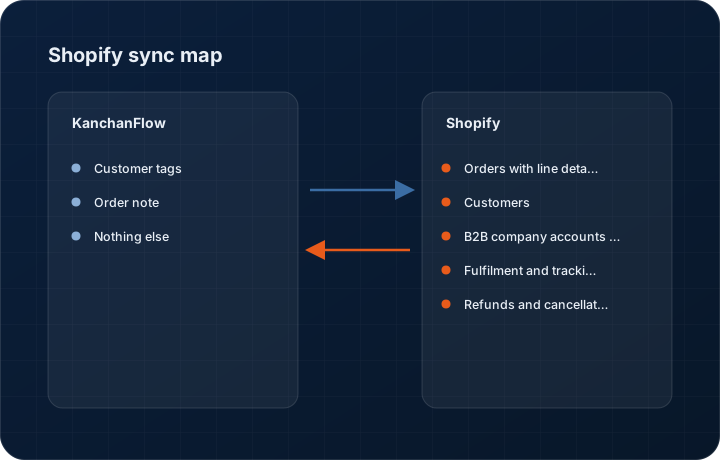
What syncs, in both directions
These are the actual fields that move. Anything not on these two tables does not sync, and we would rather write that down than let you assume it does.
KanchanFlow → Shopify
What we write out when a record moves forward.
| Field | What we send |
|---|---|
| Customer tags | Where you enable it, we write a tag to the Shopify customer reflecting their CRM segment, so your storefront can offer the right price list or content. |
| Order note | Where a Shopify order originated from a CRM quote, the quote number is written to the order note for reconciliation. |
| Nothing else | We do not manage products, inventory, pricing or fulfilment in Shopify. Your store is run from Shopify by whoever runs it today. |
Shopify → KanchanFlow
What comes back onto the customer, quote or order record.
| Field | What we read |
|---|---|
| Orders with line detail | Order number, date, line items with SKU and quantity, discounts, shipping and total, posted to the customer's timeline. |
| Customers | Name, email, phone and default address, matched to existing CRM accounts on email first and company name second. |
| B2B company accounts and locations | Where you use Shopify B2B, the company, its locations and its assigned price list, mapped to CRM accounts and plants. |
| Fulfilment and tracking | Fulfilment status and tracking numbers so a salesperson answering a where-is-my-order call does not have to open Shopify. |
| Refunds and cancellations | Refunded and cancelled orders, so account value figures in the CRM are net rather than gross. |
Sync cadence. Real time by webhook for orders and fulfilments; a 15-minute reconciliation sweep backfills anything missed. Every record also carries a Sync now control, and the last successful sync time is shown on the record so nobody works from a number of unknown age.
Figures
What this looks like in the product
We do not ship stock imagery or mocked-up screens. These three figures describe the exact shots a designer must capture from a live workspace, each carrying a visible date stamp and recaptured at every quarterly re-test.
Capture date required. Capture from a workspace with genuine mixed history. Date stamp required; mask the customer name in the product.
Capture date required. Capture with a real B2B company account. Date stamp required.
Capture date required. Capture with real figures or omit the shot. Date stamp required; recapture each quarter.
11 steps
Setting it up
Written for the person who will actually do it, in the order they will do it. Nothing here assumes you have done this before.
- 1Confirm who administers your Shopify store. You need a staff account with permission to install apps and read orders and customers.
- 2In KanchanFlow, open Settings, Integrations, Shopify and enter your store's myshopify domain.
- 3Complete the install on Shopify's own permission screen. We request read access to orders, customers, fulfilments and, where you use it, B2B companies.
- 4Choose the historical import window. Ninety days is the default and is usually enough to establish which customers are repeat buyers.
- 5Set the customer matching rule. Email primary and company name secondary works for most stores.
- 6Decide whether Shopify orders create CRM orders or only timeline entries. Timeline entries are the safer starting point unless you intend to manage fulfilment commitments from the CRM.
- 7If you use Shopify B2B, map company locations to CRM plants so quotes and orders reference the same sites.
- 8Enable customer tag write-back only if your storefront actually uses tags for segmentation. Otherwise leave it off.
- 9Set which order statuses matter. Most shops ignore draft and abandoned orders in the CRM.
- 10Run the historical import outside business hours; a large store's ninety-day import takes time.
- 11Place one test order and confirm it appears on the right customer record within a minute.
Honest ceilings
What this integration cannot do
Every connector has limits. You will find these in week three whether or not we write them down, so we write them down.
- One Shopify store per workspace. Manufacturers running separate stores per brand need a workspace per store or must choose which store syncs.
- We do not sync products or inventory. Stock levels are Shopify's business and a CRM should not be a second source of truth for them.
- We do not write orders into Shopify. A custom quote accepted in the CRM does not create a Shopify order, because custom work does not belong in a catalogue checkout.
- Shopify's API rate limits apply. A very large historical import is throttled and can take hours to complete.
- Customer matching across channels is imperfect. A buyer who uses a personal email at checkout and a work email for RFQs will create two records until someone merges them, and no matching rule solves that reliably.
- Shopify B2B features are only available on Shopify Plus. On other plans the company account fields simply do not exist and that part of the connector is inert.
From the quarterly re-test
Errors you will actually hit
Each of these was reproduced deliberately during testing. The wording is the error as the system reports it, not a paraphrase.
| Error | Likely cause | Fix |
|---|---|---|
| Orders sync but do not attach to the right account | The checkout email differs from the email on the CRM account. | Add the checkout email as a secondary address on the contact, or merge the accounts. Enabling company-name matching as a secondary rule reduces but does not eliminate this. |
| Historical import appears stuck | Shopify is throttling the request rate on a large store. | Leave it. The import resumes automatically and reports progress on the connector page. Do not restart it; restarting begins the throttled work again. |
| B2B company accounts are missing | The store is not on Shopify Plus, so the B2B objects do not exist. | Nothing to fix on our side. Company accounts require Shopify Plus and the connector hides those fields when they are unavailable. |
| Refunded orders still counted in account value | The refund webhook was missed and the reconciliation sweep has not yet run. | Wait one cycle or press Sync now on the customer. If refunds are persistently missed, check the webhook subscriptions on the Shopify app page. |
| Customer tags are not appearing in Shopify | Tag write-back is disabled, which is the default. | Enable it in connector settings. Only enable it if your storefront actually uses tags; writing tags nobody reads just adds noise to your customer records. |
Questions people ask about the Shopify integration
For standard parts, replacement components and tooling that do not need a quote. Plenty of shops run a small catalogue alongside custom work, and this connector stops those two views of a customer being separate.
Related integrations
Stripe
Send a hosted payment link with a quote, take a deposit by card or ACH, and reconcile the payout back onto the order.
Read moreQuickBooks Online & Enterprise
Post accepted quotes to QuickBooks as estimates, sales orders or invoices, and bring A/R ageing back to the estimator's screen.
Read moreShiprocket
Create a Shiprocket shipment from a dispatched order and push tracking onto the customer record. In development, target Wave 1 Month 4.
Read moreKeeping this page true
This connector was last tested end to end on 2026-08-27 against a live sandbox: fresh authorisation, an outbound write, an inbound read checked field by field, and the failure paths above triggered deliberately. It is re-tested every quarter and the date on this page changes when it is. Read how we test integrations, or see what is shipping today.
See a live quote draft built from a real RFQ
Fourteen days, no credit card, sample data pre-loaded. If it does not fit your shop, we will tell you in the first call.
- Delaware LLC
- SOC 2 Type II
- USA Data Centers (AWS)