Shiprocket for Manufacturing
Create a Shiprocket shipment from a dispatched order and push tracking onto the customer record. In development, target Wave 1 Month 4.
In short
KanchanFlow, the RFQ-to-Order CRM, is building a Shiprocket connector that creates a shipment from a dispatched order, returns the AWB number and pushes tracking milestones onto the customer timeline. It is in development with a Wave 1 Month 4 target and is not usable in production today.
Who this is for. This connector is for USA manufacturers with India operations, India-based contract customers, or manufacturers exporting to India. Shiprocket is an Indian aggregator and serves shipments originating in India.
Where is my order is the question that consumes the most sales time after a job ships, and answering it usually means opening a courier portal, finding a docket number in an email, and reading a status back over the phone. None of that requires a salesperson, but all of it takes one.
The Shiprocket connector will create the shipment from the dispatched order, so the AWB is generated against the order rather than typed into a portal, and the tracking milestones land on the customer timeline as they happen. This is in development. Everything on this page describes what is being built, and the status badge will change to Live when it is genuinely in production.
- Status
- Building · Wave 1 · M4
- Category
- Logistics
- Plan availability
- Professional and Enterprise (planned)
- Sync cadence
- Planned: real time by webhook for tracking events, with a 30-minute reconciliation poll
Field by field
What syncs, in both directions
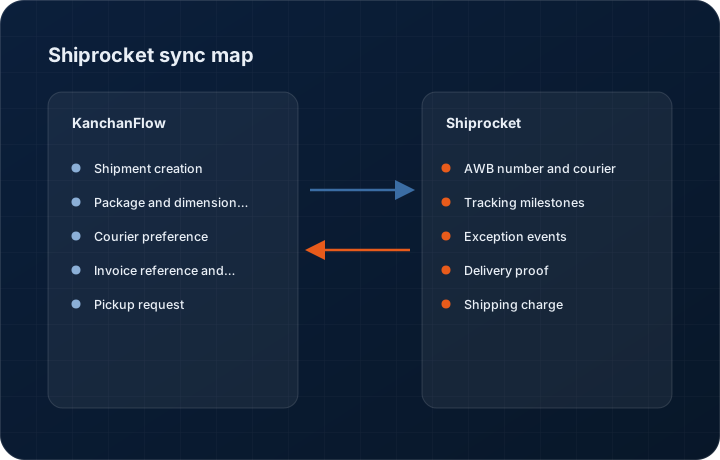
These are the actual fields that move. Anything not on these two tables does not sync, and we would rather write that down than let you assume it does.
KanchanFlow → Shiprocket
What we write out when a record moves forward.
| Field | What we send |
|---|---|
| Shipment creation | Planned: consignee name, address, phone and pin code from the order's ship-to, together with package count, dimensions and declared value, submitted to create a shipment. |
| Package and dimension detail | Planned: box dimensions and weight per package from the packing list, which is what drives courier selection and rate. |
| Courier preference | Planned: your preferred courier or Shiprocket's recommendation, selectable per shipment and defaultable per customer. |
| Invoice reference and e-way bill | Planned: invoice number and e-way bill number where one exists, so the paperwork travelling with the consignment matches the order. |
| Pickup request | Planned: pickup scheduling against your registered pickup location, so a dispatch does not need a separate portal visit. |
Shiprocket → KanchanFlow
What comes back onto the customer, quote or order record.
| Field | What we read |
|---|---|
| AWB number and courier | Planned: the assigned AWB and the courier that took the consignment, written to the order. |
| Tracking milestones | Planned: picked up, in transit, out for delivery, delivered, with timestamps on the customer timeline. |
| Exception events | Planned: undelivered attempts, address issues and RTO initiation, which are the events that actually need a salesperson to act. |
| Delivery proof | Planned: the delivery confirmation and, where the courier supplies it, the proof of delivery document attached to the order. |
| Shipping charge | Planned: the freight cost charged, so landed cost against an order can be compared to what was quoted. |
Sync cadence. Planned: real time by webhook for tracking events, with a 30-minute reconciliation poll. Every record also carries a Sync now control, and the last successful sync time is shown on the record so nobody works from a number of unknown age.
Figures
What this looks like in the product
We do not ship stock imagery or mocked-up screens. These three figures describe the exact shots a designer must capture from a live workspace, each carrying a visible date stamp and recaptured at every quarterly re-test.
Capture date required. Cannot be captured until the connector is live. Placeholder only; capture with a date stamp at release and do not publish a mockup before then.
Capture date required. Capture at release from a real shipment, with the consignee address masked in the product. Date stamp required.
Capture date required. Capture at release with genuine exceptions present. Date stamp required.
10 steps
Setting it up
Written for the person who will actually do it, in the order they will do it. Nothing here assumes you have done this before.
- 1Planned: create or identify your Shiprocket account and complete KYC and pickup location registration.
- 2Planned: generate API credentials in the Shiprocket dashboard under API settings.
- 3Planned: in KanchanFlow, open Settings, Integrations, Shiprocket and enter the credentials.
- 4Planned: map your pickup locations to the CRM plants that dispatch from them.
- 5Planned: set default package dimensions per product line so a dispatcher is not measuring every box.
- 6Planned: configure courier preference rules by destination pin code and weight band.
- 7Planned: map order statuses so that only genuinely dispatched orders create shipments.
- 8Planned: set up the webhook endpoint for tracking events from the connector page.
- 9Planned: define who may create and cancel shipments; this spends money and should not be open to everyone.
- 10Planned: run a test shipment to a colleague's address and follow it through to delivery before using it for a customer order.
Honest ceilings
What this integration cannot do
Every connector has limits. You will find these in week three whether or not we write them down, so we write them down.
- This connector is not available yet. The target is Wave 1 Month 4, and until it ships nothing on this page can be used. We publish it now so you can plan, not so you can buy something that does not exist.
- Planned: Shiprocket serves shipments originating in India. It will not handle a USA-origin dispatch, and we will not imply otherwise.
- Planned: courier serviceability, rates and delivery estimates all come from Shiprocket. When a pin code is not serviceable, we will report that rather than suggest an alternative we cannot guarantee.
- Planned: freight cost reconciliation will be at shipment level only. We will not reconcile Shiprocket's weight discrepancy charges, which are a common and unwelcome surprise on this platform.
- Planned: no international shipping support in the first release, even where Shiprocket offers it.
- Planned: shipment cancellation after pickup will not be possible from the CRM, because it is not reliably possible in the underlying platform either.
From the quarterly re-test
Errors you will actually hit
Each of these was reproduced deliberately during testing. The wording is the error as the system reports it, not a paraphrase.
| Error | Likely cause | Fix |
|---|---|---|
| Planned: Shipment creation fails with pickup location not registered | The pickup location referenced on the plant is not registered and verified in Shiprocket. | Register and verify the pickup location in the Shiprocket dashboard, then re-map it to the plant in connector settings. |
| Planned: Pin code not serviceable | No courier on your Shiprocket account serves that destination for the selected weight band. | Check serviceability in Shiprocket, and consider a different courier partner. We report the platform's answer; we cannot create serviceability that does not exist. |
| Planned: AWB assigned but no tracking events arrive | The webhook endpoint is not configured, or the courier is slow to scan the first event. | Confirm the webhook in the Shiprocket dashboard. The reconciliation poll will pick up events within thirty minutes regardless. |
| Planned: Weight discrepancy charge appears after delivery | The courier's measured weight exceeded the declared weight. | This is settled between you and Shiprocket. We show the shipping charge we were told at creation and flag when a later charge differs, but we do not dispute it for you. |
| Planned: Shipment created against the wrong address | The order's ship-to was edited after dispatch was raised. | Cancel before pickup if you still can, and re-create. After pickup, the courier's redirection process is the only route. |
Questions people ask about the Shiprocket integration
The target is Wave 1 Month 4. The status badge on this page says Building and will change to Live only when it is in production. We do not move badges early.
Related integrations
Delhivery
Direct Delhivery waybills and tracking for shops shipping heavy or palletised freight in India. In development, target Wave 1 Month 4.
Read moreFedEx
Label creation, rating and tracking for USA domestic and export shipments. In development, targeted at Wave 2 Q2 2027.
Read moreShopify
Pull direct and B2B Shopify orders into the same pipeline as your RFQs, so catalogue sales and custom work share one customer record.
Read moreKeeping this page true
This connector was last tested end to end on 2026-08-27 against a live sandbox: fresh authorisation, an outbound write, an inbound read checked field by field, and the failure paths above triggered deliberately. It is re-tested every quarter and the date on this page changes when it is. Read how we test integrations, or see what is shipping today.
See a live quote draft built from a real RFQ
Fourteen days, no credit card, sample data pre-loaded. If it does not fit your shop, we will tell you in the first call.
- Delaware LLC
- SOC 2 Type II
- USA Data Centers (AWS)