Delhivery for Manufacturing
Direct Delhivery waybills and tracking for shops shipping heavy or palletised freight in India. In development, target Wave 1 Month 4.
In short
KanchanFlow, the RFQ-to-Order CRM, is building a direct Delhivery connector for waybill creation and freight tracking, aimed at shops moving heavy or palletised consignments rather than parcels. It is in development with a Wave 1 Month 4 target and cannot be used in production today.
Who this is for. This connector is for USA manufacturers with India operations, India-based contract customers, or manufacturers exporting to India. Delhivery carries shipments originating in India.
Manufacturing freight is not e-commerce parcels. A consignment is heavy, sometimes palletised, occasionally on a dedicated vehicle, and the questions that matter are whether it was picked up, where it is now, and whether the delivery paperwork came back signed. Aggregator tooling built for parcels handles that badly.
The Delhivery connector goes direct rather than through an aggregator, which gives better handling of B2B and heavy consignments. Waybills are created from the dispatched order, tracking scans land on the customer timeline, and the proof of delivery attaches to the order. This is in development and the page will keep saying so until it ships.
- Status
- Building · Wave 1 · M4
- Category
- Logistics
- Plan availability
- Professional and Enterprise (planned)
- Sync cadence
- Planned: real time by webhook for scan events, with a 30-minute reconciliation poll
Field by field
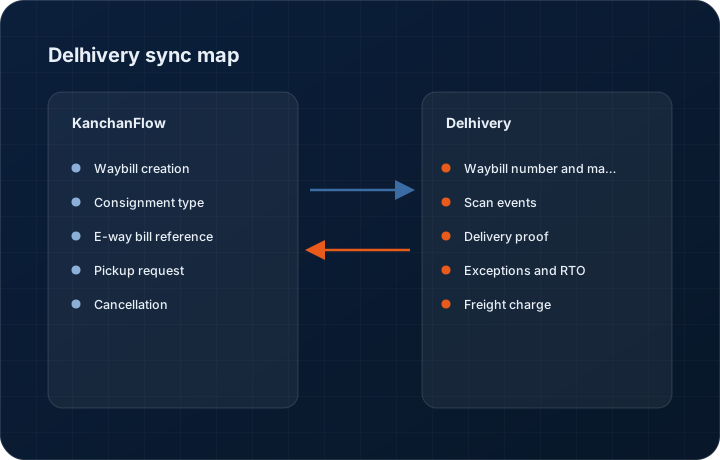
What syncs, in both directions
These are the actual fields that move. Anything not on these two tables does not sync, and we would rather write that down than let you assume it does.
KanchanFlow → Delhivery
What we write out when a record moves forward.
| Field | What we send |
|---|---|
| Waybill creation | Planned: consignee details, pickup location, package count, actual and volumetric weight, declared value and payment mode, submitted to generate a waybill. |
| Consignment type | Planned: parcel, heavy or part-truckload selection, which is the distinction that makes a direct integration worth having over an aggregator. |
| E-way bill reference | Planned: the e-way bill number generated through the ClearTax connector, attached to the consignment so documentation travels together. |
| Pickup request | Planned: pickup scheduling against a registered warehouse location with a requested time window. |
| Cancellation | Planned: waybill cancellation before manifest, from the order record, restricted to users holding the dispatch role. |
Delhivery → KanchanFlow
What comes back onto the customer, quote or order record.
| Field | What we read |
|---|---|
| Waybill number and manifest status | Planned: the assigned waybill and whether it has been manifested, on the order record. |
| Scan events | Planned: every scan from pickup through to delivery, with location and timestamp, on the customer timeline. |
| Delivery proof | Planned: the signed proof of delivery document attached to the order, which for B2B freight is often what a customer's accounts department wants before paying. |
| Exceptions and RTO | Planned: failed delivery attempts, address exceptions and return-to-origin events surfaced as tasks rather than buried in a portal. |
| Freight charge | Planned: the charged freight amount, for landed cost comparison against what was quoted. |
Sync cadence. Planned: real time by webhook for scan events, with a 30-minute reconciliation poll. Every record also carries a Sync now control, and the last successful sync time is shown on the record so nobody works from a number of unknown age.
Figures
What this looks like in the product
We do not ship stock imagery or mocked-up screens. These three figures describe the exact shots a designer must capture from a live workspace, each carrying a visible date stamp and recaptured at every quarterly re-test.
Capture date required. Cannot be captured until release. Do not publish a mockup; capture at release with a date stamp.
Capture date required. Capture at release from a genuine consignment. Date stamp required; mask consignee details.
Capture date required. Capture at release with the signature and consignee name masked in the product. Date stamp required.
10 steps
Setting it up
Written for the person who will actually do it, in the order they will do it. Nothing here assumes you have done this before.
- 1Planned: obtain a Delhivery B2B or express account and complete onboarding, including registered warehouse locations.
- 2Planned: request API credentials from your Delhivery account manager. Direct API access is not self-service.
- 3Planned: in KanchanFlow, open Settings, Integrations, Delhivery and enter the credentials and client warehouse names exactly as registered.
- 4Planned: map warehouses to the CRM plants that dispatch from them. Warehouse names must match Delhivery's records character for character.
- 5Planned: configure consignment type defaults per product line, so heavy fabrications do not default to parcel handling.
- 6Planned: set volumetric weight rules matching your Delhivery contract, because the divisor differs by agreement.
- 7Planned: connect the ClearTax e-way bill reference if you generate e-way bills, so documentation is attached at creation.
- 8Planned: configure the webhook for scan events from the connector page.
- 9Planned: restrict waybill creation and cancellation to the dispatch role.
- 10Planned: run one test consignment to a known address and follow it to delivery, including retrieving the proof of delivery, before live use.
Honest ceilings
What this integration cannot do
Every connector has limits. You will find these in week three whether or not we write them down, so we write them down.
- This connector is not available yet. Target is Wave 1 Month 4. Nothing here can be used today and we publish it so you can plan rather than so you can buy.
- Planned: Delhivery direct API access is granted by Delhivery, not by us. If your account does not have it, the connector cannot work and that is a commercial conversation with them.
- Planned: warehouse names must match Delhivery's registration exactly. This is the single most common cause of failed waybill creation on this platform and no amount of connector logic removes it.
- Planned: rate calculation will not be included in the first release. We create waybills and track; we do not quote freight.
- Planned: part-truckload and full-truckload consignments will be supported for tracking, but pickup scheduling for dedicated vehicles will still be arranged with Delhivery directly.
- Planned: no international shipping in the first release.
From the quarterly re-test
Errors you will actually hit
Each of these was reproduced deliberately during testing. The wording is the error as the system reports it, not a paraphrase.
| Error | Likely cause | Fix |
|---|---|---|
| Planned: Waybill creation fails with client warehouse not found | The warehouse name does not match Delhivery's registered name exactly, including case and spacing. | Copy the warehouse name verbatim from the Delhivery panel into the connector mapping. Do not retype it. |
| Planned: Volumetric weight rejected | The volumetric divisor configured does not match your Delhivery contract. | Confirm the divisor with your account manager and set it in connector settings. It differs between express and B2B agreements. |
| Planned: No scan events after pickup | The consignment was manifested but not yet scanned at a hub, or the webhook is unconfigured. | Check the webhook first. Genuine first-scan delays of several hours are normal for B2B freight and are not a fault. |
| Planned: Proof of delivery missing after delivery | Delhivery uploads proof of delivery on its own schedule, sometimes a day after the delivery scan. | The connector retries for seventy-two hours. After that, request it from Delhivery directly. |
| Planned: Consignment defaulted to parcel handling | No consignment type rule matched the product line on the order. | Set the consignment type default for that product line. Heavy fabrication moving as a parcel is expensive and slow. |
Questions people ask about the Delhivery integration
Shiprocket aggregates couriers and suits parcels. Delhivery direct handles heavy and palletised B2B freight far better, which is what most manufacturers actually ship.
Related integrations
Shiprocket
Create a Shiprocket shipment from a dispatched order and push tracking onto the customer record. In development, target Wave 1 Month 4.
Read moreFedEx
Label creation, rating and tracking for USA domestic and export shipments. In development, targeted at Wave 2 Q2 2027.
Read moreClearTax GSP (e-Invoice IRN)
Register an invoice with the government e-invoice portal through ClearTax and get the IRN, signed QR and acknowledgement on the order.
Read moreKeeping this page true
This connector was last tested end to end on 2026-08-27 against a live sandbox: fresh authorisation, an outbound write, an inbound read checked field by field, and the failure paths above triggered deliberately. It is re-tested every quarter and the date on this page changes when it is. Read how we test integrations, or see what is shipping today.
See a live quote draft built from a real RFQ
Fourteen days, no credit card, sample data pre-loaded. If it does not fit your shop, we will tell you in the first call.
- Delaware LLC
- SOC 2 Type II
- USA Data Centers (AWS)