ClearTax GSP (e-Invoice IRN) for Manufacturing
Register an invoice with the government e-invoice portal through ClearTax and get the IRN, signed QR and acknowledgement on the order.
In short
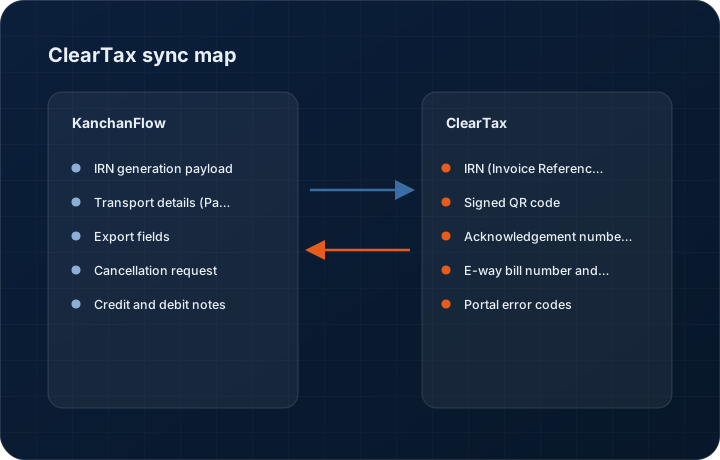
KanchanFlow, the RFQ-to-Order CRM, uses ClearTax as its GST Suvidha Provider to register invoices with the government e-invoice portal and return the IRN, the signed QR code and the acknowledgement number onto the order record. The feature is included on every tier, because a legal filing requirement is not something we will gate behind a plan.
Who this is for. This connector is for USA manufacturers with India operations, India-based contract customers, or manufacturers exporting to India. If your India entity raises GST invoices above the e-invoicing threshold, this is a compliance requirement, not an optional convenience.
India's e-invoicing mandate means an invoice above the turnover threshold is not legally valid until the Invoice Registration Portal has issued an IRN for it. That is a filing step, not a sales step, but it lands on whoever raised the invoice, and in a small shop that is often the same person who quoted the job.
This connector puts the step where the invoice already is. When an order is invoiced, KanchanFlow builds the IRN payload from the fields the quote already carries, sends it through ClearTax as GSP, and writes the IRN, acknowledgement number, acknowledgement date and signed QR back onto the record so the printed invoice carries the QR the portal issued.
- Status
- Live in production
- Category
- Compliance
- Plan availability
- All tiers — India GST, IRN and 43B(h) features are never gated by plan
- Sync cadence
- On demand at invoice registration; status polling every 15 minutes until the portal responds
Field by field
What syncs, in both directions
These are the actual fields that move. Anything not on these two tables does not sync, and we would rather write that down than let you assume it does.
KanchanFlow → ClearTax GSP (e-Invoice IRN)
What we write out when a record moves forward.
| Field | What we send |
|---|---|
| IRN generation payload | Seller GSTIN, buyer GSTIN, document type, document number and date, and every line with HSN, quantity, unit, rate, taxable value and tax split, assembled to the current e-invoice schema. |
| Transport details (Part A) | Where an e-way bill is needed, distance, transporter ID and vehicle number are submitted alongside so Part A can be generated with the IRN in one call. |
| Export fields | Shipping bill number, port code, country code and the with-payment or without-payment-of-tax flag are submitted for export invoices, including LUT-backed zero-rated supplies. |
| Cancellation request | A cancellation with its reason code can be submitted within the 24-hour portal window directly from the order record. |
| Credit and debit notes | Notes raised against a registered invoice are submitted with the original IRN referenced, so the portal links them to the right document. |
ClearTax GSP (e-Invoice IRN) → KanchanFlow
What comes back onto the customer, quote or order record.
| Field | What we read |
|---|---|
| IRN (Invoice Reference Number) | The 64-character hash returned by the portal, stored on the order and printed on the invoice. |
| Signed QR code | The base64 signed QR returned by the IRP, rendered onto the invoice PDF at the size the mandate requires. |
| Acknowledgement number and date | The Ack No and Ack Date, which are what an officer asks for in an assessment. |
| E-way bill number and validity | Where an e-way bill was generated in the same call, its number and validity date come back onto the shipment record. |
| Portal error codes | The raw IRP error code and message, shown verbatim rather than translated, because the code is what a chartered accountant will ask you to read out. |
Sync cadence. On demand at invoice registration; status polling every 15 minutes until the portal responds. Every record also carries a Sync now control, and the last successful sync time is shown on the record so nobody works from a number of unknown age.
Figures
What this looks like in the product
We do not ship stock imagery or mocked-up screens. These three figures describe the exact shots a designer must capture from a live workspace, each carrying a visible date stamp and recaptured at every quarterly re-test.
Capture date required. Capture a record that genuinely fails one validation so the reader sees what a block looks like. Date stamp required.
Capture date required. Capture from a sandbox IRP so no live IRN is published. Date stamp required and the sandbox banner must remain visible.
Capture date required. Capture the generated PDF, not a design mockup. Date stamp required; recapture each quarterly re-test.
12 steps
Setting it up
Written for the person who will actually do it, in the order they will do it. Nothing here assumes you have done this before.
- 1Confirm your India entity is actually within the e-invoicing mandate for the current financial year. If you are below the threshold, do not enable this connector.
- 2Obtain a ClearTax GSP account for your GSTIN. KanchanFlow does not resell ClearTax; you hold the commercial relationship with them.
- 3In the ClearTax dashboard, create API credentials and note the client ID, client secret and the GSTIN they are scoped to.
- 4On the government e-invoice portal, create an API user for your GSTIN and select ClearTax as the GSP. This is a separate step from the ClearTax account and is the one most shops miss.
- 5In KanchanFlow, open Settings, Integrations, ClearTax and enter the client ID, client secret, portal API username and password.
- 6Select Sandbox first. The connector defaults to sandbox and will not let you switch to production until a sandbox registration has succeeded.
- 7Map your document types. Regular invoices, credit notes, debit notes and export invoices each carry a different document type code and must be confirmed.
- 8Configure the invoice template to place the signed QR code and IRN. The PDF template will not render either until you do this.
- 9Run a sandbox registration on a real invoice's data. Read the returned IRN and QR to confirm the payload is what you expect.
- 10Have your chartered accountant review the sandbox payload before you switch to production. This is a legal filing; a second pair of eyes is cheap.
- 11Switch to production, register one live invoice, and verify it on the e-invoice portal's own search page.
- 12Enable the 24-hour cancellation control for the users who should have it, and nobody else.
Honest ceilings
What this integration cannot do
Every connector has limits. You will find these in week three whether or not we write them down, so we write them down.
- The portal allows cancellation of an IRN within 24 hours only. After that window the only remedy is a credit note, and no integration can change that.
- The IRP is a government service with its own maintenance windows and occasional multi-hour outages. When it is down, nothing we do makes an invoice register, and we will show you the portal's own error rather than pretending to retry forever.
- We register invoices. We do not file GSTR-1, GSTR-3B or any return, and we do not reconcile GSTR-2B. That remains your accountant's work in Tally, Zoho Books or ClearTax's own filing product.
- ClearTax is the only GSP we support. If your entity is contracted to a different GSP, this connector is not usable and we have no workaround to offer.
- Schema changes are mandated by the government with short notice. When the schema version changes we ship an update, but there can be a gap of a few days between the mandate date and our release, during which registrations using new fields will fail.
- The e-way bill call is best-effort. Where distance validation or vehicle number format fails at the portal, the IRN still generates but the e-way bill does not, and you will have to complete it on the portal manually.
From the quarterly re-test
Errors you will actually hit
Each of these was reproduced deliberately during testing. The wording is the error as the system reports it, not a paraphrase.
| Error | Likely cause | Fix |
|---|---|---|
| Error 2150: Duplicate IRN | The same document number and financial year was already registered, usually because a first attempt succeeded but the response was lost. | Use Fetch IRN by document number in the compliance panel. If the portal returns an existing IRN, we attach it to the order rather than re-registering. |
| Error 2172: Invalid HSN code | A line carries an HSN that is not in the portal's master, or is too short for the turnover band that applies to your entity. | Correct the HSN on the item master, not on the single quote line, then re-run registration. Six or eight digits are required depending on turnover. |
| Error 2176: Recipient GSTIN is inactive or cancelled | Your customer's GSTIN has been suspended or cancelled since you took the order. | Validate the GSTIN with the Karza connector, contact the customer, and do not register the invoice against a cancelled GSTIN. This is a commercial problem before it is a technical one. |
| Error 2189: Invalid place of supply for the tax type charged | The invoice charges CGST and SGST while the place of supply is a different state, or the reverse. | Fix the ship-to state on the order, regenerate the invoice, and register again. Do not edit the tax lines directly to force the payload through validation. |
| Authentication failed at the GSP with no further detail | The portal API user password was changed or expired, or the API user was never linked to ClearTax as GSP. | Reset the API user password on the e-invoice portal, confirm ClearTax is selected as the GSP for that GSTIN, and re-enter the credentials in the connector. |
Questions people ask about the ClearTax GSP (e-Invoice IRN) integration
No. GST, GSTIN validation, HSN handling, e-invoice IRN and the 43B(h) tracker are on every tier including Starter. Charging more for a legal filing requirement would be indefensible.
Related integrations
Karza (KYC + GSTIN validation)
Validate a customer's GSTIN, PAN and corporate identity against the source registries before you quote, not after they default.
Read moreTally & TallyPrime
Push accepted quotes into TallyPrime as sales orders and pull payment status back, without anyone re-keying a voucher.
Read moreAadhaar eSign
Get a legally valid electronic signature on a quote acceptance or supply agreement in minutes, using India's OTP-based eSign service.
Read moreKeeping this page true
This connector was last tested end to end on 2026-08-27 against a live sandbox: fresh authorisation, an outbound write, an inbound read checked field by field, and the failure paths above triggered deliberately. It is re-tested every quarter and the date on this page changes when it is. Read how we test integrations, or see what is shipping today.
See a live quote draft built from a real RFQ
Fourteen days, no credit card, sample data pre-loaded. If it does not fit your shop, we will tell you in the first call.
- Delaware LLC
- SOC 2 Type II
- USA Data Centers (AWS)