Karza (KYC + GSTIN validation) for Manufacturing
Validate a customer's GSTIN, PAN and corporate identity against the source registries before you quote, not after they default.
In short
KanchanFlow, the RFQ-to-Order CRM, uses Karza to validate a customer's GSTIN, PAN, CIN and bank account against the source registries at the moment of onboarding. It also returns GST filing regularity and MSME classification, which is what makes the Section 43B(h) payment tracker usable rather than guesswork.
Who this is for. This connector is for USA manufacturers with India operations, India-based contract customers, or manufacturers exporting to India. If none of your counterparties hold an Indian GSTIN, you do not need it.
A wrong GSTIN is not a data-quality irritation. It fails e-invoice registration, it books tax to the wrong state, and it can leave you unable to claim input credit on a job you have already shipped. Most shops discover the problem at invoicing, which is the worst possible moment.
This connector moves the check to onboarding. Type a GSTIN into a new customer record and we call Karza, return the registered legal name, trade name, principal place of business, registration date and current status, and refuse to save a cancelled GSTIN silently. The same call tells us whether the counterparty is a registered micro or small enterprise, which drives the 43B(h) payment clock.
- Status
- Live in production
- Category
- Compliance
- Plan availability
- All tiers — India GST and compliance features are never gated by plan
- Sync cadence
- Real time on entry; full re-validation of active customers every 90 days
Field by field
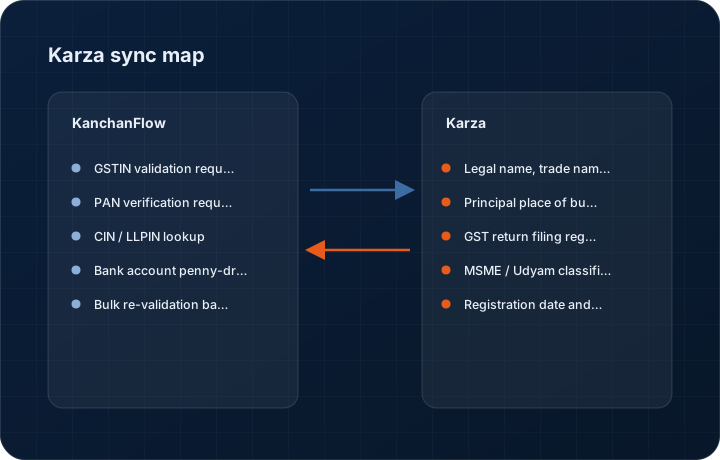
What syncs, in both directions
These are the actual fields that move. Anything not on these two tables does not sync, and we would rather write that down than let you assume it does.
KanchanFlow → Karza (KYC + GSTIN validation)
What we write out when a record moves forward.
| Field | What we send |
|---|---|
| GSTIN validation request | The GSTIN typed on a customer or plant record is submitted for verification the moment the field loses focus, before the record can be saved as active. |
| PAN verification request | PAN is verified against the income tax registry for name match, which is what catches a customer who has given you a group entity's PAN by mistake. |
| CIN / LLPIN lookup | Company identification numbers are submitted to return directors, incorporation date and company status, used on Enterprise workspaces for counterparty due diligence. |
| Bank account penny-drop | Account number and IFSC are submitted for a name-match verification before a customer refund or a dealer payout is set up. |
| Bulk re-validation batch | The full active customer list is resubmitted quarterly so a GSTIN that was cancelled after onboarding is caught before the next invoice. |
Karza (KYC + GSTIN validation) → KanchanFlow
What comes back onto the customer, quote or order record.
| Field | What we read |
|---|---|
| Legal name, trade name and status | The registered legal name, trade name and whether the GSTIN is Active, Suspended or Cancelled, written to the customer record and shown as a badge. |
| Principal place of business and state code | The registered address and state code, which we use to drive the place-of-supply tax logic rather than relying on typed addresses. |
| GST return filing regularity | Which of the last several GSTR-1 and GSTR-3B periods were filed, surfaced as a simple regular or irregular filer signal on the credit panel. |
| MSME / Udyam classification | Whether the counterparty is registered as a micro, small or medium enterprise, which sets the Section 43B(h) payment window on any payable to them. |
| Registration date and constitution of business | Used on the customer 360 header so a salesperson can see they are dealing with a six-month-old proprietorship rather than a thirty-year-old private limited company. |
Sync cadence. Real time on entry; full re-validation of active customers every 90 days. Every record also carries a Sync now control, and the last successful sync time is shown on the record so nobody works from a number of unknown age.
Figures
What this looks like in the product
We do not ship stock imagery or mocked-up screens. These three figures describe the exact shots a designer must capture from a live workspace, each carrying a visible date stamp and recaptured at every quarterly re-test.
Capture date required. Capture live with a genuine public-sector GSTIN so no private customer data is shown. Date stamp required.
Capture date required. Capture from a sandbox with a deliberately cancelled test GSTIN. Date stamp required.
Capture date required. Capture with real day counts, not zeros. Date stamp required; recapture each quarterly re-test.
11 steps
Setting it up
Written for the person who will actually do it, in the order they will do it. Nothing here assumes you have done this before.
- 1Obtain a Karza account and API credentials for your India entity. As with ClearTax, you hold this relationship directly and we do not resell it.
- 2In the Karza dashboard, enable the specific products you intend to use: GSTIN verification, PAN verification, and optionally CIN lookup and bank penny-drop.
- 3Note your Karza API key and the environment base URL. Sandbox and production keys are different and are not interchangeable.
- 4In KanchanFlow, open Settings, Integrations, Karza and paste the key. Start in sandbox.
- 5Choose which checks run automatically on customer creation. GSTIN is on by default; PAN, CIN and bank verification are off because each one costs a call.
- 6Set the enforcement level. Warn shows a banner and allows the save; Block prevents activating a customer with a cancelled or invalid GSTIN. Most shops start on Warn and move to Block after a month.
- 7Turn on MSME classification capture if you have India payables, because this is what feeds the Section 43B(h) tracker.
- 8Set the quarterly re-validation window to run outside business hours. It consumes one call per active customer.
- 9Run a sandbox validation on five real customer GSTINs and compare the returned legal names against your own records. Expect to find at least one mismatch.
- 10Switch to production and re-run the same five to confirm the production key is live.
- 11Brief your sales team on what a Suspended badge means before they see one on a live account, so the first conversation with the customer is an informed one.
Honest ceilings
What this integration cannot do
Every connector has limits. You will find these in week three whether or not we write them down, so we write them down.
- Karza is a paid per-call service that you buy directly. High-volume validation costs money, and our quarterly re-validation of every active customer is the single largest consumer of calls. You can narrow its scope, but you cannot make it free.
- GST filing regularity data lags the portal by a variable period, typically a few days. It is a credit signal, not a real-time statement of a counterparty's compliance.
- Udyam MSME classification is only returned where the counterparty has actually registered on the Udyam portal. An unregistered micro enterprise is invisible to this check, so the 43B(h) tracker cannot be complete on its own.
- Bank penny-drop performs a name match, which returns a similarity result rather than a yes or no. A near-match still needs a human decision and we will not decide it for you.
- We validate. We do not remediate. If a GSTIN is cancelled, the connector tells you and stops; renegotiating with that customer is not something software does.
- No Karza call is made for non-Indian counterparties, so a USA-only workspace gets no value from this connector at all and should leave it switched off.
From the quarterly re-test
Errors you will actually hit
Each of these was reproduced deliberately during testing. The wording is the error as the system reports it, not a paraphrase.
| Error | Likely cause | Fix |
|---|---|---|
| Validation returns Invalid GSTIN format before any call is made | The GSTIN failed our local checksum validation, so we did not spend a paid API call on it. | Check the entry for the common transpositions between the letter O and the digit zero, and between the letter I and the digit one, in positions three to seven. |
| Karza returns Source unavailable | The upstream GST registry is down or throttling. Karza passes this through rather than caching a stale answer. | The record saves as Validation pending and we retry automatically on a backoff. Do not force-approve the customer to clear the badge. |
| Legal name from Karza does not match the customer name in the CRM | You are dealing with a trade name or a divisional name rather than the registered legal entity. | Keep the trade name as the display name and store the registered legal name in the legal name field. Invoices and e-invoice payloads must use the legal name. |
| Quarterly re-validation consumed far more calls than expected | The batch ran against all customers including inactive and archived ones. | Set the re-validation scope to customers with activity in the last twelve months in connector settings, then check the call estimate the connector shows before the next run. |
| MSME classification is blank for a supplier you know is small | The counterparty has not registered on the Udyam portal, so there is no record to return. | Record the classification manually on the counterparty record with a note of the evidence you hold. The 43B(h) tracker will use the manual value and mark it as self-declared. |
Questions people ask about the Karza (KYC + GSTIN validation) integration
No. GSTIN validation, GST, IRN and the 43B(h) tracker are available on every tier including Starter. What varies by tier is the advanced 43B(h) exposure calculator, which is an Enterprise capability.
Related integrations
ClearTax GSP (e-Invoice IRN)
Register an invoice with the government e-invoice portal through ClearTax and get the IRN, signed QR and acknowledgement on the order.
Read moreTally & TallyPrime
Push accepted quotes into TallyPrime as sales orders and pull payment status back, without anyone re-keying a voucher.
Read moreAadhaar eSign
Get a legally valid electronic signature on a quote acceptance or supply agreement in minutes, using India's OTP-based eSign service.
Read moreKeeping this page true
This connector was last tested end to end on 2026-08-27 against a live sandbox: fresh authorisation, an outbound write, an inbound read checked field by field, and the failure paths above triggered deliberately. It is re-tested every quarter and the date on this page changes when it is. Read how we test integrations, or see what is shipping today.
See a live quote draft built from a real RFQ
Fourteen days, no credit card, sample data pre-loaded. If it does not fit your shop, we will tell you in the first call.
- Delaware LLC
- SOC 2 Type II
- USA Data Centers (AWS)