Tally & TallyPrime for Manufacturing
Push accepted quotes into TallyPrime as sales orders and pull payment status back, without anyone re-keying a voucher.
In short
KanchanFlow, the RFQ-to-Order CRM, connects to Tally and TallyPrime over the local ODBC and XML gateway so an accepted quote becomes a Tally sales order with its GSTIN, HSN and line-level tax intact. Payment and outstanding balance flow back every fifteen minutes, so estimators can see who has paid before they quote again.
Who this is for. This connector is for USA manufacturers with India operations, India-based contract customers, or manufacturers exporting to India. Tally is the books of record for the India entity; KanchanFlow is the quoting layer that feeds it.
Most shops we talk to keep Tally on one machine in the accounts room and the quoting process everywhere else. The result is a re-keying step: an estimator wins a job, prints the quote, walks it over, and someone types the same twelve line items into a Tally sales order two days later. That gap is where wrong HSN codes and stale customer masters come from.
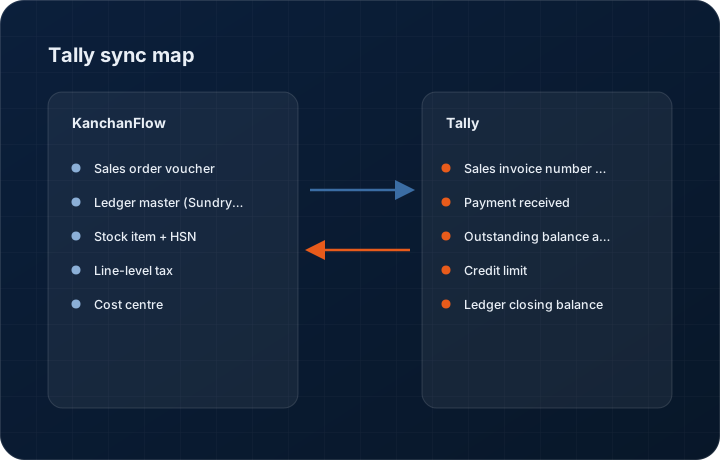
This connector closes that gap in one direction and opens a window in the other. KanchanFlow writes the accepted quote into Tally as a sales order voucher, matched to the existing ledger by GSTIN rather than by name. Tally sends back the invoice number, the payment received against it, and the outstanding balance, so the CRM record shows what the accounts room already knows.
- Status
- Live in production
- Category
- Accounting
- Plan availability
- All tiers — Starter selects one accounting connector; Professional and Enterprise include all three
- Sync cadence
- Every 15 minutes, or on demand from the record via Sync now
Field by field
What syncs, in both directions
These are the actual fields that move. Anything not on these two tables does not sync, and we would rather write that down than let you assume it does.
KanchanFlow → Tally & TallyPrime
What we write out when a record moves forward.
| Field | What we send |
|---|---|
| Sales order voucher | Accepted quote becomes a Sales Order voucher with the quote number in the Reference field and the KanchanFlow quote ID in a UDF, so the two records stay traceable in both systems. |
| Ledger master (Sundry Debtors) | New customers are created under Sundry Debtors with GSTIN, state code, PAN and the registered billing address. Existing ledgers are matched on GSTIN first, PAN second, and never on name alone. |
| Stock item + HSN | Each quote line maps to a Tally stock item by part number. If the item does not exist we create it with the HSN/SAC code, unit of measure and GST rate from the quote line. |
| Line-level tax | CGST/SGST for intra-state and IGST for inter-state are computed from the place-of-supply state code on the quote, not copied from a default, so a Maharashtra-to-Gujarat order books as IGST. |
| Cost centre | The territory on the quote maps to a Tally cost centre, so revenue lands in the right regional bucket without an accountant re-tagging it at month end. |
| Narration | Quote revision number, estimator name and the RFQ source are written into the voucher narration for anyone auditing where a number came from. |
Tally & TallyPrime → KanchanFlow
What comes back onto the customer, quote or order record.
| Field | What we read |
|---|---|
| Sales invoice number and date | When accounts converts the sales order to an invoice, the invoice number and date appear on the KanchanFlow order record within one sync cycle. |
| Payment received | Receipt vouchers allocated against the invoice reduce the outstanding amount shown on the customer 360 and on the order timeline. |
| Outstanding balance and ageing bucket | Total outstanding and the 0-30 / 31-60 / 61-90 / 90+ ageing bucket per ledger, so an estimator can see a customer is 74 days overdue before quoting them again. |
| Credit limit | The credit limit set on the Tally ledger is read into the CRM and shown as a warning band on new quotes for that account. |
| Ledger closing balance | Read once per day for the customer 360 header. This is a display value, not an accounting source of truth. |
Sync cadence. Every 15 minutes, or on demand from the record via Sync now. Every record also carries a Sync now control, and the last successful sync time is shown on the record so nobody works from a number of unknown age.
Figures
What this looks like in the product
We do not ship stock imagery or mocked-up screens. These three figures describe the exact shots a designer must capture from a live workspace, each carrying a visible date stamp and recaptured at every quarterly re-test.
Capture date required. Capture from a live workspace with a real matched ledger. The screenshot must carry a visible date stamp in the corner and be recaptured at each quarterly re-test.
Capture date required. Capture in TallyPrime 4.x on Windows. Date stamp required; blur the company name in the title bar.
Capture date required. Capture with a customer that genuinely has an ageing balance, not a zeroed sample record. Date stamp required.
12 steps
Setting it up
Written for the person who will actually do it, in the order they will do it. Nothing here assumes you have done this before.
- 1In TallyPrime, open the company you want to connect and go to F11 Features and set Use ODBC to Yes. Note the ODBC port, which defaults to 9000.
- 2Still in TallyPrime, enable the XML/HTTP gateway under Configure, Advanced Configuration, and set the Tally interface to act as both Client and Server.
- 3Confirm Tally is reachable from the machine that will run the bridge by opening http://localhost:9000 in a browser. You should see a short XML response, not a blank page.
- 4Download the KanchanFlow Tally Bridge from Settings, Integrations, Tally. It is a small Windows service, roughly 18 MB, that runs on the same machine or the same LAN as Tally.
- 5Install the bridge as a Windows service, not as a foreground application. If it runs as a logged-in user, it stops syncing when that user logs off.
- 6Paste the workspace pairing token from Settings, Integrations, Tally into the bridge configuration and click Pair. The token expires after 30 minutes.
- 7Select the Tally company to bind. One KanchanFlow workspace binds to exactly one Tally company. If you keep multiple companies, run one bridge instance per company on separate ports.
- 8Map your Tally voucher types. By default we write to Sales Order, but shops that use a custom voucher type must select it here before the first push.
- 9Map units of measure. KanchanFlow ships EA, PC, KG, MTR, SET and LOT. Any unit you use in Tally that is not in that list must be mapped or the push will fail on that line.
- 10Run the pre-flight check. It writes a test sales order for 1 unit into Tally, reads it back, and then cancels it. Do this outside working hours the first time.
- 11Turn on Payment write-back if you want ageing and outstanding balances in the CRM. This is read-only against Tally and can be left off.
- 12Push one real accepted quote and open it in Tally before you enable the connector for the whole team.
Honest ceilings
What this integration cannot do
Every connector has limits. You will find these in week three whether or not we write them down, so we write them down.
- TallyPrime 3.0 or later, or Tally.ERP 9 release 6.6.3 or later. Older releases do not expose the sales-order fields we write and will fail the pre-flight check.
- Tally has no cloud API. The bridge must run on a machine that is on the same network as Tally and switched on. If that machine sleeps, the queue holds but nothing syncs until it wakes.
- One workspace to one Tally company. Multi-company groups need one bridge per company and cannot roll up inside the CRM.
- We do not write purchase vouchers, journal entries, stock journals, payroll or any inventory movement. Sales orders and customer masters only.
- We do not push quote attachments, drawings or terms and conditions text into Tally. Those stay in KanchanFlow.
- Payment write-back is a read of allocated receipts. Advances, on-account receipts and unallocated credits will not reduce the outstanding figure we display, so our number can read higher than what accounts believes is owed.
From the quarterly re-test
Errors you will actually hit
Each of these was reproduced deliberately during testing. The wording is the error as the system reports it, not a paraphrase.
| Error | Likely cause | Fix |
|---|---|---|
| Pre-flight fails with Could not reach Tally at port 9000 | Tally is not running, ODBC is off, or Windows Firewall is blocking the port on the bridge machine. | Open Tally, check F11 for ODBC set to Yes, then add an inbound rule for TCP 9000 on the private profile. Test with http://localhost:9000 before retrying. |
| Push rejected: Ledger does not exist | The customer has no GSTIN in KanchanFlow, so we could not match a Sundry Debtors ledger and were not permitted to create one because ledger creation is off. | Add the GSTIN to the customer record, or turn on Create missing ledgers in the connector settings and re-push. Verify the created ledger's state code afterwards. |
| Push rejected: Unit of measure not found | A quote line uses a unit that has no mapping to a Tally simple unit, most often a custom unit like SQFT or COIL. | Create the unit in Tally under Inventory Info, Units of Measure, then add the mapping in the connector's unit table and re-push the quote. |
| Duplicate sales orders appear in Tally | Someone re-pushed a quote after the voucher was manually renumbered in Tally, so our reference lookup no longer matched. | Delete the duplicate voucher in Tally, then use Relink in the connector panel to bind the quote to the surviving voucher number. Do not renumber vouchers we have written. |
| Tax computes as CGST/SGST on an inter-state order | The place-of-supply state code on the quote is blank or matches the company state, usually because the shipping address was typed as free text. | Set the state on the ship-to address in KanchanFlow, cancel the voucher in Tally, and re-push. The state code drives the tax split, not the address text. |
Questions people ask about the Tally & TallyPrime integration
Yes, as long as the bridge runs on that same VPS or on a machine with a private network route to it. We do not expose Tally to the public internet and we will not ask you to.
Related integrations
Zoho Books
Turn an accepted quote into a Zoho Books sales order or invoice, and read payment status back onto the customer record.
Read moreClearTax GSP (e-Invoice IRN)
Register an invoice with the government e-invoice portal through ClearTax and get the IRN, signed QR and acknowledgement on the order.
Read moreKarza (KYC + GSTIN validation)
Validate a customer's GSTIN, PAN and corporate identity against the source registries before you quote, not after they default.
Read moreKeeping this page true
This connector was last tested end to end on 2026-08-27 against a live sandbox: fresh authorisation, an outbound write, an inbound read checked field by field, and the failure paths above triggered deliberately. It is re-tested every quarter and the date on this page changes when it is. Read how we test integrations, or see what is shipping today.
See a live quote draft built from a real RFQ
Fourteen days, no credit card, sample data pre-loaded. If it does not fit your shop, we will tell you in the first call.
- Delaware LLC
- SOC 2 Type II
- USA Data Centers (AWS)