Zoho Books for Manufacturing
Turn an accepted quote into a Zoho Books sales order or invoice, and read payment status back onto the customer record.
In short
KanchanFlow, the RFQ-to-Order CRM, connects to Zoho Books through the official OAuth API so an accepted quote posts as a sales order or invoice with its items, taxes and place of supply intact. Payments, credit notes and outstanding balances come back on a fifteen-minute cycle, which is the fastest write-back of the three accounting connectors we ship.
Who this is for. This connector is for USA manufacturers with India operations, India-based contract customers, or manufacturers exporting to India. It also runs against the US, UK, EU, AU and global Zoho Books editions, but the GST fields described below only appear on the India edition.
Zoho Books is the easiest of our three accounting connectors to live with, because it is the only one with a real cloud API and no bridge software. You authorise once with OAuth, pick an organisation, and the connector runs server to server. Nothing has to stay switched on in your office for the sync to work.
What it does is narrow on purpose. KanchanFlow owns the RFQ, the cost buildup and the revision history. Zoho Books owns the ledger. The connector moves an accepted quote across that line as a sales order or an invoice, and brings back only what a salesperson needs to see: what was billed, what was paid, and what is overdue.
- Status
- Live in production
- Category
- Accounting
- Plan availability
- All tiers — Starter selects one accounting connector; Professional and Enterprise include all three
- Sync cadence
- Every 15 minutes, or on demand from the record via Sync now
Field by field
What syncs, in both directions
These are the actual fields that move. Anything not on these two tables does not sync, and we would rather write that down than let you assume it does.
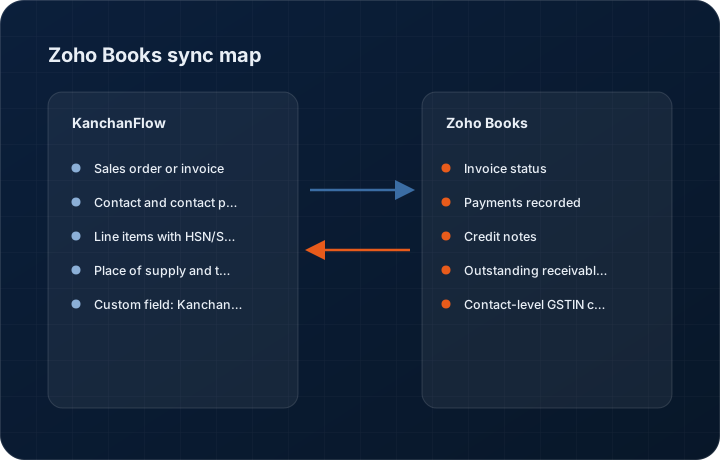
KanchanFlow → Zoho Books
What we write out when a record moves forward.
| Field | What we send |
|---|---|
| Sales order or invoice | You choose per workspace which one an accepted quote creates. Sales order is the default because it leaves accounts in control of when revenue is recognised. |
| Contact and contact person | Customer becomes a Zoho Books Contact matched on GSTIN, then on email domain. The quote's named buyer is written as a Contact Person so statements go to a human, not a generic inbox. |
| Line items with HSN/SAC | Each quote line posts with part number as item code, description, quantity, rate, HSN or SAC code and discount. Items missing from Zoho Books are created if item creation is enabled. |
| Place of supply and tax treatment | Destination state drives the tax treatment field, so intra-state posts CGST plus SGST and inter-state posts IGST. Export orders post with the zero-rated treatment and the LUT reference if one is on file. |
| Custom field: KanchanFlow quote ID | A text custom field carries the quote ID and revision number, which is what makes the record traceable back to the estimate that produced it. |
| Salesperson | The quote owner maps to a Zoho Books salesperson record so commission reporting in Books matches ownership in the CRM. |
Zoho Books → KanchanFlow
What comes back onto the customer, quote or order record.
| Field | What we read |
|---|---|
| Invoice status | Draft, sent, overdue, partially paid or paid, refreshed every cycle and shown as a badge on the order timeline. |
| Payments recorded | Each payment against the invoice, with date, amount and mode, appears on the customer 360 payment strip. |
| Credit notes | Credit notes raised against a synced invoice appear on the order record so a salesperson does not chase money that has been credited back. |
| Outstanding receivable and days overdue | Read per contact and shown as a warning band on any new quote raised for that customer. |
| Contact-level GSTIN corrections | If accounts fixes a wrong GSTIN in Zoho Books, we pull the corrected value back rather than overwriting it on the next push. |
Sync cadence. Every 15 minutes, or on demand from the record via Sync now. Every record also carries a Sync now control, and the last successful sync time is shown on the record so nobody works from a number of unknown age.
Figures
What this looks like in the product
We do not ship stock imagery or mocked-up screens. These three figures describe the exact shots a designer must capture from a live workspace, each carrying a visible date stamp and recaptured at every quarterly re-test.
Capture date required. Capture the real consent screen. Date stamp required; the organisation name in the header may be blurred.
Capture date required. Capture from a live workspace against an inter-state order so the IGST treatment is visible. Date stamp required.
Capture date required. Capture in the India edition of Zoho Books. Date stamp required; recapture at each quarterly re-test.
11 steps
Setting it up
Written for the person who will actually do it, in the order they will do it. Nothing here assumes you have done this before.
- 1In KanchanFlow, open Settings, Integrations, Zoho Books and click Connect. You are sent to Zoho's own consent screen.
- 2Sign in as a Zoho Books user with the Admin role. A Staff-role user can authorise the connection but cannot create the custom field in step six.
- 3Review the requested scopes on the consent screen. We ask for contacts, items, sales orders, invoices, payments and credit notes, and nothing else. Approve.
- 4Choose your Zoho Books organisation. If you run multiple organisations, one KanchanFlow workspace binds to one organisation.
- 5Choose whether an accepted quote posts as a Sales Order or an Invoice. Sales Order is the safer default and is what we recommend for the first month.
- 6Let the connector create its custom field. It adds one text field named KanchanFlow Quote ID to the sales order and invoice modules. Zoho Books allows a limited number of custom fields per module, so if you are at that ceiling you must free one first.
- 7Map your tax rates. The connector reads your Books tax list and asks you to confirm which rate is your default GST rate and which is your zero-rated export rate.
- 8Map units of measure between the CRM and your Books item units. Unmapped units block a push at the line level, not the whole order.
- 9Decide whether missing contacts and items may be created automatically. Most shops turn contact creation on and item creation off, so the item master stays curated by accounts.
- 10Run the pre-flight check. It creates a draft sales order for one item, reads it back, and voids it.
- 11Post one real accepted quote and confirm the totals in Zoho Books match the quote to the cent before enabling the connector for the team.
Honest ceilings
What this integration cannot do
Every connector has limits. You will find these in week three whether or not we write them down, so we write them down.
- Zoho Books API rate limits apply per organisation and are shared with every other app you have connected. A shop running several Zoho apps against one organisation can hit the ceiling and see syncs deferred to the next cycle.
- We post one sales order per accepted quote. We cannot merge several quotes into a single consolidated order, and we cannot split one quote across multiple orders.
- Quote attachments, drawings and terms text do not transfer. Only the fields listed above move.
- Recurring invoices, retainer invoices, purchase orders, bills, expenses and inventory adjustments are out of scope and will stay that way.
- Multi-currency works, but we post at the exchange rate held in Zoho Books at the moment of posting. If Books has a stale rate, the posted order carries the stale rate and we will not correct it afterwards.
- If a Zoho Books admin deletes a synced sales order, we do not resurrect it. The CRM record shows Unlinked and someone has to decide what should happen next.
From the quarterly re-test
Errors you will actually hit
Each of these was reproduced deliberately during testing. The wording is the error as the system reports it, not a paraphrase.
| Error | Likely cause | Fix |
|---|---|---|
| Connection drops after 90 days with an invalid_grant error | The OAuth refresh token was revoked, usually because the authorising user's Zoho password changed or their account was deactivated. | Reconnect from Settings, Integrations, Zoho Books using an account that is not going to be deactivated. Authorise with a shared admin identity rather than an individual estimator's login. |
| Post fails with Custom field limit reached | The Books organisation already uses its full allowance of custom fields on the sales order module. | Delete an unused custom field in Zoho Books, then click Repair setup in the connector. The connector will not silently drop the quote ID field, because without it nothing is traceable. |
| Tax total in Books is off by a few cents against the quote | Zoho Books rounds tax at the line level while the quote rounded at the document level, or a discount was entered as a percentage on one side and an amount on the other. | Set Rounding to Line level in the connector settings to match Books, then re-post. Do not adjust the quote to make the numbers agree. |
| Duplicate contacts created for the same customer | The customer had no GSTIN and their email domain differed from the one on the existing Books contact. | Merge the contacts in Zoho Books, then open the CRM customer and use Link existing contact to bind to the surviving record. |
| Sync shows Deferred for several cycles | The organisation's API rate limit was consumed by another connected application. | Check the API usage page in Zoho. If another app is the cause, stagger its schedule. Our queue is preserved and drains automatically once headroom returns. |
Questions people ask about the Zoho Books integration
No. This connector talks to Zoho Books only. KanchanFlow is the CRM; adding Zoho CRM alongside it would give you two systems arguing about who owns the customer record.
Related integrations
Tally & TallyPrime
Push accepted quotes into TallyPrime as sales orders and pull payment status back, without anyone re-keying a voucher.
Read moreQuickBooks Online & Enterprise
Post accepted quotes to QuickBooks as estimates, sales orders or invoices, and bring A/R ageing back to the estimator's screen.
Read moreRazorpay & RazorpayX
Attach a payment link to a quote, take an advance before the job is scheduled, and see the settlement land on the order record.
Read moreKeeping this page true
This connector was last tested end to end on 2026-08-27 against a live sandbox: fresh authorisation, an outbound write, an inbound read checked field by field, and the failure paths above triggered deliberately. It is re-tested every quarter and the date on this page changes when it is. Read how we test integrations, or see what is shipping today.
See a live quote draft built from a real RFQ
Fourteen days, no credit card, sample data pre-loaded. If it does not fit your shop, we will tell you in the first call.
- Delaware LLC
- SOC 2 Type II
- USA Data Centers (AWS)