Razorpay & RazorpayX for Manufacturing
Attach a payment link to a quote, take an advance before the job is scheduled, and see the settlement land on the order record.
In short
KanchanFlow, the RFQ-to-Order CRM, generates Razorpay payment links against a quote or milestone so a buyer can pay an advance by UPI, card or netbanking, and the paid amount reconciles automatically onto the order. RazorpayX adds outbound dealer payouts for shops that pay commission on channel-sourced orders.
Who this is for. This connector is for USA manufacturers with India operations, India-based contract customers, or manufacturers exporting to India. Razorpay settles to an Indian bank account, so a USA-only shop should use the Stripe connector instead.
The advance is the moment a quote becomes a job. Until the money moves, a shop is holding capacity for someone who has not committed. Most shops handle this with a bank detail block at the bottom of the quote PDF and a phone call three days later asking whether the transfer went out.
With this connector the payment link is part of the quote itself. The buyer taps it, pays by UPI or card, and the order record shows Advance received with the payment ID against it before anyone has picked up the phone. Milestone and balance payments work the same way, and RazorpayX handles the money going the other direction to dealers.
- Status
- Live in production
- Category
- Payments
- Plan availability
- All tiers for inbound payment links; RazorpayX dealer payouts on Professional and Enterprise
- Sync cadence
- Real time by webhook for payments and payouts; a 15-minute reconciliation sweep catches anything a webhook missed
Field by field
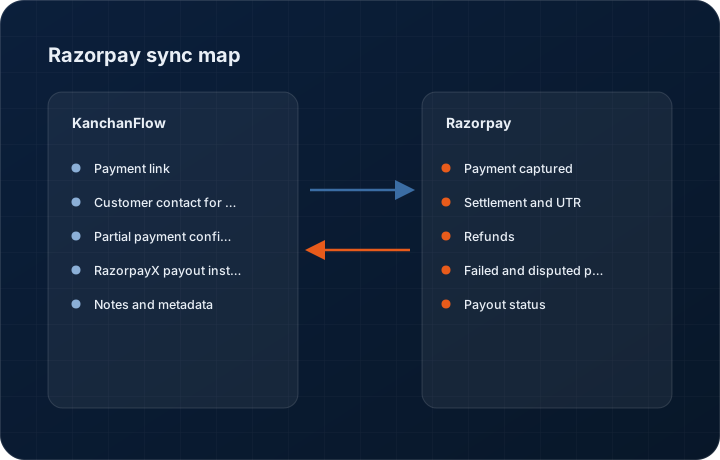
What syncs, in both directions
These are the actual fields that move. Anything not on these two tables does not sync, and we would rather write that down than let you assume it does.
KanchanFlow → Razorpay & RazorpayX
What we write out when a record moves forward.
| Field | What we send |
|---|---|
| Payment link | Created against a quote, an order milestone or a proforma, carrying amount, currency, description, the CRM reference and an expiry date. The link is embedded in the quote PDF and can be sent by email or WhatsApp. |
| Customer contact for the link | Name, email and mobile so Razorpay can send its own reminders and so the payment is attributable to a person, not just an amount. |
| Partial payment configuration | Where you allow it, the link accepts a partial amount with a defined minimum, which is how advance-then-balance terms are enforced without creating two links. |
| RazorpayX payout instruction | Dealer commission payouts are submitted with beneficiary account, IFSC, amount, purpose and the CRM payout reference, on approval by whoever holds the payout role. |
| Notes and metadata | Quote number, order number, territory and dealer code are written into Razorpay notes so finance can reconcile in the Razorpay dashboard without opening the CRM. |
Razorpay & RazorpayX → KanchanFlow
What comes back onto the customer, quote or order record.
| Field | What we read |
|---|---|
| Payment captured | Payment ID, method, amount and timestamp arrive by webhook within seconds of capture and post to the order timeline. |
| Settlement and UTR | The settlement ID and bank UTR once Razorpay settles to your account, which is the reference your accountant will match against the bank statement. |
| Refunds | Full and partial refunds against a synced payment, with reason, so a salesperson is not chasing money that has been returned. |
| Failed and disputed payments | Failure reason codes and any dispute raised, surfaced on the order rather than left in the payment gateway dashboard. |
| Payout status | For RazorpayX, whether a dealer payout is queued, processing, processed or reversed, with the reversal reason where relevant. |
Sync cadence. Real time by webhook for payments and payouts; a 15-minute reconciliation sweep catches anything a webhook missed. Every record also carries a Sync now control, and the last successful sync time is shown on the record so nobody works from a number of unknown age.
Figures
What this looks like in the product
We do not ship stock imagery or mocked-up screens. These three figures describe the exact shots a designer must capture from a live workspace, each carrying a visible date stamp and recaptured at every quarterly re-test.
Capture date required. Capture from a live workspace in test mode. Date stamp required; the link itself must be a test-mode link.
Capture date required. Capture a genuine test payment that has reached settlement, not a captured-only event. Date stamp required.
Capture date required. Masking must be in the product, not applied in post-processing. Date stamp required; recapture each quarter.
11 steps
Setting it up
Written for the person who will actually do it, in the order they will do it. Nothing here assumes you have done this before.
- 1Confirm your Razorpay account is activated with a settlement bank account and KYC complete. A test-mode-only account can be connected but cannot take real money.
- 2In the Razorpay dashboard, create API keys under Settings, API Keys. Copy the key ID and secret; the secret is shown once.
- 3In KanchanFlow, open Settings, Integrations, Razorpay and enter the key ID and secret. Start in test mode.
- 4Copy the webhook URL shown in the connector and add it in Razorpay under Settings, Webhooks, subscribing to payment captured, payment failed, refund processed, settlement processed and, if using RazorpayX, payout events.
- 5Set the webhook secret in both places. A webhook without a verified signature is refused by the connector rather than trusted.
- 6Configure the default advance percentage and whether partial payments are allowed. Thirty to fifty per cent advance is what most job shops set.
- 7Set the payment link expiry. Seven days is the default and keeps stale links from being paid against superseded quotes.
- 8Place the payment block on your quote PDF template. Without this, links can still be sent but will not appear on the printed quote.
- 9If you want dealer payouts, enable RazorpayX separately, fund the account, and assign the payout approval role to a named finance user.
- 10Run a test payment of one rupee end to end and confirm the order timeline updates without anyone touching it.
- 11Switch to live keys, re-add the live webhook, and take one real advance before rolling it out to the sales team.
Honest ceilings
What this integration cannot do
Every connector has limits. You will find these in week three whether or not we write them down, so we write them down.
- Razorpay settles to Indian bank accounts and is regulated as an Indian payment aggregator. A shop with only a USA bank account cannot use it; use Stripe instead.
- International card acceptance on Razorpay requires separate approval from them and is not enabled by default, so an overseas buyer may find the link declines even though it works for domestic customers.
- Settlement timing is Razorpay's, typically T+2 or T+3 depending on your account. We report the settlement, we do not accelerate it.
- We do not perform three-way reconciliation between the payment, the accounting invoice and the bank statement. We show the UTR; matching it in Tally or Zoho Books remains an accounting task.
- Payment links are per quote or per milestone. There is no customer-level statement link that lets a buyer pay several open invoices in one transaction.
- RazorpayX payouts are irreversible once processed. Our approval step is the only control, and if the wrong beneficiary is approved neither we nor Razorpay can pull the money back.
From the quarterly re-test
Errors you will actually hit
Each of these was reproduced deliberately during testing. The wording is the error as the system reports it, not a paraphrase.
| Error | Likely cause | Fix |
|---|---|---|
| Payment succeeded but the order still shows unpaid | The webhook did not reach us, usually because the webhook secret differs between Razorpay and the connector. | Re-enter the same secret in both places. The 15-minute reconciliation sweep will pick up the payment in the meantime, so no money is lost, only visibility. |
| Webhook signature verification failed in the connector log | The webhook was configured on the live keys while the connector is still in test mode, or the reverse. | Match the mode. Test and live webhooks are separate objects in Razorpay and each has its own secret. |
| Link expired before the customer paid | Expiry is set shorter than your customer's approval cycle, common when a buyer needs internal sign-off. | Regenerate the link from the quote, which creates a fresh link against the current revision. Consider a fourteen-day expiry for accounts with slow internal approvals. |
| Partial payment received when full payment was expected | Partial payments are enabled on the link and the buyer chose to pay less than the full amount. | The order shows the balance outstanding and a second link can be issued for it. If you never want this, disable partial payments at the connector level. |
| RazorpayX payout reversed with beneficiary account invalid | The dealer's IFSC or account number is wrong, or the account is dormant. | Correct the dealer's bank details on the dealer record, verify them with a penny-drop through the Karza connector, and re-issue the payout. |
Questions people ask about the Razorpay & RazorpayX integration
That is the main reason this connector exists. Set an advance percentage on the quote and the order stays in Awaiting advance until the payment webhook lands.
Related integrations
Stripe
Send a hosted payment link with a quote, take a deposit by card or ACH, and reconcile the payout back onto the order.
Read moreTally & TallyPrime
Push accepted quotes into TallyPrime as sales orders and pull payment status back, without anyone re-keying a voucher.
Read moreWhatsApp Business API (WABA)
Send quotes, follow-ups and production updates on WhatsApp from the CRM, with every thread attached to the RFQ it belongs to.
Read moreKeeping this page true
This connector was last tested end to end on 2026-08-27 against a live sandbox: fresh authorisation, an outbound write, an inbound read checked field by field, and the failure paths above triggered deliberately. It is re-tested every quarter and the date on this page changes when it is. Read how we test integrations, or see what is shipping today.
See a live quote draft built from a real RFQ
Fourteen days, no credit card, sample data pre-loaded. If it does not fit your shop, we will tell you in the first call.
- Delaware LLC
- SOC 2 Type II
- USA Data Centers (AWS)