WhatsApp Business API (WABA) for Manufacturing
Send quotes, follow-ups and production updates on WhatsApp from the CRM, with every thread attached to the RFQ it belongs to.
In short
KanchanFlow, the RFQ-to-Order CRM, connects to the official WhatsApp Business API so quotes, follow-ups and production updates send from a verified business number and every reply threads onto the RFQ it belongs to. Message billing is Meta cost plus a published markup of twenty, fifteen or ten per cent by tier.
In a lot of shops the real quote conversation happens on WhatsApp, on a salesperson's personal phone, and it leaves with them when they do. Nobody else can see what was promised, and the follow-up that would have won the job never happens because the person who owned the thread is on site.
Moving that conversation onto the official Business API changes who owns it. Messages send from a verified business number, threads attach to the RFQ or quote rather than to a person, and the Quote Follow-Up agent can draft the two-day and seven-day nudges. The number belongs to the company, so a salesperson leaving does not take the history with them.
- Status
- Live in production
- Category
- Messaging
- Plan availability
- All tiers — 500 / 5,000 / 25,000 messages included by tier; see /whatsapp-billing
- Sync cadence
- Real time by webhook in both directions; billing reconciliation with Meta once daily
Field by field
What syncs, in both directions
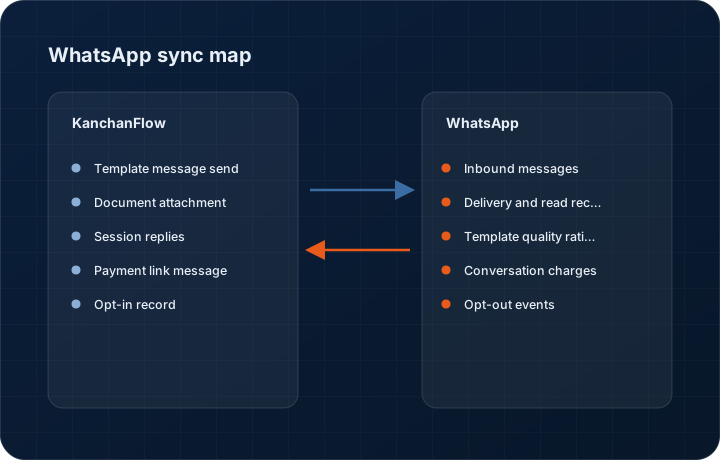
These are the actual fields that move. Anything not on these two tables does not sync, and we would rather write that down than let you assume it does.
KanchanFlow → WhatsApp Business API (WABA)
What we write out when a record moves forward.
| Field | What we send |
|---|---|
| Template message send | Approved templates for quote sent, quote follow-up, order confirmed, production milestone and dispatch, each with the quote number, part description and amount injected as variables. |
| Document attachment | The quote PDF or drawing sent as a document message, capped by Meta at 100 MB and by us at 25 MB so the buyer's phone can actually open it. |
| Session replies | Free-form replies inside the 24-hour customer service window, sent by a salesperson from the CRM thread rather than from a personal handset. |
| Payment link message | The Razorpay or Stripe payment link for an advance, sent as a template with the amount and expiry so the buyer can pay from the thread. |
| Opt-in record | Where consent was captured, when, and through which channel, written against the contact because Meta requires you to be able to show it. |
WhatsApp Business API (WABA) → KanchanFlow
What comes back onto the customer, quote or order record.
| Field | What we read |
|---|---|
| Inbound messages | Every reply, including images of a part or a hand-marked drawing, threaded onto the RFQ, quote or order it references. |
| Delivery and read receipts | Sent, delivered, read or failed per message, so a salesperson can tell the difference between an ignored quote and an undelivered one. |
| Template quality rating | Meta's own quality rating per template, surfaced in settings, because a template dropping to low quality precedes it being paused. |
| Conversation charges | Meta's conversation category and charge for each 24-hour window, which is what the billing on this page is calculated from. |
| Opt-out events | A customer replying STOP is recorded and further template sends to that number are blocked automatically. |
Sync cadence. Real time by webhook in both directions; billing reconciliation with Meta once daily. Every record also carries a Sync now control, and the last successful sync time is shown on the record so nobody works from a number of unknown age.
Figures
What this looks like in the product
We do not ship stock imagery or mocked-up screens. These three figures describe the exact shots a designer must capture from a live workspace, each carrying a visible date stamp and recaptured at every quarterly re-test.
Capture date required. Capture from a live workspace with the customer's number masked in the product. Date stamp required.
Capture date required. Capture the genuine template list including at least one template in a non-approved state. Date stamp required.
Capture date required. Capture with real non-zero usage. Date stamp required; recapture each quarterly re-test.
12 steps
Setting it up
Written for the person who will actually do it, in the order they will do it. Nothing here assumes you have done this before.
- 1Decide which phone number will be your WhatsApp Business number. It must not be in use on the consumer WhatsApp app or the WhatsApp Business app, and moving a number off those apps deletes its chat history.
- 2Create or identify your Meta Business Manager account and complete business verification. This is the slowest step and can take several days.
- 3In KanchanFlow, open Settings, Integrations, WhatsApp and start Embedded Signup, which walks you through Meta's own flow without leaving the CRM.
- 4Create the WhatsApp Business Account and register your number, completing the SMS or voice verification Meta sends.
- 5Set your display name. Meta reviews it, and a name that does not match your registered business will be rejected.
- 6Submit your message templates for approval. Start with quote sent, quote follow-up and order confirmed; approval usually takes minutes but can take a day.
- 7Map each template to the CRM event that triggers it, and set the variable bindings to real fields rather than static text.
- 8Configure the Quote Follow-Up agent cadence if you want automated nudges. Two days and seven days after send is the default and it consumes AI credits per draft.
- 9Record how you capture opt-in. Meta requires it, and the connector will not send a template to a contact with no opt-in record unless you override per contact with a reason.
- 10Set your monthly spend alert. The connector warns at eighty per cent of your included message allowance and again at one hundred.
- 11Send a live test to your own number and confirm the thread appears against a test RFQ.
- 12Brief the sales team that WhatsApp threads are now company records that customers can see quoted back to them, because behaviour changes when a message is on the record.
Honest ceilings
What this integration cannot do
Every connector has limits. You will find these in week three whether or not we write them down, so we write them down.
- Meta controls template approval, quality ratings and messaging limits, not us. A template can be paused or a number's daily limit reduced by Meta with no notice and no appeal we can make on your behalf.
- Free-form replies are only possible inside the 24-hour window that opens when a customer messages you. Outside it, only an approved template can be sent, and template categories are priced differently by Meta.
- One number per WhatsApp Business Account binding per workspace by default. Starter includes one number and can add two; Professional includes three and can add seven; Enterprise is unlimited.
- Migrating an existing number from the consumer WhatsApp app permanently deletes that number's chat history. There is no export and no way back.
- Meta's per-conversation pricing changes periodically and varies by country and category. Your bill moves when Meta's rate card moves, and we pass that through rather than absorbing it.
- We do not support WhatsApp payments, catalogues, or the shopping cart features, and we have no plan to.
From the quarterly re-test
Errors you will actually hit
Each of these was reproduced deliberately during testing. The wording is the error as the system reports it, not a paraphrase.
| Error | Likely cause | Fix |
|---|---|---|
| Template send fails with Template not approved | The template is pending review, was rejected, or was edited after approval, which resets it to pending. | Check the template's status in the template manager and read Meta's rejection reason. Rejections are usually promotional wording in a utility-category template. |
| Messages stop sending after a spike in volume | The number hit its Meta messaging limit tier, which starts low and increases with good-quality sending history. | Wait for the 24-hour window to roll, reduce send volume, and improve quality rating. Limits raise automatically as your sending history matures; there is no way to buy your way up. |
| Customer replies are not appearing in the CRM | The webhook subscription for messages was not enabled on the WhatsApp Business Account, or the callback verification failed. | Re-run the webhook setup from the connector page. Inbound messages received during the gap are not recoverable, which is why this should be verified during setup. |
| Template quality rating dropped to low | Recipients blocked or reported the messages, usually because the template reads as marketing rather than a genuine transaction update. | Pause that template, rewrite it to reference the specific quote and part, and resubmit. Do not send marketing content from a number you rely on for quote delivery. |
| Overage charges higher than expected | Each 24-hour conversation window is billed by Meta by category, and a burst of follow-ups opened many separate windows. | Review the usage panel by category. Consolidating follow-ups into fewer conversations reduces cost more than shortening individual messages does. |
Questions people ask about the WhatsApp Business API (WABA) integration
Every tier includes messages: 500 a month on Starter, 5,000 on Professional and 25,000 on Enterprise. Beyond that you pay Meta's own conversation cost plus our markup, which is 20 per cent on Starter, 15 on Professional and 10 on Enterprise. The full worked example is on the WhatsApp billing page at /whatsapp-billing.
Related integrations
IndiaMART Insta & Enquiries
Pull IndiaMART enquiries into the CRM within minutes, deduplicate them against existing accounts, and route them to an estimator.
Read moreRazorpay & RazorpayX
Attach a payment link to a quote, take an advance before the job is scheduled, and see the settlement land on the order record.
Read moreAadhaar eSign
Get a legally valid electronic signature on a quote acceptance or supply agreement in minutes, using India's OTP-based eSign service.
Read moreKeeping this page true
This connector was last tested end to end on 2026-08-27 against a live sandbox: fresh authorisation, an outbound write, an inbound read checked field by field, and the failure paths above triggered deliberately. It is re-tested every quarter and the date on this page changes when it is. Read how we test integrations, or see what is shipping today.
See a live quote draft built from a real RFQ
Fourteen days, no credit card, sample data pre-loaded. If it does not fit your shop, we will tell you in the first call.
- Delaware LLC
- SOC 2 Type II
- USA Data Centers (AWS)