Invoice editor with credit and debit notes, aging and credit management
Invoices that come from the order, not from a second system. Credit notes, debit notes, an aging bucket view and a credit limit that actually blocks the next shipment.
In short
KanchanFlow's invoice editor closes the RFQ-to-Order CRM loop: an accepted quote becomes an order, and an order becomes an invoice without rekeying a line. It issues credit and debit notes against the original document, tracks aging in 0-30-60-90 buckets, and enforces a per-customer credit limit before the next dispatch.
What it is
Shops usually invoice in the accounting package, which means the sales team cannot see what is unpaid without asking the bookkeeper. We keep invoicing next to the order so the person chasing the customer can see the balance, the aging bucket and the credit limit on the same screen as the quote history.
Invoices carry the same line structure as the order they came from, so a partial dispatch invoices partially and the balance stays visible on the order. Credit notes and debit notes reference the original invoice number rather than floating free, which is what your accountant and any auditor will ask for first.
Capabilities
What it does
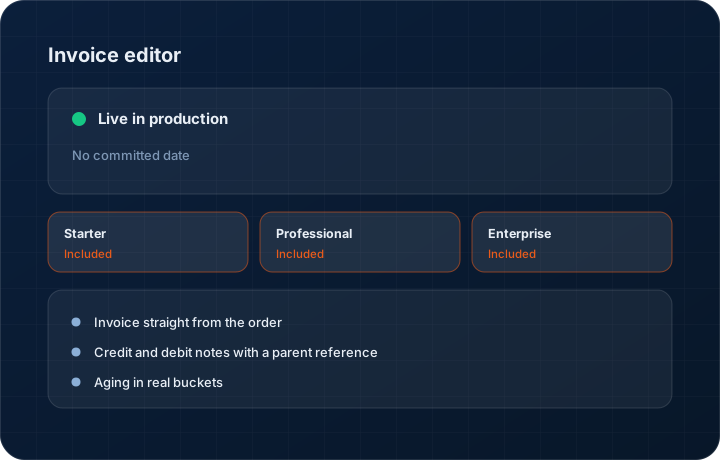
Invoice straight from the order
Lines, quantities, prices, tax treatment and delivery address all carry from the order. Invoice the whole order or only the quantity that shipped — the order keeps the balance open until it is fully invoiced.
Credit and debit notes with a parent reference
A credit note is raised against a specific invoice and shows on both records. Short shipment, rejected parts, a price correction after the fact — each gets a note that points at the document it corrects.
Aging in real buckets
Current, 1-30, 31-60, 61-90 and 90-plus, per customer and in total. The aging view is the same data the salesperson sees on the account, so nobody is chasing a customer who paid last Tuesday.
Credit limits that hold
Set a credit limit per customer. When outstanding plus the value of the next dispatch crosses it, the order flags before the goods leave. You can override it, but somebody has to make that choice on the record.
Payment recording and part payments
Record full or partial payments against an invoice with a date and reference. The balance, the aging bucket and the customer's exposure all move together.
Step by step
How it works
The order these steps happen in matters more than the feature list above it.
- 1
Accept the quote and open the order
An accepted quote becomes an order with the same lines. Nothing is retyped, and the quote revision the customer accepted stays linked to the order.
- 2
Dispatch some or all of it
Record what actually shipped against each line. Partial dispatch is normal in a job shop, so the order stays open with a remaining quantity per line.
- 3
Raise the invoice
Invoice the dispatched quantity. Tax treatment follows the customer record — US tax jurisdiction rates, or GST with HSN and place of supply where the India module applies.
- 4
Correct it with a note, not an edit
If the invoice is wrong after it is issued, raise a credit or debit note referencing it. The original document is never silently rewritten.
- 5
Record payment and watch the bucket
Enter payments as they land. The aging view, the customer balance and the credit-limit check all update from the same figures.
What this is not
This is not an accounting ledger — we raise and track the customer-facing documents, then hand them to Tally, Zoho Books or QuickBooks for the books of account.
This is not an ERP, MRP, CAD, BOM, or advanced CPQ system — it manages customer RFQs, quotes, follow-ups, and order handoff.
Tier availability
What you get on each plan
These rows come from the same feature matrix the pricing page publishes. If the two ever disagree, the matrix is wrong and we fix it.
| Plan | Availability |
|---|---|
| Starter | Included. One accounting connector of your choice for pushing invoices out. |
| Professional | Included. All three accounting connectors — Tally, Zoho Books and QuickBooks. |
| Enterprise | Included. All three connectors plus a custom ERP connector and multi-entity roll-up. |
Starter is $39 per user per month, Professional $49, Enterprise $99 plus a $2,000 monthly platform fee. Annual billing is 17% lower. See the full matrix.
Interface
What it looks like
Invoice list filtered to the 61-90 aging bucket, showing balance, days overdue and the owning salesperson.
Interface capture of the aging view. Customer names and amounts are sample data.
Credit note being raised against invoice INV-2026-0418 for a short-shipped line.
Interface capture of the credit note form with the parent invoice reference populated.
Screenshots are described rather than mocked up. Captures are taken from the build current at the date shown in the changelog, on a sample workspace.
Connectors
Integrations this feature uses
Starter includes one accounting connector and one lead source; Professional and Enterprise include all of them. Browse every integration.
Questions about invoice editor
No. We raise the customer-facing document and track what is owed; your accounting package remains the book of record. The connector pushes invoices, credit notes and payments across so the two do not drift.
Related features
Orders
Quote-as-Order with staged billing and partial dispatch
Read moreGST invoicing
GST invoicing with GSTIN, HSN, GSTR-1 and GSTR-3B
Read moreUS tax rates
US tax rates and SaaS jurisdictions
Read moreWhat's shipping today
All 47 features grouped by status on one page, with the newest releases alongside.
Read moreSee a live quote draft built from a real RFQ
Fourteen days, no credit card, sample data pre-loaded. If it does not fit your shop, we will tell you in the first call.
- Delaware LLC
- SOC 2 Type II
- USA Data Centers (AWS)