TradeIndia for Manufacturing
Import TradeIndia buy leads and enquiries into the RFQ pipeline, including the export enquiries that matter to overseas suppliers.
In short
KanchanFlow, the RFQ-to-Order CRM, imports TradeIndia buy leads and direct enquiries through their lead API, deduplicates them against existing accounts and routes them by product category. TradeIndia carries a higher proportion of export and bulk enquiries than the other Indian directories, which changes how you should qualify them.
Who this is for. This connector is for USA manufacturers with India operations, India-based contract customers, or manufacturers exporting to India. It is also the channel where an India entity finds export enquiries from third countries.
TradeIndia sits somewhere between a directory and a marketplace. Its buy leads are usually posted by buyers looking for bulk or export supply, which means the enquiries carry more quantity information than a JustDial callback and more commercial intent than a general category search. They also go to more suppliers at once, so speed still decides who gets the conversation.
The connector polls the lead API, creates a lead per enquiry with the buy-lead text intact, and routes on product category. Because a meaningful share of these are export enquiries, the connector flags leads with a non-Indian destination so they can go to whoever handles documentation rather than into the domestic queue.
- Status
- Live in production
- Category
- Lead source
- Plan availability
- All tiers — Starter includes one selectable lead source; Professional and Enterprise include unlimited
- Sync cadence
- Every 15 minutes, or on demand from the connector page
Field by field
What syncs, in both directions
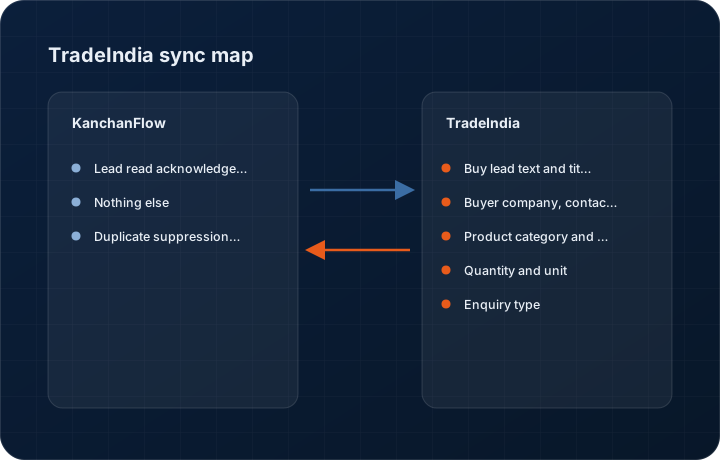
These are the actual fields that move. Anything not on these two tables does not sync, and we would rather write that down than let you assume it does.
KanchanFlow → TradeIndia
What we write out when a record moves forward.
| Field | What we send |
|---|---|
| Lead read acknowledgement | We mark a lead as retrieved so it does not resurface on every poll in the TradeIndia panel. |
| Nothing else | Product listings, catalogue content and paid membership settings remain managed in the TradeIndia seller panel. |
| Duplicate suppression key | The TradeIndia enquiry ID is stored on our lead, so a re-delivered enquiry updates rather than duplicates. |
TradeIndia → KanchanFlow
What comes back onto the customer, quote or order record.
| Field | What we read |
|---|---|
| Buy lead text and title | The buyer's posted requirement in full, which on TradeIndia usually names a quantity, a specification and sometimes a target price. |
| Buyer company, contact and country | Company name, contact person, phone, email and country. The country field is what drives our export flag. |
| Product category and subcategory | Used for routing to the right estimator and product line. |
| Quantity and unit | Parsed where TradeIndia provides them as structured fields, preserved in the text where it does not. |
| Enquiry type | Whether the record is a posted buy lead, a direct product enquiry or a catalogue enquiry, because each converts at a different rate. |
Sync cadence. Every 15 minutes, or on demand from the connector page. Every record also carries a Sync now control, and the last successful sync time is shown on the record so nobody works from a number of unknown age.
Figures
What this looks like in the product
We do not ship stock imagery or mocked-up screens. These three figures describe the exact shots a designer must capture from a live workspace, each carrying a visible date stamp and recaptured at every quarterly re-test.
Capture date required. Capture with at least one genuine export-flagged lead. Date stamp required; mask buyer contact details in the product.
Capture date required. Capture a lead that genuinely carries a quantity so the parsing is visible. Date stamp required.
Capture date required. Capture from a configured workspace, not an empty mapping table. Date stamp required.
10 steps
Setting it up
Written for the person who will actually do it, in the order they will do it. Nothing here assumes you have done this before.
- 1Log in to the TradeIndia seller panel with an administrator account for the listing.
- 2Open the lead management section and generate API credentials. TradeIndia issues a user ID and a profile-specific key.
- 3Note whether your membership tier includes API lead access. Free listings generally do not.
- 4In KanchanFlow, open Settings, Integrations, TradeIndia and enter the user ID and key.
- 5Run the connection test, which reads recent leads without creating anything, and inspect the sample.
- 6Map TradeIndia categories to your product lines. Leave anything you do not make unmapped so it routes to a review queue rather than an estimator.
- 7Set the dedupe rule. Email plus mobile works better here than on the other Indian directories because TradeIndia buyers are more often businesses with stable contact details.
- 8Turn on the export flag rule so leads with a non-Indian country route to whoever owns export documentation.
- 9Set the response target. Buy leads are less time-critical than IndiaMART enquiries; four business hours is a realistic first-response target.
- 10Enable live import and review the first week's leads for category mapping gaps.
Honest ceilings
What this integration cannot do
Every connector has limits. You will find these in week three whether or not we write them down, so we write them down.
- API lead access depends on your TradeIndia membership tier. If your plan does not include it, this connector cannot work and that is a commercial matter with TradeIndia, not a technical one.
- Buy leads are broadcast to many suppliers simultaneously. A lead reaching you is not a lead that is yours, and conversion on this channel is correspondingly low.
- Attachments and specification documents posted with a buy lead are not exposed through the API. You have to open the panel for those.
- Quantity parsing is best-effort. Free-text requirements such as one container load or as per drawing cannot be turned into a number, and we leave them as text rather than guessing.
- Historical backfill is limited to the window TradeIndia's API exposes, typically a few days.
- Export flags rely on the country field being populated by the buyer. Buyers frequently leave it blank, so the flag catches most but not all export enquiries.
From the quarterly re-test
Errors you will actually hit
Each of these was reproduced deliberately during testing. The wording is the error as the system reports it, not a paraphrase.
| Error | Likely cause | Fix |
|---|---|---|
| Authentication fails with an invalid profile ID | The key was generated against a different seller profile than the one you entered. | Regenerate the key from the correct profile in the TradeIndia panel and re-enter both the user ID and the key together. |
| Leads import but all route to the review queue | No category mappings have been configured, which is the safe default. | Open the connector's category mapping table and map your active categories. Leave genuinely irrelevant categories unmapped on purpose. |
| Quantity field is empty on leads that clearly state a quantity | The quantity is inside the free-text requirement rather than in a structured field. | Read the requirement text on the lead. We do not infer a numeric quantity from prose because a wrong quantity on an RFQ is worse than no quantity. |
| Import returns nothing despite leads visible in the panel | The membership tier does not include API access, or the API entitlement lapsed with a renewal. | Check the entitlement with TradeIndia. The connector reports zero leads rather than an error because the API answers successfully with an empty set. |
| Same buyer creates several accounts | The buyer posts from different email addresses across enquiries. | Set dedupe to mobile-primary with email as secondary, then merge the existing duplicates from the account list. |
Questions people ask about the TradeIndia integration
TradeIndia buy leads carry more quantity and specification detail and a higher share of export enquiries, but volume is lower and each lead is broadcast to more suppliers. Neither is a substitute for the other.
Related integrations
IndiaMART Insta & Enquiries
Pull IndiaMART enquiries into the CRM within minutes, deduplicate them against existing accounts, and route them to an estimator.
Read moreJustDial
Capture JustDial leads into the RFQ pipeline with the call recording reference, so a phone enquiry becomes a tracked lead.
Read moreSulekha
Capture Sulekha service and supplier enquiries into the pipeline so a local enquiry is not lost between an app notification and a callback.
Read moreKeeping this page true
This connector was last tested end to end on 2026-08-27 against a live sandbox: fresh authorisation, an outbound write, an inbound read checked field by field, and the failure paths above triggered deliberately. It is re-tested every quarter and the date on this page changes when it is. Read how we test integrations, or see what is shipping today.
See a live quote draft built from a real RFQ
Fourteen days, no credit card, sample data pre-loaded. If it does not fit your shop, we will tell you in the first call.
- Delaware LLC
- SOC 2 Type II
- USA Data Centers (AWS)