Cloudbeds for Manufacturing
For manufacturers who supply the hospitality trade: pull property and room-count data from a customer's Cloudbeds account into the CRM.
In short
KanchanFlow, the RFQ-to-Order CRM, reads property records, room counts and property groupings from a customer's Cloudbeds account so a manufacturer supplying contract furniture, FF&E or commercial kitchen equipment can size a fit-out from real data. It is the narrowest connector we ship and it suits one specific kind of shop.
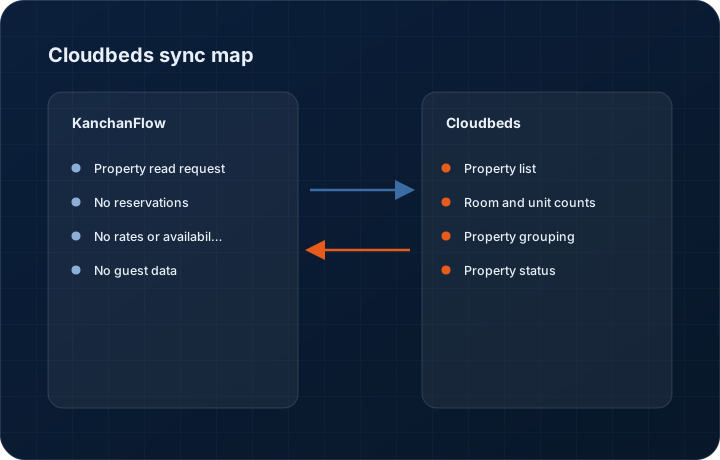
This connector exists for a specific customer type: manufacturers whose buyers are hotels and hospitality groups. If you make contract furniture, casegoods, commercial laundry equipment or kitchen fit-outs, the size of the opportunity is a function of properties and room counts, and those numbers live in the customer's property management system.
Where a hospitality customer is willing to grant read access, we pull their property list, room counts and property groupings onto the account. An estimator sizing a refurbishment then quotes against a real room count rather than a number somebody remembered from a site visit two years ago.
- Status
- Live in production
- Category
- Other
- Plan availability
- Professional and Enterprise
- Sync cadence
- Once daily; property data does not change often enough to justify anything faster
Field by field
What syncs, in both directions
These are the actual fields that move. Anything not on these two tables does not sync, and we would rather write that down than let you assume it does.
KanchanFlow → Cloudbeds
What we write out when a record moves forward.
| Field | What we send |
|---|---|
| Property read request | The only outbound call is an authenticated read of the property list on the customer's account, scoped to the properties you selected during setup. |
| No reservations | We never create, modify or cancel a reservation. The scope is not requested, so the capability does not exist even if someone asked for it. |
| No rates or availability | We never write rates, restrictions or availability. A manufacturer has no business changing a hotel's pricing and we did not build the path. |
| No guest data | We never read or write guest records. Guest scopes are not requested, which is the point of the second screenshot on this page. |
Cloudbeds → KanchanFlow
What comes back onto the customer, quote or order record.
| Field | What we read |
|---|---|
| Property list | Each property on the connected Cloudbeds account, with name, address and city, mapped to plants or sites on the CRM customer record. |
| Room and unit counts | Total rooms and room types per property, which is the figure that sizes a furniture or equipment fit-out quote. |
| Property grouping | How properties are grouped in the customer's account, which usually reveals the real purchasing structure of a hospitality group. |
| Property status | Active or inactive, so a closed property is not quoted for a refurbishment. |
Sync cadence. Once daily; property data does not change often enough to justify anything faster. Every record also carries a Sync now control, and the last successful sync time is shown on the record so nobody works from a number of unknown age.
Figures
What this looks like in the product
We do not ship stock imagery or mocked-up screens. These three figures describe the exact shots a designer must capture from a live workspace, each carrying a visible date stamp and recaptured at every quarterly re-test.
Capture date required. Capture from a sandbox or a customer who has explicitly consented to being shown. Date stamp required; property names must be masked.
Capture date required. Capture the genuine scope list, because the absence of guest scopes is the point of the screenshot. Date stamp required.
Capture date required. Capture a real quote in a sandbox workspace. Date stamp required.
10 steps
Setting it up
Written for the person who will actually do it, in the order they will do it. Nothing here assumes you have done this before.
- 1Confirm this connector applies to you. If your customers are not hospitality properties, it has no function and you should skip it.
- 2Ask your customer whether they will grant read access to their Cloudbeds account. This is their data and their decision, and most conversations end here.
- 3Have the customer create a read-only API user in Cloudbeds scoped to property data only.
- 4In KanchanFlow, open Settings, Integrations, Cloudbeds and add a connection for that customer, entering the credentials they provided.
- 5Select which properties to sync. A large group may have properties that are not yours to quote.
- 6Map properties to the plant or site records on the CRM customer so quotes reference the right property.
- 7Map room types to your product lines if you quote different products by room type.
- 8Run the first sync and check the room counts against whatever you believed them to be. Expect discrepancies; that is the reason for doing this.
- 9Set the refresh to daily and leave it there.
- 10Document with the customer what you are reading and why, in writing. Access to a customer's operational system should never be an informal arrangement.
Honest ceilings
What this integration cannot do
Every connector has limits. You will find these in week three whether or not we write them down, so we write them down.
- This connector requires your customer to grant you access to their system, which most will not. Realistically it applies to a small number of long-standing accounts, and we would rather say that plainly than imply it is widely usable.
- Read-only, permanently. There is no write path and we will not build one.
- We never read reservations, rates, occupancy or any guest data, and we do not request those scopes. If you were hoping to see occupancy to time a refurbishment pitch, this connector will not give you that.
- One Cloudbeds connection per CRM customer. A group with several separate Cloudbeds accounts needs one connection each.
- Room counts reflect what the customer maintains in Cloudbeds, which is often out of date after a renovation. It is better data than a memory, not authoritative data.
- This is our lowest-usage connector by a wide margin. It receives the same quarterly regression as everything else, but it gets far less real-world exercise, so unusual configurations are more likely to surface problems here.
From the quarterly re-test
Errors you will actually hit
Each of these was reproduced deliberately during testing. The wording is the error as the system reports it, not a paraphrase.
| Error | Likely cause | Fix |
|---|---|---|
| Authentication fails with insufficient scope | The API user the customer created has fewer permissions than property read. | Ask the customer to grant property read on the API user. Do not ask them to widen scopes beyond that; we do not use anything else. |
| Room counts differ from what the customer told you | The Cloudbeds configuration was not updated after a renovation or a room-type change. | Treat the sync as a prompt for a conversation, not as a correction. Confirm the count with the customer and record the agreed figure on the property. |
| Properties appear that are not yours to quote | The credentials cover the customer's whole group. | Deselect them in the property selection screen. Only selected properties are stored. |
| Sync stopped after the customer rotated credentials | The customer's IT changed the API user password. | Ask for the new credentials. This connector breaks whenever the customer's own housekeeping changes, which is a reason to check it quarterly. |
| Duplicate plant records on the customer | Properties were synced before existing plant records were mapped. | Merge the plants and set the mapping in the connector so future syncs bind to the surviving record. |
Questions people ask about the Cloudbeds integration
Because manufacturers who supply hospitality need room counts and property lists to size a quote. If you do not supply that trade, this connector is not for you and switching it off costs you nothing.
Related integrations
Shopify
Pull direct and B2B Shopify orders into the same pipeline as your RFQs, so catalogue sales and custom work share one customer record.
Read moreQuickBooks Online & Enterprise
Post accepted quotes to QuickBooks as estimates, sales orders or invoices, and bring A/R ageing back to the estimator's screen.
Read moreOutlook / Microsoft 365
Two-way mail and calendar sync for shops on Microsoft 365, with shared mailbox support for a quotes address the whole team works from.
Read moreKeeping this page true
This connector was last tested end to end on 2026-08-27 against a live sandbox: fresh authorisation, an outbound write, an inbound read checked field by field, and the failure paths above triggered deliberately. It is re-tested every quarter and the date on this page changes when it is. Read how we test integrations, or see what is shipping today.
See a live quote draft built from a real RFQ
Fourteen days, no credit card, sample data pre-loaded. If it does not fit your shop, we will tell you in the first call.
- Delaware LLC
- SOC 2 Type II
- USA Data Centers (AWS)