Gmail two-way sync for Manufacturing
Every RFQ email, drawing attachment and quote reply threads onto the right record without anyone forwarding anything.
In short
KanchanFlow, the RFQ-to-Order CRM, syncs Gmail in both directions so inbound RFQ emails and their drawing attachments land on the customer record and quotes send from the estimator's own address. The RFQ Agent can read a matched inbound email and draft a structured RFQ from it, which costs two AI credits.
In most shops the RFQ arrives as an email with a drawing attached, and the entire quoting process starts in somebody's inbox. That is fine until the person is on holiday, or the customer replies to the wrong thread, or the drawing that was quoted against turns out to be revision B when the email chain also contains revision C.
Two-way sync moves the record out of the inbox without moving the work. Mail continues in Gmail, but every message with a matched customer address threads onto the account, the attachments attach to the RFQ, and outbound quotes send from the estimator's own address so the customer sees a person, not a no-reply.
- Status
- Live in production
- Category
- Plan availability
- All tiers — AI extraction from email consumes AI credits, which vary by tier
- Sync cadence
- Near real time via Gmail push notifications; a 15-minute poll reconciles anything missed
Field by field
What syncs, in both directions
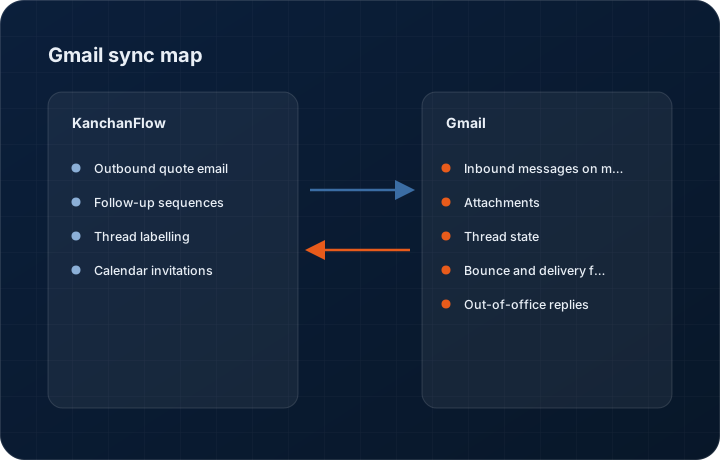
These are the actual fields that move. Anything not on these two tables does not sync, and we would rather write that down than let you assume it does.
KanchanFlow → Gmail two-way sync
What we write out when a record moves forward.
| Field | What we send |
|---|---|
| Outbound quote email | Sent through the user's own Gmail account so it appears in their Sent folder and replies come back to them, with the quote PDF attached and the quote number in the subject. |
| Follow-up sequences | Follow-up emails drafted in the CRM send as replies within the original thread, which is what keeps the customer's mail client showing one conversation rather than five. |
| Thread labelling | Where you enable it, a Gmail label is applied to synced threads so someone working in the inbox can see which conversations the CRM is tracking. |
| Calendar invitations | Meeting invitations created from a CRM activity send through the user's Google account so they carry their identity and free-busy correctly. |
Gmail two-way sync → KanchanFlow
What comes back onto the customer, quote or order record.
| Field | What we read |
|---|---|
| Inbound messages on matched addresses | Any message from or to an address on a customer or lead record threads onto that record, with the body stored and searchable. |
| Attachments | Drawings, purchase orders and specification documents attach to the record. PDF and image attachments can be pushed to OCR at three credits per page. |
| Thread state | Whether a thread is awaiting a reply from you or from the customer, which drives the follow-up queue. |
| Bounce and delivery failures | Hard bounces mark the contact address as invalid so nobody keeps sending quotes to a person who left the company. |
| Out-of-office replies | Detected and used to defer automated follow-ups rather than sending three nudges to someone on leave. |
Sync cadence. Near real time via Gmail push notifications; a 15-minute poll reconciles anything missed. Every record also carries a Sync now control, and the last successful sync time is shown on the record so nobody works from a number of unknown age.
Figures
What this looks like in the product
We do not ship stock imagery or mocked-up screens. These three figures describe the exact shots a designer must capture from a live workspace, each carrying a visible date stamp and recaptured at every quarterly re-test.
Capture date required. Capture from a live workspace with a genuine multi-message thread. Date stamp required; mask the customer domain in the product.
Capture date required. Capture a real extraction including at least one field the agent could not determine. Date stamp required.
Capture date required. Capture the genuine settings screen. Date stamp required.
12 steps
Setting it up
Written for the person who will actually do it, in the order they will do it. Nothing here assumes you have done this before.
- 1Decide your sync scope before you connect. Matched contacts only syncs mail to and from addresses already on a CRM record; full mailbox syncs everything and is far more invasive.
- 2Discuss that choice with your team. Full mailbox sync means their personal correspondence in a work account becomes visible in a shared system, and that conversation is better held before switching it on than after.
- 3In KanchanFlow, open Settings, Integrations, Gmail and click Connect. Each user connects their own account; there is no single admin connection that covers everyone.
- 4Authorise on Google's consent screen. We request read and send scopes on the connected mailbox, and we show exactly which on the connector page.
- 5Choose the sync scope you decided on in step one.
- 6Set the historical import window. Thirty days is the default; a longer window takes longer to complete and rarely changes any decision.
- 7Configure send-as. If your estimators send from a shared address such as quotes@, add it as a send-as alias in Gmail first, then select it in the connector.
- 8Turn on attachment sync and set the size ceiling. Our per-attachment limit is 25 MB.
- 9Enable OCR on attachments only where you want it, because it consumes three AI credits per page and a fifty-page specification is not free.
- 10Enable the RFQ Agent extraction if you want inbound emails drafted into structured RFQs. It costs two credits per extraction and always requires human confirmation.
- 11Set up thread labelling if your team lives in the inbox rather than the CRM.
- 12Send one test quote to yourself and confirm it appears in both Gmail Sent and the CRM timeline.
Honest ceilings
What this integration cannot do
Every connector has limits. You will find these in week three whether or not we write them down, so we write them down.
- Each user connects individually. There is no Google Workspace domain-wide delegation option, so a twelve-person sales team means twelve connections and twelve consent screens.
- Full mailbox sync stores message bodies from the connected account in your workspace. That is a real privacy decision and, in some jurisdictions, one your employees must be told about.
- Gmail applies API quotas per account. A very large historical import can be throttled and take hours, and there is no way to buy priority.
- Attachments above 25 MB are not synced. The message still threads, with a marker naming the file that was skipped.
- We do not sync drafts, chats, or messages in Spam and Trash.
- If a user changes their Google password or their account has its OAuth grant revoked by an administrator, sync stops silently from Google's side until they reconnect. We alert the user, but mail received in the gap imports only if it is inside the historical window on reconnection.
From the quarterly re-test
Errors you will actually hit
Each of these was reproduced deliberately during testing. The wording is the error as the system reports it, not a paraphrase.
| Error | Likely cause | Fix |
|---|---|---|
| Emails from a known customer are not threading onto their record | The message came from an address not on the customer record, commonly a personal or a plant-specific address. | Add the address to the contact. You can also enable domain matching, which threads any address on the customer's email domain, at the cost of occasionally catching the wrong person. |
| Sync stopped and the user saw no warning | The OAuth grant was revoked, usually by a Workspace administrator tightening third-party app access. | Have the administrator allow the app in the Workspace admin console, then have the user reconnect. This is the single most common Gmail support ticket we see. |
| Attachment missing from an RFQ | The file exceeded the 25 MB ceiling or was a Drive link rather than a real attachment. | Ask the customer to send the file directly, or download it from Drive and attach it manually. We do not follow Drive links from email bodies. |
| Duplicate quote emails in the customer's inbox | The quote was sent from both the CRM and Gmail directly by the estimator. | Send quotes from one place. Enabling thread labelling makes it obvious in Gmail which conversations the CRM is already handling. |
| AI credits consumed faster than expected | Attachment OCR is enabled and a customer sent a long specification document. | Set OCR to manual trigger rather than automatic. Three credits per page adds up quickly on a fifty-page document, and most pages of a spec do not need extracting. |
Questions people ask about the Gmail two-way sync integration
Only if you choose full mailbox sync. The default is matched contacts only, which syncs mail to and from addresses already on a CRM record and nothing else. We recommend leaving it there.
Related integrations
Outlook / Microsoft 365
Two-way mail and calendar sync for shops on Microsoft 365, with shared mailbox support for a quotes address the whole team works from.
Read moreGoogle Calendar
Put site visits, capability audits and quote review calls on the calendar from the record, with travel time and free-busy respected.
Read moreTypeform
Take a conditional RFQ intake form, complete with uploads and logic jumps, straight into the estimating queue.
Read moreKeeping this page true
This connector was last tested end to end on 2026-08-27 against a live sandbox: fresh authorisation, an outbound write, an inbound read checked field by field, and the failure paths above triggered deliberately. It is re-tested every quarter and the date on this page changes when it is. Read how we test integrations, or see what is shipping today.
See a live quote draft built from a real RFQ
Fourteen days, no credit card, sample data pre-loaded. If it does not fit your shop, we will tell you in the first call.
- Delaware LLC
- SOC 2 Type II
- USA Data Centers (AWS)