Typeform for Manufacturing
Take a conditional RFQ intake form, complete with uploads and logic jumps, straight into the estimating queue.
In short
KanchanFlow, the RFQ-to-Order CRM, receives Typeform submissions by webhook within seconds, including file uploads, logic-jump answers and hidden fields carrying UTM parameters. It is the intake form we recommend when a shop wants a real qualification flow rather than a flat list of questions.
A good RFQ intake form asks different questions depending on the answer before it. A sheet-metal enquiry needs material, gauge and finish; a machining enquiry needs tolerance, surface finish and whether material certification is required. Asking every buyer all of it every time is how you end up with a long form that people abandon halfway through.
Typeform handles that branching well, and this connector carries the result across intact. Answers arrive by webhook in seconds, hidden fields bring UTM parameters and referrer with them, and file uploads land as attachments on the RFQ so the estimator has the drawing in front of them straight away.
- Status
- Live in production
- Category
- Lead source
- Plan availability
- All tiers — Starter includes one selectable lead source; Professional and Enterprise include unlimited
- Sync cadence
- Real time by webhook; a 15-minute reconciliation poll backfills any missed submission
Field by field
What syncs, in both directions
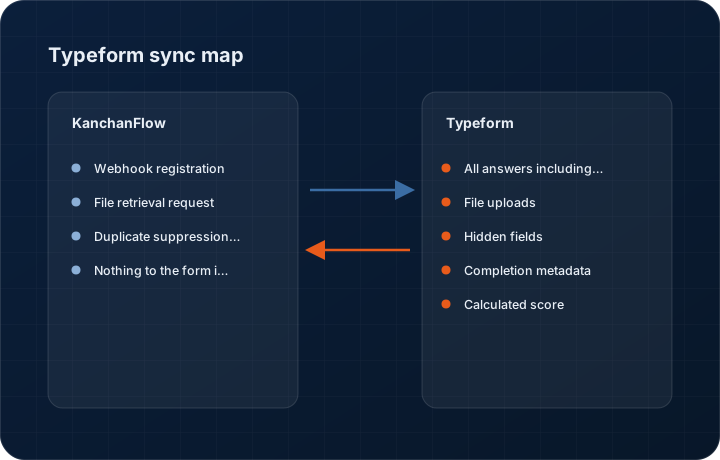
These are the actual fields that move. Anything not on these two tables does not sync, and we would rather write that down than let you assume it does.
KanchanFlow → Typeform
What we write out when a record moves forward.
| Field | What we send |
|---|---|
| Webhook registration | Where you connect the account rather than configuring by hand, we register the webhook against the selected form with a signing secret. |
| File retrieval request | For each mapped file upload answer we fetch that specific file from Typeform's storage at submission time, so the attachment survives their retention window. |
| Duplicate suppression key | The Typeform response token is stored on the lead, so a webhook redelivery updates the existing record rather than duplicating it. |
| Nothing to the form itself | We never modify questions, logic jumps or settings, and we never write responses back into Typeform. |
Typeform → KanchanFlow
What comes back onto the customer, quote or order record.
| Field | What we read |
|---|---|
| All answers including logic branches | Every answered question, with unanswered branches recorded as skipped rather than blank, which matters when you are auditing why a field is empty. |
| File uploads | Drawings, specifications and photos uploaded through a file question, fetched and attached to the lead or RFQ. |
| Hidden fields | UTM source, medium, campaign, referrer and any custom hidden field you pass in the form URL, preserved for attribution. |
| Completion metadata | Whether the form was completed or partially submitted, and how long it took, which is a useful signal of enquiry seriousness. |
| Calculated score | Where you use Typeform's scoring logic to pre-qualify, the score arrives and can drive routing. |
Sync cadence. Real time by webhook; a 15-minute reconciliation poll backfills any missed submission. Every record also carries a Sync now control, and the last successful sync time is shown on the record so nobody works from a number of unknown age.
Figures
What this looks like in the product
We do not ship stock imagery or mocked-up screens. These three figures describe the exact shots a designer must capture from a live workspace, each carrying a visible date stamp and recaptured at every quarterly re-test.
Capture date required. Capture the genuine setup page. Date stamp required; the secret must be masked in the product.
Capture date required. Capture a real branching RFQ form. Date stamp required.
Capture date required. Capture end to end from one genuine submission. Date stamp required; recapture each quarter.
12 steps
Setting it up
Written for the person who will actually do it, in the order they will do it. Nothing here assumes you have done this before.
- 1Build or identify the Typeform you want to connect. If you are starting fresh, ask for part description, quantity, material, tolerance, target date and a drawing upload as the minimum useful RFQ intake.
- 2In KanchanFlow, open Settings, Integrations, Typeform and choose Connect account or Webhook only. Connecting the account lets us list your forms; webhook only works if you prefer not to grant account access.
- 3Copy the webhook URL and signing secret from the connector page.
- 4In Typeform, open the form, go to Connect, Webhooks, and add the endpoint with the secret. Enable it.
- 5Send a test submission from Typeform's own webhook panel and confirm it arrives in the CRM.
- 6Map each question to a CRM field. Typeform identifies questions by a stable reference, so set the reference on each question rather than relying on the question text.
- 7Map the file upload question to attachments.
- 8Map hidden fields to your source attribution fields, and make sure your website appends the UTM parameters to the form URL, otherwise the hidden fields arrive empty.
- 9Decide whether submissions create a Lead or an RFQ, and set routing on material, product line or Typeform score.
- 10Configure partial submission handling. Importing partials gives you a list of people who started an RFQ and stopped, which is often worth a phone call.
- 11Set the response target and enable the acknowledgement email.
- 12Run one complete real submission with a file before pointing your website at the form.
Honest ceilings
What this integration cannot do
Every connector has limits. You will find these in week three whether or not we write them down, so we write them down.
- Typeform is a paid product for anything beyond a small monthly response allowance, and file upload questions require a higher plan. That cost is yours, not ours.
- File uploads on Typeform's own storage have retention limits by plan. We fetch files at submission time so the attachment survives, but a file we failed to fetch during an outage may be gone by the time we retry.
- Question references must be set deliberately. If you duplicate a form, Typeform generates new references and the mappings on the copy will not carry over.
- Webhook redelivery from Typeform is limited. A prolonged outage on our side is covered by the reconciliation poll only where the account connection is authorised; webhook-only setups have no backfill path at all.
- We do not support Typeform's payment questions, and a form using one will import the submission without payment status.
- Partial submissions are only available where you enable them in Typeform, and they arrive without the answers the respondent never reached, which can look like data loss if nobody explains it.
From the quarterly re-test
Errors you will actually hit
Each of these was reproduced deliberately during testing. The wording is the error as the system reports it, not a paraphrase.
| Error | Likely cause | Fix |
|---|---|---|
| Webhook shows delivered in Typeform but nothing appears in the CRM | Signature verification failed, usually because the secret was regenerated on one side only. | Copy the secret from the connector page into Typeform again. We reject unverified webhooks rather than accepting unsigned data. |
| Mappings broke after duplicating a form | The duplicate has new question references. | Set the question references on the duplicate to match the original, or re-map. Setting references deliberately when the form is built avoids this entirely. |
| Hidden UTM fields arrive empty | The website is linking to the form URL without appending the parameters. | Append the hidden field parameters to the form URL in your site's links. Typeform does not infer them from the referrer. |
| Drawing attachment missing on an otherwise complete RFQ | The file fetch failed at submission time, most often because the file exceeded our 25 MB attachment ceiling. | The lead shows a fetch-failed marker with the file name. Ask the customer to resend, or retrieve it from Typeform's results view within its retention window. |
| Partial submissions cluttering the lead inbox | Partial import is on and most respondents abandon early. | Filter partials into their own queue rather than turning them off. A partial with a phone number is often worth a call; one with nothing but a first name is not. |
Questions people ask about the Typeform integration
Logic jumps, uploads from buyers who are not signed in to a Google account, spam protection, and hidden fields for attribution. Google Forms is free and adequate; Typeform is the better intake form if you are serious about qualification.
Related integrations
Google Forms
Turn an RFQ request form into structured leads, including the drawing file the customer uploaded, without anyone watching a spreadsheet.
Read moreMeta Lead Ads
Pull Facebook and Instagram lead form submissions into the pipeline in seconds, with campaign, ad set and ad recorded against every lead.
Read moreGmail two-way sync
Every RFQ email, drawing attachment and quote reply threads onto the right record without anyone forwarding anything.
Read moreKeeping this page true
This connector was last tested end to end on 2026-08-27 against a live sandbox: fresh authorisation, an outbound write, an inbound read checked field by field, and the failure paths above triggered deliberately. It is re-tested every quarter and the date on this page changes when it is. Read how we test integrations, or see what is shipping today.
See a live quote draft built from a real RFQ
Fourteen days, no credit card, sample data pre-loaded. If it does not fit your shop, we will tell you in the first call.
- Delaware LLC
- SOC 2 Type II
- USA Data Centers (AWS)