Meta Lead Ads for Manufacturing
Pull Facebook and Instagram lead form submissions into the pipeline in seconds, with campaign, ad set and ad recorded against every lead.
In short
KanchanFlow, the RFQ-to-Order CRM, subscribes to Meta's leadgen webhook so a Facebook or Instagram lead form submission reaches an estimator within seconds, carrying campaign, ad set and ad names. That attribution is what lets a shop see which ad produced quoted revenue rather than which produced form fills.
Manufacturers who advertise on Meta usually measure the wrong thing, because the ad platform can only report the form fill. Whether that lead became an RFQ, a quote, or an order is invisible on the Meta side, so budget decisions get made on cost per lead rather than cost per quoted dollar.
This connector carries the campaign, ad set and ad identifiers through to the lead, then keeps them attached as the lead becomes an RFQ, a quote and an order. The source report then shows spend against quoted and won value, which is the only version of this report worth looking at.
- Status
- Live in production
- Category
- Lead source
- Plan availability
- All tiers — Starter includes one selectable lead source; Professional and Enterprise include unlimited
- Sync cadence
- Real time by webhook, typically within seconds; a 15-minute poll backfills any missed submission
Field by field
What syncs, in both directions
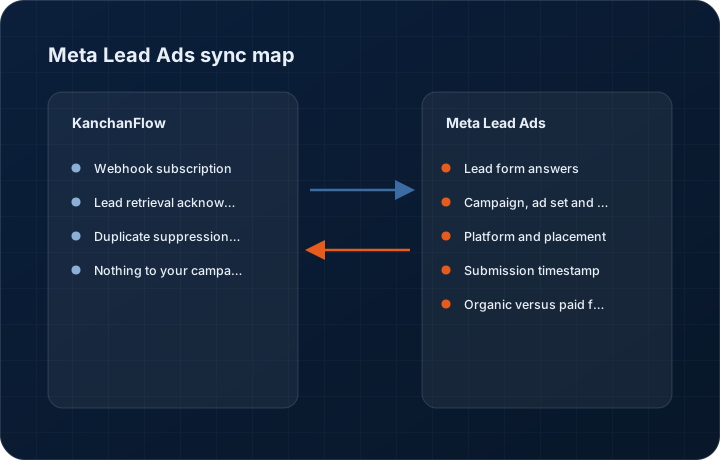
These are the actual fields that move. Anything not on these two tables does not sync, and we would rather write that down than let you assume it does.
KanchanFlow → Meta Lead Ads
What we write out when a record moves forward.
| Field | What we send |
|---|---|
| Webhook subscription | We register a leadgen webhook subscription against each page you select, which is the only object we create on the Meta side. |
| Lead retrieval acknowledgement | Each leadgen ID is retrieved and acknowledged so Meta does not keep redelivering a lead we have already stored. |
| Duplicate suppression key | The Meta leadgen ID is stored against our lead, so a webhook redelivery updates the existing record rather than creating a second one. |
| Nothing to your campaigns | We do not create, edit, pause or budget campaigns, and we do not upload conversion events. This connector reads leads and nothing else, which is why we do not request ads management scope. |
Meta Lead Ads → KanchanFlow
What comes back onto the customer, quote or order record.
| Field | What we read |
|---|---|
| Lead form answers | Every field on the form, including custom questions, mapped to CRM fields you choose. Unmapped answers are preserved on the lead rather than discarded. |
| Campaign, ad set and ad | Names and IDs for all three levels, which is what makes downstream attribution possible. |
| Platform and placement | Whether the lead came from Facebook or Instagram and in which placement, useful because the two convert very differently for industrial offers. |
| Submission timestamp | The moment the form was submitted, which the response clock runs from rather than from the moment we received it. |
| Organic versus paid flag | Instagram and Facebook page forms can generate leads without ad spend; we mark which is which so cost per lead is not miscalculated. |
Sync cadence. Real time by webhook, typically within seconds; a 15-minute poll backfills any missed submission. Every record also carries a Sync now control, and the last successful sync time is shown on the record so nobody works from a number of unknown age.
Figures
What this looks like in the product
We do not ship stock imagery or mocked-up screens. These three figures describe the exact shots a designer must capture from a live workspace, each carrying a visible date stamp and recaptured at every quarterly re-test.
Capture date required. Capture from a workspace with a genuinely running campaign. Date stamp required; mask lead contact details in the product.
Capture date required. Capture with a real multi-question form. Date stamp required.
Capture date required. Requires real campaign data; do not fabricate spend figures. Date stamp required and recapture each quarter.
11 steps
Setting it up
Written for the person who will actually do it, in the order they will do it. Nothing here assumes you have done this before.
- 1Confirm you are an admin on the Meta Business Manager account that owns the Facebook page and the ad account.
- 2In KanchanFlow, open Settings, Integrations, Meta Lead Ads and click Connect.
- 3Authorise on Meta's own consent screen. We request leads retrieval, pages read engagement and ads read. Read the scopes; we do not ask for ads management.
- 4Select the pages whose lead forms you want to import. A page not selected here sends nothing.
- 5Map the fields for each active lead form. Full name, email, phone and company are usually straightforward; custom questions such as material or annual volume need a decision about which CRM field they belong in.
- 6Decide what happens to unmapped answers. The default is to keep them on the lead as a note, which is better than losing them.
- 7Set the dedupe rule. Email primary with phone secondary suits Meta leads, because the form usually pre-fills a real email from the user's profile.
- 8Configure routing by campaign or by a form field such as material type, so leads reach the estimator who can qualify them.
- 9Set an aggressive response target. Meta leads go cold faster than most people expect; fifteen minutes is a reasonable target during business hours.
- 10Submit a test lead using Meta's Lead Ads Testing Tool and confirm it appears in the CRM with campaign attribution.
- 11Check the connector again after any new campaign launch, because a new form needs its fields mapping before its leads are useful.
Honest ceilings
What this integration cannot do
Every connector has limits. You will find these in week three whether or not we write them down, so we write them down.
- Meta access tokens expire and the connection needs re-authorising periodically. A page admin change or a password reset can also invalidate it, and leads submitted while the connection is broken are recoverable only within Meta's own retention window.
- A new lead form's custom questions arrive unmapped. Leads still import, but the answers sit as notes until someone maps them, which is easy to forget in the week a campaign launches.
- Lead quality on Meta for industrial offers is highly variable and the form's low friction is exactly why. Expect a substantial share of unqualified submissions and design your qualification step around it.
- We do not push conversion events back to Meta, so the ad platform cannot optimise against your quoted or won value. Attribution is visible in our reports only.
- We cannot retrieve leads submitted before the connector was authorised beyond Meta's retention window.
- Instagram lead forms expose fewer placement details than Facebook ones, so placement-level analysis is thinner on the Instagram side.
From the quarterly re-test
Errors you will actually hit
Each of these was reproduced deliberately during testing. The wording is the error as the system reports it, not a paraphrase.
| Error | Likely cause | Fix |
|---|---|---|
| Leads stopped arriving with no error shown | The Meta access token expired or was invalidated by a page role change. | Reconnect from the connector page. Set a calendar reminder to check the connection quarterly; the connector also emails the workspace owner when the token nears expiry. |
| Leads arrive with no campaign name | The lead came from an organic page form rather than a paid ad. | Nothing is wrong. Filter on the organic flag in the source report so organic leads are not counted against ad spend. |
| Custom question answers are missing from lead fields | The form is new and its questions have not been mapped. | Open field mapping for that form. The answers are already on the lead as notes and will be moved into fields for future submissions once mapped. |
| Test lead does not appear | The page was not selected during setup, or the Lead Ads Testing Tool submitted against a form on a different page. | Check the page selection in connector settings and re-run the test against a form on a selected page. |
| Duplicate leads from the same person | The same user submitted two different forms, which Meta treats as two distinct leads. | Enable cross-form dedupe on email in connector settings. Leave it off if you deliberately want to see repeat interest as separate signals. |
Questions people ask about the Meta Lead Ads integration
Usually within a few seconds of submission, because Meta pushes a webhook rather than us polling. The response clock runs from the submission time, not from our receipt.
Related integrations
Google Forms
Turn an RFQ request form into structured leads, including the drawing file the customer uploaded, without anyone watching a spreadsheet.
Read moreTypeform
Take a conditional RFQ intake form, complete with uploads and logic jumps, straight into the estimating queue.
Read moreWhatsApp Business API (WABA)
Send quotes, follow-ups and production updates on WhatsApp from the CRM, with every thread attached to the RFQ it belongs to.
Read moreKeeping this page true
This connector was last tested end to end on 2026-08-27 against a live sandbox: fresh authorisation, an outbound write, an inbound read checked field by field, and the failure paths above triggered deliberately. It is re-tested every quarter and the date on this page changes when it is. Read how we test integrations, or see what is shipping today.
See a live quote draft built from a real RFQ
Fourteen days, no credit card, sample data pre-loaded. If it does not fit your shop, we will tell you in the first call.
- Delaware LLC
- SOC 2 Type II
- USA Data Centers (AWS)