Zoom for Manufacturing
Create a Zoom link from the record for a drawing walkthrough, and get the recording and an AI summary back on the account timeline.
In short
KanchanFlow, the RFQ-to-Order CRM, creates Zoom meetings from a customer or RFQ record and brings the recording, transcript and participation details back onto the timeline. Where you enable it, meeting summarisation turns a drawing review into written follow-up actions at three to six AI credits per meeting.
The drawing review call is where a quote is really settled. Tolerances get relaxed, a finish gets changed, a delivery date gets agreed, and thirty minutes later nobody has written any of it down. The quote goes out reflecting what the estimator remembers, which is not always what was said.
This connector attaches that call to the record. The meeting is created from the RFQ, the recording and transcript come back to it, and the summarisation agent extracts the decisions and follow-ups as text you can check against the quote before you send it. The point is not the recording; it is the written record of what changed.
- Status
- Live in production
- Category
- Scheduling
- Plan availability
- All tiers — meeting summarisation consumes AI credits (3 credits ≤30 min, 6 credits 30–60 min)
- Sync cadence
- Real time by webhook for meeting events and recordings; summaries generate within minutes of the recording being available
Field by field
What syncs, in both directions
These are the actual fields that move. Anything not on these two tables does not sync, and we would rather write that down than let you assume it does.
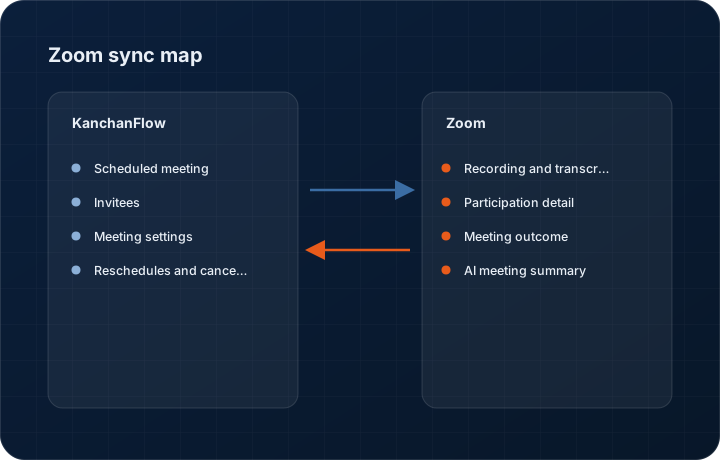
KanchanFlow → Zoom
What we write out when a record moves forward.
| Field | What we send |
|---|---|
| Scheduled meeting | Created with the topic carrying the customer and RFQ number, the agenda carrying the record link, and the correct host from the CRM activity owner. |
| Invitees | Internal attendees and customer contacts from the activity, so the join link reaches everyone without a separate email. |
| Meeting settings | Waiting room, recording policy and passcode applied from the template you configure, so a customer call is not accidentally set to record when your policy says it should not be. |
| Reschedules and cancellations | Changing the activity updates the Zoom meeting rather than leaving a stale link circulating. |
Zoom → KanchanFlow
What comes back onto the customer, quote or order record.
| Field | What we read |
|---|---|
| Recording and transcript | Cloud recordings and their transcripts attach to the activity, subject to your Zoom plan including cloud recording. |
| Participation detail | Who joined, when and for how long, which is a blunt but useful signal of whether the customer's technical people actually attended. |
| Meeting outcome | Whether the meeting occurred, was cancelled or nobody joined, written to the activity so no-shows are visible in the pipeline. |
| AI meeting summary | Where enabled, a structured summary with decisions and follow-up actions, generated from the transcript at three credits for meetings up to thirty minutes and six credits for thirty to sixty. |
Sync cadence. Real time by webhook for meeting events and recordings; summaries generate within minutes of the recording being available. Every record also carries a Sync now control, and the last successful sync time is shown on the record so nobody works from a number of unknown age.
Figures
What this looks like in the product
We do not ship stock imagery or mocked-up screens. These three figures describe the exact shots a designer must capture from a live workspace, each carrying a visible date stamp and recaptured at every quarterly re-test.
Capture date required. Capture from a live workspace. Date stamp required.
Capture date required. Capture from a genuine recorded internal test call, never a customer call. Date stamp required.
Capture date required. Capture the genuine settings page. Date stamp required.
11 steps
Setting it up
Written for the person who will actually do it, in the order they will do it. Nothing here assumes you have done this before.
- 1Confirm your Zoom plan. Cloud recording and transcripts require a paid Zoom plan; a free account can create meetings but nothing comes back afterwards.
- 2Decide your recording policy before connecting. Recording a customer without clear consent is a legal problem in several US states and in most of Europe, and this is a decision for your business, not a default we should set.
- 3In KanchanFlow, open Settings, Integrations, Zoom and click Connect. Each meeting host connects their own Zoom account.
- 4Authorise on Zoom's consent screen. On some Zoom accounts the marketplace app must be pre-approved by a Zoom administrator first.
- 5Configure meeting templates: waiting room, passcode, and whether recording starts automatically. Create separate templates for internal and customer meetings.
- 6Set which CRM activity types can create Zoom meetings.
- 7Set the recording retention period in the connector, and make sure it is no longer than your own data retention policy allows.
- 8Enable meeting summarisation only where you want it, and be aware it consumes AI credits per meeting.
- 9Configure who can read recordings. By default only the activity owner and their manager can, which is usually correct.
- 10Run a test meeting with a colleague, record it, and confirm the recording, transcript and summary all arrive on the activity.
- 11Tell your customers you record, if you record. Doing so is both the legal position in many places and the decent one.
Honest ceilings
What this integration cannot do
Every connector has limits. You will find these in week three whether or not we write them down, so we write them down.
- Cloud recording, transcripts and therefore summaries require a paid Zoom plan. On a free plan this connector schedules meetings and nothing else.
- Transcript accuracy on a shop-floor call with background machine noise is poor, and a summary built on a poor transcript is worse than no summary. Do not rely on it for anything you would not re-read.
- Recording consent is your responsibility. We provide the policy controls; we do not and cannot enforce the law of the jurisdiction your customer is in.
- Recordings consume workspace storage against your tier's allowance. A shop recording every call will fill a Starter tier's 10 GB quickly.
- We do not support Zoom Phone, Zoom Contact Center, or webinars. Meetings only.
- Summarisation is an AI feature and will occasionally attribute a decision to the wrong participant or miss a caveat. It is a starting point for a human to correct, not a record of what was agreed.
From the quarterly re-test
Errors you will actually hit
Each of these was reproduced deliberately during testing. The wording is the error as the system reports it, not a paraphrase.
| Error | Likely cause | Fix |
|---|---|---|
| Connect fails with App not pre-approved | The Zoom account restricts marketplace apps and an administrator has not approved ours. | Ask your Zoom administrator to pre-approve the app in the Zoom marketplace admin settings, then reconnect. |
| Meeting created but no recording appears | The Zoom plan does not include cloud recording, or the meeting was recorded locally to the host's machine. | Local recordings never leave the host's computer and cannot be fetched. Set cloud recording in the meeting template if you want recordings on the record. |
| Summary is inaccurate or misses a key decision | The transcript quality was poor, usually from background noise or several people speaking at once. | Read the transcript, correct the summary on the activity, and treat the summary as a draft. Recording from a quiet room materially improves both. |
| Storage warnings after enabling recording sync | Recordings are counted against your tier's storage allowance. | Shorten the retention period, restrict which activity types sync recordings, or add storage. On Starter, extra 10 GB is $10 per month. |
| Customer joined but participation shows nobody attended | The customer joined a different meeting, usually an old link from a rescheduled activity. | Reschedule from the CRM rather than creating a new meeting manually, so the link circulating is always the current one. |
Questions people ask about the Zoom integration
To schedule, no. For recordings, transcripts and summaries, yes. We will not pretend a free plan gives you the part that matters.
Related integrations
Google Calendar
Put site visits, capability audits and quote review calls on the calendar from the record, with travel time and free-busy respected.
Read moreOutlook / Microsoft 365
Two-way mail and calendar sync for shops on Microsoft 365, with shared mailbox support for a quotes address the whole team works from.
Read moreGmail two-way sync
Every RFQ email, drawing attachment and quote reply threads onto the right record without anyone forwarding anything.
Read moreKeeping this page true
This connector was last tested end to end on 2026-08-27 against a live sandbox: fresh authorisation, an outbound write, an inbound read checked field by field, and the failure paths above triggered deliberately. It is re-tested every quarter and the date on this page changes when it is. Read how we test integrations, or see what is shipping today.
See a live quote draft built from a real RFQ
Fourteen days, no credit card, sample data pre-loaded. If it does not fit your shop, we will tell you in the first call.
- Delaware LLC
- SOC 2 Type II
- USA Data Centers (AWS)