IndiaMART auto lead capture
Enquiries stop sitting in a portal inbox until someone logs in. They arrive as leads, de-duplicated and assigned, with the product enquired about already attached.
In short
IndiaMART auto lead capture pulls enquiries from your IndiaMART seller account into KanchanFlow within minutes, de-duplicates them against existing accounts, and routes each to an owner. Because the RFQ-to-Order CRM treats an enquiry as the start of an RFQ, the lead arrives with the product enquired about already attached.
What it is
IndiaMART generates volume, and volume decays fast. A buyer who sends the same enquiry to six suppliers usually engages with whoever replies first. If your enquiries sit in a portal inbox until someone remembers to check it, you are competing on a delay you chose. Response speed is the one variable on that enquiry you fully control.
The connector polls your seller account and creates a lead for each new enquiry, carrying the buyer's name, company, phone, city and the product line they asked about. Repeat enquiries from a number or company already in the system attach to the existing account instead of creating a duplicate, and assignment follows the rules you set.
Capabilities
What it does
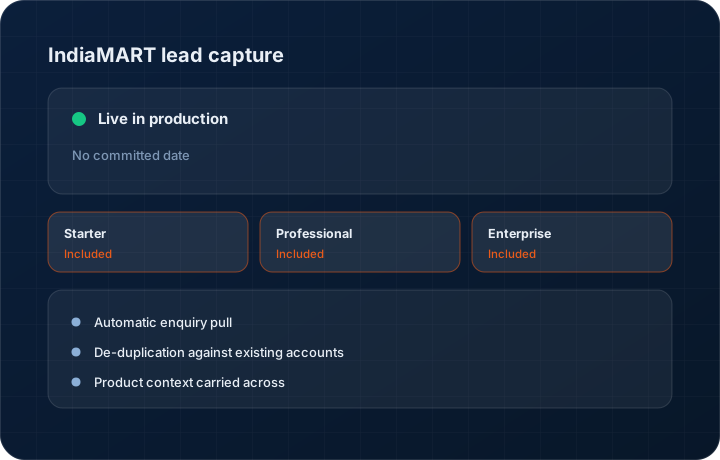
Automatic enquiry pull
Enquiries are fetched from your seller account on a short cycle. Nobody has to log into the portal, copy a phone number and paste it into the CRM.
De-duplication against existing accounts
A repeat buyer matches on phone number and company name and attaches to their existing record rather than creating a second one. Your account list does not rot.
Product context carried across
The product or category the buyer enquired about lands on the lead, so the salesperson opens the record already knowing what the conversation is about.
Owner assignment on arrival
Route by product line, territory or round robin. The lead has an owner from the moment it exists, which is the difference between a two-minute reply and a two-day one.
Straight into WhatsApp follow-up
Most IndiaMART buyers respond on WhatsApp. The lead carries the phone number into the WhatsApp hub so the first reply is one click, not a retype.
Step by step
How it works
The order these steps happen in matters more than the feature list above it.
- 1
Connect your seller account
Authorise the IndiaMART connection with your seller credentials. Starter includes one lead source of your choice; Professional and Enterprise include all sources.
- 2
Enquiries are pulled in
New enquiries are fetched automatically and created as leads with buyer name, company, phone, city and the product enquired about.
- 3
De-duplicate and match
Each enquiry is matched against existing contacts and accounts. A known buyer attaches to their record with the new enquiry on the timeline.
- 4
Assign an owner
Assignment rules place the lead with a person or territory. The owner is notified so the clock starts on a reply, not on a portal login.
- 5
Reply and qualify
Reply on WhatsApp or by call from the record. Where the enquiry is a real RFQ, convert it and start the quoting workflow.
What this is not
This is not an IndiaMART management console — we capture and route enquiries, we do not manage your listings, catalogue or paid placement.
This is not an ERP, MRP, CAD, BOM, or advanced CPQ system — it manages customer RFQs, quotes, follow-ups, and order handoff.
Tier availability
What you get on each plan
These rows come from the same feature matrix the pricing page publishes. If the two ever disagree, the matrix is wrong and we fix it.
| Plan | Availability |
|---|---|
| Starter | One selectable lead source — choose IndiaMART, or add more at $10 per source per month. |
| Professional | Unlimited lead sources included. |
| Enterprise | Unlimited lead sources plus custom sources. |
Starter is $39 per user per month, Professional $49, Enterprise $99 plus a $2,000 monthly platform fee. Annual billing is 17% lower. See the full matrix.
Interface
What it looks like
Lead list filtered to IndiaMART source, showing product enquired about, city and assigned owner.
Interface capture of the lead list. Buyer details are sample data.
Duplicate detection panel matching a new enquiry to an existing account by phone number.
Interface capture of the de-duplication step.
Screenshots are described rather than mocked up. Captures are taken from the build current at the date shown in the changelog, on a sample workspace.
Connectors
Integrations this feature uses
Starter includes one accounting connector and one lead source; Professional and Enterprise include all of them. Browse every integration.
Questions about indiamart lead capture
Within minutes of appearing in your seller account. The connector polls continuously rather than on a nightly batch, because enquiry response time is the whole point.
Related features
WhatsApp Business Hub
WhatsApp Business Hub — inbox, flows, calls, templates, broadcasts
Read moreRFQ management
RFQ as a first-class object
Read moreCustomer 360
Customer 360 with plants and stakeholder mapping
Read moreWhat's shipping today
All 47 features grouped by status on one page, with the newest releases alongside.
Read moreSee a live quote draft built from a real RFQ
Fourteen days, no credit card, sample data pre-loaded. If it does not fit your shop, we will tell you in the first call.
- Delaware LLC
- SOC 2 Type II
- USA Data Centers (AWS)