Customer 360 with plants and stakeholder mapping
One buyer at head office, two engineers at the plant in Ohio, a quality manager who can stop everything. A customer is a structure, and it should be recorded as one.
Development progress
60%
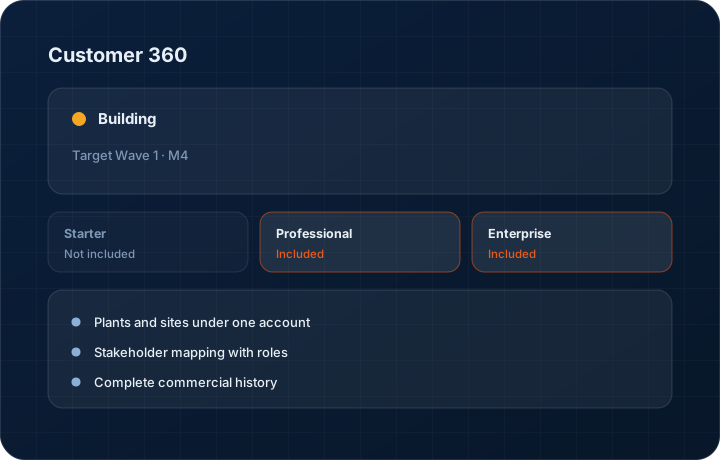
Target Wave 1 · M4. Progress figures move when the work does, and the changelog records the release.
In short
Customer 360 models a KanchanFlow account as a company with plants, sites and mapped stakeholders rather than a single row, combining quoting, order, payment and conversation history in one view. It is roughly 60 percent complete, targeted at Wave 1 Milestone 4, and it is the most advanced of the in-progress customer features.
What it is
Manufacturing customers are not individuals. A tier-one supplier has a corporate purchasing office that negotiates, plants that release orders, engineers who decide whether your process is acceptable, and a quality manager who can stop shipments. Recording all of that as one company row loses every relationship that actually matters. It also loses the reason a deal was won, which is usually a person.
Customer 360 gives the account plants and sites, contacts with roles and influence, and a complete history of quotes, orders, payments and conversations across all of them. Starter keeps a basic single-level customer record; Professional adds plants and stakeholder mapping; Enterprise adds multi-entity roll-up for groups. The structure is built as work happens rather than maintained by hand in a spreadsheet.
Capabilities
What it does
Plants and sites under one account
A customer with four plants is one account with four sites, each with its own ship-to address, contacts and order history, rolled up to the parent.
Stakeholder mapping with roles
Buyer, engineer, quality, plant manager, accounts payable — each with their influence on the decision recorded. When your champion leaves, you can see who else you know.
Complete commercial history
Quotes raised, win rate, orders, dispatch performance, invoices, aging and outstanding balance in one view instead of five separate reports.
Conversation history across channels
Calls, WhatsApp threads, emails and visit records interleaved on one timeline, which is what a handover between salespeople actually requires.
Part and programme history
Which parts you have quoted and made for this customer, at what price, on which drawing revision. That history is what makes the repeat quote fast.
Multi-entity roll-up on Enterprise
Where the same customer group buys from several of your legal entities, Enterprise rolls exposure and history up across them.
Step by step
How it works
The order these steps happen in matters more than the feature list above it.
- 1
Create the account
The parent company record holds the commercial relationship — terms, credit limit, currency and owner.
- 2
Add plants and sites
Each plant has its own address, contacts and delivery requirements, and its own order history under the parent.
- 3
Map the stakeholders
Record contacts with their role and influence. Note who signs, who specifies and who can stop a shipment, because those are rarely the same person.
- 4
Let history accumulate
Quotes, orders, invoices, calls, messages and visits attach automatically as work happens. Nobody maintains this view by hand.
- 5
Use it before the meeting
Open the account on the phone before you walk in and you know the open quotes, the outstanding balance and the last conversation.
What this is not
This is not a data enrichment service — we structure the relationships you record, we do not buy third-party firmographic data or append contacts from outside sources.
This is not an ERP, MRP, CAD, BOM, or advanced CPQ system — it manages customer RFQs, quotes, follow-ups, and order handoff.
Tier availability
What you get on each plan
These rows come from the same feature matrix the pricing page publishes. If the two ever disagree, the matrix is wrong and we fix it.
| Plan | Availability |
|---|---|
| Starter | Basic customer record. No plant structure and no stakeholder mapping. |
| Professional | Plants, sites and stakeholder mapping with full commercial history. |
| Enterprise | Everything in Professional plus multi-entity roll-up across companies. |
Starter is $39 per user per month, Professional $49, Enterprise $99 plus a $2,000 monthly platform fee. Annual billing is 17% lower. See the full matrix.
Interface
What it looks like
Development build of an account with three plants, nine mapped contacts by role, and rolled-up quote and order history.
Development build capture at approximately 60 percent complete. Names are sample data.
Development build of the stakeholder map showing role, influence and last contact date for each person.
Development build capture, not production.
Screenshots are described rather than mocked up. Captures are taken from the build current at the date shown in the changelog, on a sample workspace.
Connectors
Integrations this feature uses
Starter includes one accounting connector and one lead source; Professional and Enterprise include all of them. Browse every integration.
Questions about customer 360
About 60 percent. Basic customer records with contacts and history are live; the plant hierarchy and stakeholder mapping are the parts targeted at Wave 1 Milestone 4.
Related features
Dealer 360
Dealer 360 with AI reorder prediction
Read moreManufacturing workspace
Manufacturing workspace — dashboard, customers, inventory, orders, purchase orders, shipments
Read moreTerritory management
Territory management, 7-level hierarchy
Read moreWhat's shipping today
All 47 features grouped by status on one page, with the newest releases alongside.
Read moreSee a live quote draft built from a real RFQ
Fourteen days, no credit card, sample data pre-loaded. If it does not fit your shop, we will tell you in the first call.
- Delaware LLC
- SOC 2 Type II
- USA Data Centers (AWS)