MyOB for Manufacturing
Post accepted quotes to MyOB Business or AccountRight as sales orders with GST handled the Australian way, and read payment status back.
In short
KanchanFlow, the RFQ-to-Order CRM, connects to MyOB Business and AccountRight Live through MyOB's own API so an accepted quote becomes a sales order with Australian GST tax codes and ABN-matched contacts. It is the connector that opens the Wave 2 Australian market, and it sits outside the three-connector count in our pricing table.
MyOB is here because Australian job shops asked for it and because the Wave 2 Australian market depends on it. It behaves much like the Zoho Books connector: cloud API, OAuth, no bridge software, and a deliberately narrow scope that leaves the ledger to the accountant.
The differences are Australian. Tax codes are GST, FRE, EXP and N-T rather than a rate you type. Contacts are matched on ABN. Terms are expressed in MyOB's own balance-due-days convention. The connector handles all four so an estimator in Melbourne is not translating an American accounting model in their head.
- Status
- Live in production
- Category
- Accounting
- Plan availability
- Professional and Enterprise — on Starter, via the $15/month extra accounting connector add-on
- Sync cadence
- Every 15 minutes for MyOB Business; every 30 minutes for AccountRight Live company files, or on demand
Field by field
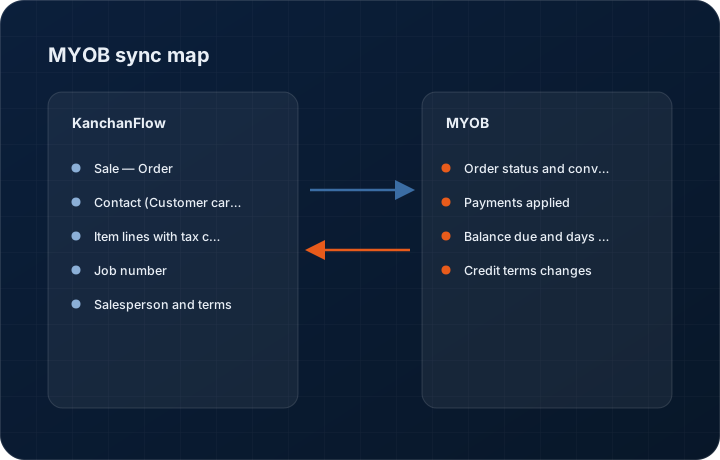
What syncs, in both directions
These are the actual fields that move. Anything not on these two tables does not sync, and we would rather write that down than let you assume it does.
KanchanFlow → MyOB
What we write out when a record moves forward.
| Field | What we send |
|---|---|
| Sale — Order | The accepted quote posts as a Sale of type Order, leaving the conversion to an Invoice with your bookkeeper. The KanchanFlow quote number goes in the Customer PO field. |
| Contact (Customer card) | Matched on ABN first, then on the stored MyOB contact UID. New cards carry the trading name, ABN, billing address and the buyer as the contact person. |
| Item lines with tax code | Each quote line posts with item number, description, quantity, unit price and the resolved tax code. GST is applied for domestic sales and EXP for exports, rather than a hard-coded ten per cent. |
| Job number | Where you use MyOB jobs, the CRM order number maps to the MyOB job so cost and revenue land against the same job in AccountRight reporting. |
| Salesperson and terms | The quote owner maps to an employee card, and the customer's payment terms map to MyOB's balance-due-days model. |
MyOB → KanchanFlow
What comes back onto the customer, quote or order record.
| Field | What we read |
|---|---|
| Order status and conversion | We report when an order has been converted to an invoice, and carry the invoice number back onto the CRM order record. |
| Payments applied | Payments recorded against the converted invoice show on the customer 360 payment strip. |
| Balance due and days overdue | Read per customer card and shown as a warning band on new quotes for that account. |
| Credit terms changes | If accounts changes the credit terms on the MyOB card, the CRM picks up the new terms on the next cycle rather than continuing to quote the old ones. |
Sync cadence. Every 15 minutes for MyOB Business; every 30 minutes for AccountRight Live company files, or on demand. Every record also carries a Sync now control, and the last successful sync time is shown on the record so nobody works from a number of unknown age.
Figures
What this looks like in the product
We do not ship stock imagery or mocked-up screens. These three figures describe the exact shots a designer must capture from a live workspace, each carrying a visible date stamp and recaptured at every quarterly re-test.
Capture date required. Capture the genuine MyOB consent flow. Date stamp required; business name may be blurred.
Capture date required. Capture with at least one EXP-coded export line present so the tax logic is visible. Date stamp required.
Capture date required. Capture in AccountRight. Date stamp required; recapture each quarterly re-test.
11 steps
Setting it up
Written for the person who will actually do it, in the order they will do it. Nothing here assumes you have done this before.
- 1Confirm which MyOB product you run. MyOB Business connects over the cloud API directly; AccountRight must be an AccountRight Live file, not a purely local one.
- 2In KanchanFlow, open Settings, Integrations, MyOB and click Connect.
- 3Sign in with a my.MyOB account that has access to the company file, and complete MyOB's two-factor prompt.
- 4Enter the company file credentials if your file has a user ID and password set. MyOB requires these separately from the my.MyOB login and the connector cannot proceed without them.
- 5Select the company file to bind. One KanchanFlow workspace binds to one company file.
- 6Map tax codes. Confirm which code is your standard GST code, which is your export code, and which applies to freight lines.
- 7Map income accounts for each item type you quote, including freight and tooling if you charge them as separate lines.
- 8Decide whether missing customer cards may be created. Most Australian shops turn this on because ABN matching is reliable enough to avoid duplicates.
- 9Turn on job mapping only if you already use MyOB jobs. Partially populated jobs make AccountRight job reporting less useful, not more.
- 10Run the pre-flight check, which writes a one-line order, reads it back and deletes it.
- 11Post one real accepted quote and have your bookkeeper confirm the tax codes and account coding before enabling it for the team.
Honest ceilings
What this integration cannot do
Every connector has limits. You will find these in week three whether or not we write them down, so we write them down.
- AccountRight Live only. A classic AccountRight file kept solely on a local drive has no API surface and cannot be connected at all.
- MyOB is not one of the three accounting connectors counted in our pricing table. It is included on Professional and Enterprise; on Starter it needs the extra accounting connector add-on at $15 per month.
- MyOB's API applies per-file throttling that we do not control. Large first-time contact syncs can take several cycles to complete and there is no way to speed that up.
- We do not write purchase orders, bills, payroll, inventory adjustments or bank transactions, and will not.
- Item creation is off by default and we recommend leaving it off, because MyOB item numbers are short and collisions with your existing numbering are easy to create and painful to unwind.
- This is our least-exercised accounting connector. It passes the same quarterly regression as the others, but it has the smallest number of shops running it in production, so an unusual company-file configuration is more likely to surface a bug here first.
From the quarterly re-test
Errors you will actually hit
Each of these was reproduced deliberately during testing. The wording is the error as the system reports it, not a paraphrase.
| Error | Likely cause | Fix |
|---|---|---|
| Connect fails with Company file credentials required | The AccountRight file has a user ID and password set at the file level, which is separate from the my.MyOB sign-in. | Enter the file-level user ID and password in the connector setup. If nobody remembers them, an AccountRight administrator can reset them from within the file. |
| Post rejected: Tax code is not valid for this account | The income account mapped for that line is restricted to a different tax code in MyOB's account setup. | Either change the account mapping in the connector or relax the tax code restriction on the MyOB account. Do not change the tax code on the quote to force it through. |
| Duplicate customer cards appear | The customer had no ABN in KanchanFlow, so we fell back to name matching and MyOB's name differed by punctuation. | Merge the cards in MyOB, then Link existing contact from the CRM customer record. Add the ABN so future matching uses it. |
| Sync shows Throttled for several cycles | MyOB is rate-limiting the company file, usually during a large initial contact import. | Wait. The queue drains automatically. If it persists past a day, reduce the contact sync scope to active customers only in connector settings. |
| Order posts but the job number is blank | Job mapping is enabled but the referenced MyOB job does not exist or is marked inactive. | Create or reactivate the job in MyOB, then use Repost on the CRM order. We do not create jobs automatically because job codes are usually governed by a scheme we cannot infer. |
Questions people ask about the MyOB integration
Because Australia is the Wave 2 market and a real number of USA manufacturers have an Australian subsidiary or distributor running MyOB. It ships now so those shops are not blocked later.
Related integrations
QuickBooks Online & Enterprise
Post accepted quotes to QuickBooks as estimates, sales orders or invoices, and bring A/R ageing back to the estimator's screen.
Read moreZoho Books
Turn an accepted quote into a Zoho Books sales order or invoice, and read payment status back onto the customer record.
Read moreStripe
Send a hosted payment link with a quote, take a deposit by card or ACH, and reconcile the payout back onto the order.
Read moreKeeping this page true
This connector was last tested end to end on 2026-08-27 against a live sandbox: fresh authorisation, an outbound write, an inbound read checked field by field, and the failure paths above triggered deliberately. It is re-tested every quarter and the date on this page changes when it is. Read how we test integrations, or see what is shipping today.
See a live quote draft built from a real RFQ
Fourteen days, no credit card, sample data pre-loaded. If it does not fit your shop, we will tell you in the first call.
- Delaware LLC
- SOC 2 Type II
- USA Data Centers (AWS)