Field visits with GPS check-in and territory
A visit plan for the week, a check-in at the gate, notes captured while the conversation is fresh, and an honest coverage picture at the end of the month.
In short
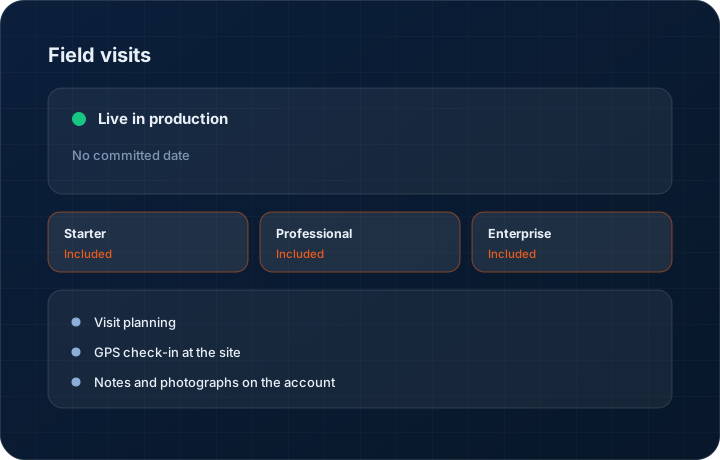
Field visits in KanchanFlow plan, verify and record customer site visits inside the RFQ-to-Order CRM. A visit is checked in with GPS at the customer's location, notes and photographs attach to the account, and coverage reports show which accounts in a territory have actually been seen this quarter.
What it is
Field sales in manufacturing is expensive. A day out is fuel, tolls and eight hours of a senior person's time, and the return on it is invisible if the only record is a line in an expense claim. The common failure is not dishonesty, it is that visits get written up days later from memory, or not at all.
We make the visit a record with a location and a time on it. The salesperson plans the week's calls, checks in when they arrive, captures what was discussed while it is fresh, and photographs the part or drawing that came up. At the end of the month you can see coverage by territory rather than by anecdote.
Capabilities
What it does
Visit planning
Plan the week's calls against accounts and see them on the mobile home screen each morning. Planned versus actual is visible, which is a more useful conversation than a headcount of visits.
GPS check-in at the site
Check in when you arrive. Location and time are captured at that moment against the customer, so the visit record is evidence rather than recollection.
Notes and photographs on the account
Capture what was discussed and photograph the part, the drawing on the table, or the competitor's product on the shelf. It attaches to the customer, not to a phone gallery.
Territory coverage reporting
See which accounts in a territory have been visited and which have not been touched in ninety days. Flat list on Starter, seven-level hierarchy on Professional and above.
Follow-up actions from the visit
Create the quote, the sample request or the callback directly from the visit record so the outcome is linked to the call that produced it.
Step by step
How it works
The order these steps happen in matters more than the feature list above it.
- 1
Plan the week
Select accounts to visit and schedule them. The plan appears on the mobile home screen, ordered for the day.
- 2
Check in on arrival
Open the visit on the phone and check in. Location and timestamp are recorded against the customer record.
- 3
Capture while it is fresh
Type or dictate what was discussed, add photographs of parts or prints, and note the next step before leaving the car park.
- 4
Create the follow-up
Raise the quote, the sample request or the callback task straight from the visit so nothing depends on remembering it later.
- 5
Review coverage
At month end, look at coverage by territory and by account tier. The question is not how many visits happened but which accounts were left alone.
What this is not
This is not employee location tracking — location is captured at check-in only, and we do not follow staff between visits.
This is not an ERP, MRP, CAD, BOM, or advanced CPQ system — it manages customer RFQs, quotes, follow-ups, and order handoff.
Tier availability
What you get on each plan
These rows come from the same feature matrix the pricing page publishes. If the two ever disagree, the matrix is wrong and we fix it.
| Plan | Availability |
|---|---|
| Starter | Included. Flat territory list. |
| Professional | Included. Seven-level territory hierarchy with coverage reporting. |
| Enterprise | Included. Seven-level hierarchy plus custom territory structures. |
Starter is $39 per user per month, Professional $49, Enterprise $99 plus a $2,000 monthly platform fee. Annual billing is 17% lower. See the full matrix.
Interface
What it looks like
Weekly visit plan on mobile with four scheduled calls, two checked in and one marked missed.
Interface capture from the mobile visit planner. Account names are sample data.
Territory coverage report showing accounts visited, accounts overdue and accounts untouched in ninety days.
Interface capture of the coverage report.
Screenshots are described rather than mocked up. Captures are taken from the build current at the date shown in the changelog, on a sample workspace.
Connectors
Integrations this feature uses
Starter includes one accounting connector and one lead source; Professional and Enterprise include all of them. Browse every integration.
Questions about field visits
No. Location is captured at check-in and nowhere else. Continuous tracking is a different product and a different relationship with your team, and we do not build it.
Related features
Territory management
Territory management, 7-level hierarchy
Read moreSales visit intelligence
Sales visit intelligence — voice to CRM
Read moreMobile app
Native iOS and Android app
Read moreWhat's shipping today
All 47 features grouped by status on one page, with the newest releases alongside.
Read moreSee a live quote draft built from a real RFQ
Fourteen days, no credit card, sample data pre-loaded. If it does not fit your shop, we will tell you in the first call.
- Delaware LLC
- SOC 2 Type II
- USA Data Centers (AWS)