Native iOS and Android app
Built for the people who are not at a desk: the owner approving a discount from a customer's lobby, the salesperson logging a visit in a parking lot, the plant manager checking an order from the floor.
In short
The KanchanFlow mobile app is a native iOS and Android client for the RFQ-to-Order CRM, not a shrunken web page. It covers customer lookup, quote review and approval, order status, visit check-in and WhatsApp follow-up, with large touch targets and offline-tolerant behaviour for shops with poor coverage.
What it is
Manufacturing sales does not happen at a desk. The estimator is on the floor with the print, the owner is in a customer's lobby, and the field salesperson is in a truck between two plants. A CRM that only works properly on a laptop gets updated at nine at night, if at all, and usually from memory.
The app carries the parts of the workflow that genuinely need to be mobile. Look up a customer and their open quotes before you walk in. Approve a discount that is sitting on your name. Check in at a visit and dictate what happened. Reply to a buyer on WhatsApp from the record rather than from your personal thread.
Capabilities
What it does
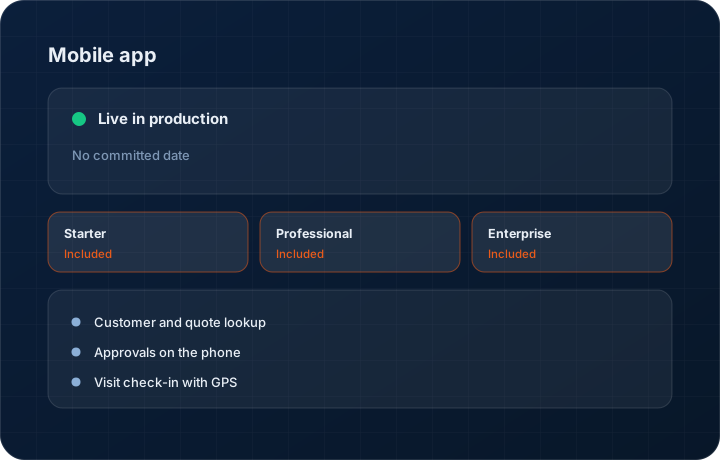
Customer and quote lookup
Search a customer, see their open quotes, last order, outstanding balance and recent conversation before you walk into the meeting. Nothing about that should require a laptop.
Approvals on the phone
Discount and margin approvals that are waiting on you appear as a list with the numbers that matter — quoted price, cost, resulting margin — and approve or reject in two taps.
Visit check-in with GPS
Check in at a customer site and the visit is logged with location and time. The record is created where the visit happened, not reconstructed on Friday.
Order and dispatch status
Look up an order and see what has shipped, what is outstanding and what has been invoiced, so you can answer the question standing in front of you.
Built for a shop-floor phone
Large touch targets, high contrast, and screens that stay usable with gloves and in daylight. It tolerates intermittent connectivity rather than throwing an error and losing your input.
Step by step
How it works
The order these steps happen in matters more than the feature list above it.
- 1
Install and sign in
Download from the App Store or Google Play and sign in with your workspace credentials. Your permissions and role home screen come with you.
- 2
Start from your home screen
The app opens on the role-specific home screen — an owner sees approvals and the command centre summary, a salesperson sees today's visits and open quotes.
- 3
Work the record in front of you
Search a customer, open a quote, check an order. Actions taken on the phone write to the same records as the web app immediately.
- 4
Log the field work
Check in at a visit, capture what was discussed, photograph a part or a drawing, and attach it to the customer without emailing it to yourself.
- 5
Follow up from the record
Call or message the buyer from inside the record so the activity is logged against the account rather than living on your personal phone.
What this is not
This is not a shop-floor data collection terminal — it does not do job clocking, machine monitoring or barcode-based production reporting.
This is not an ERP, MRP, CAD, BOM, or advanced CPQ system — it manages customer RFQs, quotes, follow-ups, and order handoff.
Tier availability
What you get on each plan
These rows come from the same feature matrix the pricing page publishes. If the two ever disagree, the matrix is wrong and we fix it.
| Plan | Availability |
|---|---|
| Starter | Included. Two role-specific home screens — Owner and Salesperson. |
| Professional | Included. All eight role-specific home screens. |
| Enterprise | Included. All eight home screens plus custom role-based access control. |
Starter is $39 per user per month, Professional $49, Enterprise $99 plus a $2,000 monthly platform fee. Annual billing is 17% lower. See the full matrix.
Interface
What it looks like
Mobile approval queue showing three pending discount requests with quoted price, cost and resulting margin on each.
Interface capture from the iOS app. Figures are sample data.
Customer detail on mobile with open quotes, outstanding balance and the most recent WhatsApp exchange.
Interface capture from the Android app.
Screenshots are described rather than mocked up. Captures are taken from the build current at the date shown in the changelog, on a sample workspace.
Connectors
Integrations this feature uses
Starter includes one accounting connector and one lead source; Professional and Enterprise include all of them. Browse every integration.
Questions about mobile app
Native, for both iOS and Android. That matters for camera access, GPS check-in and behaving sensibly when the signal drops inside a steel building.
Related features
Field visits
Field visits with GPS check-in and territory
Read moreSales visit intelligence
Sales visit intelligence — voice to CRM
Read moreManufacturing workspace
Manufacturing workspace — dashboard, customers, inventory, orders, purchase orders, shipments
Read moreWhat's shipping today
All 47 features grouped by status on one page, with the newest releases alongside.
Read moreSee a live quote draft built from a real RFQ
Fourteen days, no credit card, sample data pre-loaded. If it does not fit your shop, we will tell you in the first call.
- Delaware LLC
- SOC 2 Type II
- USA Data Centers (AWS)