Channel partner management
Dealers are not customers and not salespeople. They get their own records, their own order history, and on Professional their own portal to place and track orders.
In short
Channel partner management in KanchanFlow gives dealers and distributors first-class records inside the RFQ-to-Order CRM, separate from direct customers. Each partner carries its own order history, pricing and contacts, and on Professional a portal where the dealer places and tracks orders without going through your inside sales desk.
What it is
Manufacturers who sell through a channel usually run it out of one manager's inbox and a spreadsheet of dealer codes. That works until the manager is on leave, or until you want to know which dealers have stopped ordering, or which ones are quoting against each other on the same end customer.
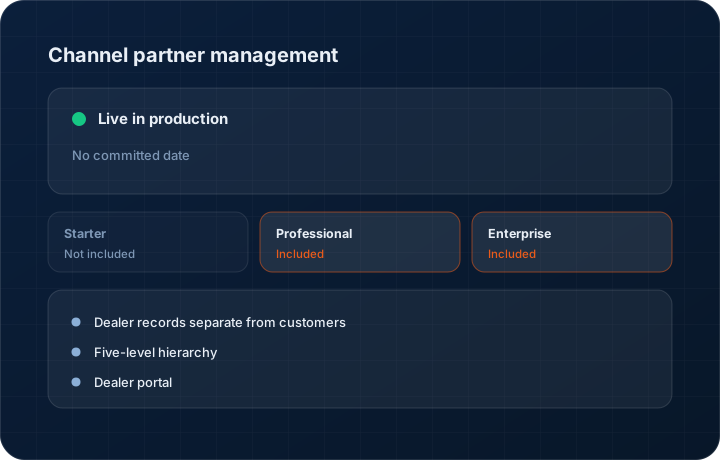
We model the dealer as its own record with contacts, agreed pricing, credit terms and complete order history. Starter carries twenty-five basic dealer records for shops with a small channel. Professional makes dealer counts unlimited, adds a five-level hierarchy for distributor and sub-dealer structures, and opens the dealer portal. Enterprise adds custom structures on top of the same five levels.
Capabilities
What it does
Dealer records separate from customers
A dealer buys to resell and needs different pricing, different credit terms and different reporting from a direct account. Mixing the two in one list is how channel reporting becomes useless.
Five-level hierarchy
Master distributor, regional distributor, dealer, sub-dealer and retail. Roll performance up or drill down, on Professional and Enterprise.
Dealer portal
Partners log in to place orders, see their order status, download invoices and check their outstanding balance without emailing your inside sales desk for each one.
Partner-specific pricing
Hold agreed dealer pricing and discount structures against the partner record so orders price correctly without a manual lookup on every line.
Order history and reorder patterns
Every dealer's ordering history is on the record, which is what the reorder prediction agent reads when it flags a partner who has gone quiet.
Step by step
How it works
The order these steps happen in matters more than the feature list above it.
- 1
Create the partner record
Set up the dealer with contacts, addresses, agreed pricing, credit terms and their place in the hierarchy.
- 2
Set pricing and terms
Attach the dealer price list or discount structure. Orders from that partner price against it rather than against your direct list price.
- 3
Give portal access
On Professional and Enterprise, invite the partner's contacts to the portal so they can place and track orders themselves.
- 4
Take and fulfil orders
Dealer orders run through the same order, dispatch and invoice flow as direct business, with the dealer as the billing party.
- 5
Review channel performance
Look at ordering patterns by partner and by level of the hierarchy, and act on partners whose volume has dropped.
What this is not
This is not a partner marketing or lead-registration system — there is no deal registration workflow, MDF management or co-marketing module here.
This is not an ERP, MRP, CAD, BOM, or advanced CPQ system — it manages customer RFQs, quotes, follow-ups, and order handoff.
Tier availability
What you get on each plan
These rows come from the same feature matrix the pricing page publishes. If the two ever disagree, the matrix is wrong and we fix it.
| Plan | Availability |
|---|---|
| Starter | 25 basic dealer records. No hierarchy and no dealer portal. |
| Professional | Unlimited dealers, 5-level hierarchy and the dealer portal. |
| Enterprise | Unlimited dealers, 5-level hierarchy plus custom structures, dealer portal included. |
Starter is $39 per user per month, Professional $49, Enterprise $99 plus a $2,000 monthly platform fee. Annual billing is 17% lower. See the full matrix.
Interface
What it looks like
Dealer hierarchy view with a master distributor, two regional distributors and eleven dealers underneath.
Interface capture of the dealer hierarchy. Partner names are sample data.
Dealer portal order screen as a partner sees it, with their price list applied and their outstanding balance shown.
Interface capture of the partner-facing portal.
Screenshots are described rather than mocked up. Captures are taken from the build current at the date shown in the changelog, on a sample workspace.
Connectors
Integrations this feature uses
Starter includes one accounting connector and one lead source; Professional and Enterprise include all of them. Browse every integration.
Questions about channel partner management
Twenty-five basic records. If you run a real channel, Professional makes them unlimited and adds the hierarchy and the portal, which is where the value actually is.
Related features
Dealer 360
Dealer 360 with AI reorder prediction
Read moreCustomer 360
Customer 360 with plants and stakeholder mapping
Read moreOrders
Quote-as-Order with staged billing and partial dispatch
Read moreWhat's shipping today
All 47 features grouped by status on one page, with the newest releases alongside.
Read moreSee a live quote draft built from a real RFQ
Fourteen days, no credit card, sample data pre-loaded. If it does not fit your shop, we will tell you in the first call.
- Delaware LLC
- SOC 2 Type II
- USA Data Centers (AWS)