e-Invoice IRN generation
Push the invoice to the Invoice Registration Portal, get the IRN and signed QR back, and print both on the document — without leaving the invoice you just raised.
For USA manufacturers with India operations, India-based contract customers, or manufacturers exporting to India.
In short
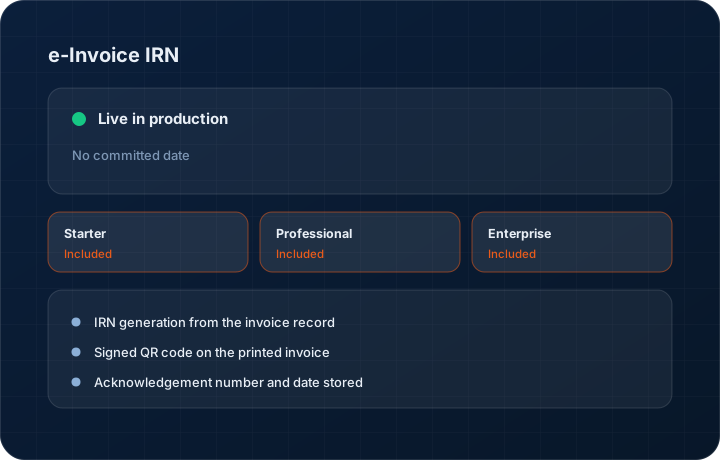
e-Invoice IRN generation registers a KanchanFlow invoice with India's Invoice Registration Portal and writes the returned Invoice Reference Number, acknowledgement number and signed QR code back onto the document. It runs from inside the RFQ-to-Order CRM rather than a separate portal upload, and is included on every tier including Starter.
What it is
India's e-invoicing rules mean a B2B invoice above the applicable turnover threshold is not valid until it has been registered and carries an IRN with a signed QR code. Most shops handle this by exporting a JSON file, uploading it to a portal, and pasting the result back — which is where transposition errors and missed cancellations come from.
We do the round trip from the invoice record. When you register, the payload is built from the invoice you already raised, the response is written back onto it, and the QR code prints on the PDF. If the invoice has to be cancelled, the cancellation runs within the statutory window from the same screen, and the record shows what happened and when.
Capabilities
What it does
IRN generation from the invoice record
No JSON export, no portal login, no copy-paste. The payload is assembled from the invoice, sent for registration and the response is stored against the document.
Signed QR code on the printed invoice
The QR returned by the portal is written onto the invoice PDF and the share link, so the document your customer receives is the registered one.
Acknowledgement number and date stored
The acknowledgement number and timestamp are kept on the invoice permanently. When a customer's accounts team queries a document eighteen months later, the registration evidence is on the record.
Cancellation within the statutory window
Cancel a registered invoice inside the allowed period with a reason code. The cancellation and its reason are stored, and the invoice is marked cancelled rather than deleted.
Failure handling that does not lose the invoice
If registration is rejected, the error from the portal is shown against the invoice with the field that failed. The invoice stays as a draft you can correct and resubmit.
Step by step
How it works
The order these steps happen in matters more than the feature list above it.
- 1
Raise the invoice with complete GST data
Party GSTIN, HSN codes, place of supply and values must all be present. The invoice will not submit with a missing mandatory field, which is a cheaper failure than a portal rejection.
- 2
Register it
Press generate IRN. The invoice payload is built and sent to the Invoice Registration Portal through your e-invoicing provider credentials.
- 3
Receive the IRN, acknowledgement and QR
The portal returns the Invoice Reference Number, an acknowledgement number and date, and the signed QR code. All three are written onto the invoice record.
- 4
Send the registered document
The PDF and the share link now carry the IRN and QR. That is the version your customer's accounts payable team needs for their input tax credit.
- 5
Cancel if you must, inside the window
If the invoice is wrong, cancel it with a reason code inside the statutory period and raise a corrected one. After the window closes, the correction is a credit note instead.
What this is not
This is not an e-way bill system — we register the invoice and store the IRN, we do not generate or manage e-way bills for goods movement.
This is not an ERP, MRP, CAD, BOM, or advanced CPQ system — it manages customer RFQs, quotes, follow-ups, and order handoff.
Tier availability
What you get on each plan
These rows come from the same feature matrix the pricing page publishes. If the two ever disagree, the matrix is wrong and we fix it.
| Plan | Availability |
|---|---|
| Starter | Included. Never an add-on, never a tier gate. |
| Professional | Included. Same feature set as Starter. |
| Enterprise | Included, plus the advanced exposure calculator on the compliance dashboard. |
Starter is $39 per user per month, Professional $49, Enterprise $99 plus a $2,000 monthly platform fee. Annual billing is 17% lower. See the full matrix.
Interface
What it looks like
Invoice header after registration, showing the IRN, acknowledgement number, acknowledgement date and the signed QR code.
Interface capture of a registered invoice. IRN shown is sample data.
Cancellation dialog with the reason code list and the remaining time in the statutory window.
Interface capture of the IRN cancellation flow.
Screenshots are described rather than mocked up. Captures are taken from the build current at the date shown in the changelog, on a sample workspace.
Connectors
Integrations this feature uses
Starter includes one accounting connector and one lead source; Professional and Enterprise include all of them. Browse every integration.
Questions about e-invoice irn
Yes. Registration happens against your organisation's credentials with an authorised provider such as ClearTax. We connect to that provider; we are not the registrar.
Related features
GST invoicing
GST invoicing with GSTIN, HSN, GSTR-1 and GSTR-3B
Read moreGSTIN validation
GSTIN validation
Read moreInvoice editor
Invoice editor with credit and debit notes, aging and credit management
Read moreWhat's shipping today
All 47 features grouped by status on one page, with the newest releases alongside.
Read moreSee a live quote draft built from a real RFQ
Fourteen days, no credit card, sample data pre-loaded. If it does not fit your shop, we will tell you in the first call.
- Delaware LLC
- SOC 2 Type II
- USA Data Centers (AWS)