Multi-currency quotes, invoices and forecasting
Quote a Monterrey customer in pesos and a Windsor customer in Canadian dollars, and still see one pipeline number in US dollars on Monday morning.
In short
Multi-currency in KanchanFlow lets each quote, order and invoice carry its own currency with an exchange rate locked at the moment of pricing, while the RFQ-to-Order CRM rolls every open deal up to a single reporting currency. The locked rate means your margin does not move between quoting and invoicing without somebody deciding it should.
What it is
USA manufacturers rarely sell only in dollars. Cross-border work into Canada and Mexico, a European OEM's purchasing office, an Indian contract customer — each expects to be quoted in a currency they can approve internally. Doing that in a spreadsheet means the rate is whatever the person remembered on the day.
We attach the currency and the rate to the document. The quote is priced at a rate you locked, the order inherits it, and the invoice uses it unless you deliberately re-rate. Reporting converts everything to your base currency using those document rates, so pipeline and revenue figures are traceable back to individual deals.
Capabilities
What it does
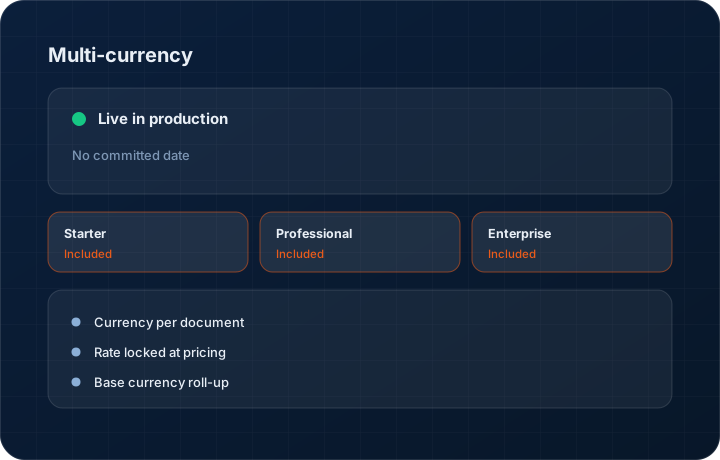
Currency per document
Quotes, orders and invoices each carry their own currency. A customer who buys in euros and a customer who buys in dollars sit in the same pipeline without either being converted at report time only.
Rate locked at pricing
The exchange rate is captured onto the quote when you price it. It does not float. If you want to re-rate, that is an explicit action on a new revision that the customer can see.
Base currency roll-up
Pipeline value, booked orders and outstanding receivables all report in your base currency using the rate on each document, so the total is a sum of real deals rather than a re-conversion.
Customer default currency
Set the currency once on the customer and every new quote for them starts in it. Fewer decisions per quote means fewer quotes sent in the wrong currency.
Forecasting in one currency
Sales forecasts convert at document rates so a weakening currency shows up as a smaller forecast rather than being hidden by a re-conversion at today's rate.
Step by step
How it works
The order these steps happen in matters more than the feature list above it.
- 1
Set your base currency
Choose the currency all reporting rolls up to. For a USA shop that is US dollars; it is set once at the workspace level.
- 2
Set a default currency per customer
On the customer record, choose the currency they buy in. New quotes for that customer open in it automatically.
- 3
Price the quote and lock the rate
Enter line prices in the quote currency. The rate against your base currency is captured on the quote at that moment and shown on the header.
- 4
Convert to an order
The order inherits the currency and the locked rate from the accepted revision, so the value you booked is the value you quoted.
- 5
Invoice and report
The invoice uses the order's currency and rate. Aging, pipeline and forecast views convert with the document rates so every total traces back to specific records.
What this is not
This is not treasury or hedging software — we lock a rate to a document for commercial clarity, we do not manage FX exposure or place forward contracts.
This is not an ERP, MRP, CAD, BOM, or advanced CPQ system — it manages customer RFQs, quotes, follow-ups, and order handoff.
Tier availability
What you get on each plan
These rows come from the same feature matrix the pricing page publishes. If the two ever disagree, the matrix is wrong and we fix it.
| Plan | Availability |
|---|---|
| Starter | Included on every tier. |
| Professional | Included on every tier. |
| Enterprise | Included, with multi-entity roll-up across companies reporting into one base currency. |
Starter is $39 per user per month, Professional $49, Enterprise $99 plus a $2,000 monthly platform fee. Annual billing is 17% lower. See the full matrix.
Interface
What it looks like
Quote header in Canadian dollars showing the locked rate and the equivalent value in the base reporting currency.
Interface capture of the quote currency panel. Rates shown are sample data.
Pipeline view with deals in four currencies rolled up to a single US dollar total.
Interface capture of the pipeline roll-up.
Screenshots are described rather than mocked up. Captures are taken from the build current at the date shown in the changelog, on a sample workspace.
Connectors
Integrations this feature uses
Starter includes one accounting connector and one lead source; Professional and Enterprise include all of them. Browse every integration.
Questions about multi-currency
From a market rate feed at the moment you lock the quote. You can also enter a rate manually if your business uses an internally agreed rate for the quarter.
Related features
Quote editor
Quote editor with attachments, share links, FX and revisions
Read moreInvoice editor
Invoice editor with credit and debit notes, aging and credit management
Read moreUS tax rates
US tax rates and SaaS jurisdictions
Read moreWhat's shipping today
All 47 features grouped by status on one page, with the newest releases alongside.
Read moreSee a live quote draft built from a real RFQ
Fourteen days, no credit card, sample data pre-loaded. If it does not fit your shop, we will tell you in the first call.
- Delaware LLC
- SOC 2 Type II
- USA Data Centers (AWS)